
1. Introducció
Thank you for choosing the Comelit Bravo Series 5701 Black and White Video Intercom. This manual provides essential information for the safe and efficient installation, operation, and maintenance of your new video intercom system. Please read this manual thoroughly before use and retain it for future reference.
The Comelit Bravo Series 5701 is a handset-version monitor with a 4-inch black and white screen, featuring a glossy white finish and a silver lower shell. It includes standard door opener buttons, two additional function buttons, a signal LED, and controls for brightness, contrast, and call volume. The privacy function, which temporarily excludes video intercom calls, is standard and activated by setting the call volume to zero. This unit can be converted into a desktop version with article 5712. Dimensions: 212x225x55 mm.
2. Informació de seguretat
Instruccions importants de seguretat:
- Llegiu atentament totes les instruccions abans de la instal·lació i l'ús.
- Installation should only be performed by qualified personnel in accordance with local electrical codes.
- No exposeu la unitat a la pluja o la humitat.
- No obriu la unitat casing; no hi ha peces a l'interior que l'usuari pugui reparar. Demaneu totes les tasques de manteniment a personal de servei qualificat.
- Ensure the power supply is disconnected before performing any maintenance or installation work.
3. Contingut del paquet
Verifiqueu que tots els components siguin presents al paquet:
- Comelit Bravo Series 5701 Black and White Video Intercom Monitor (1 unit)
- Manual d'usuari (aquest document)
- Accessoris de muntatge (cargols, tacs de paret)
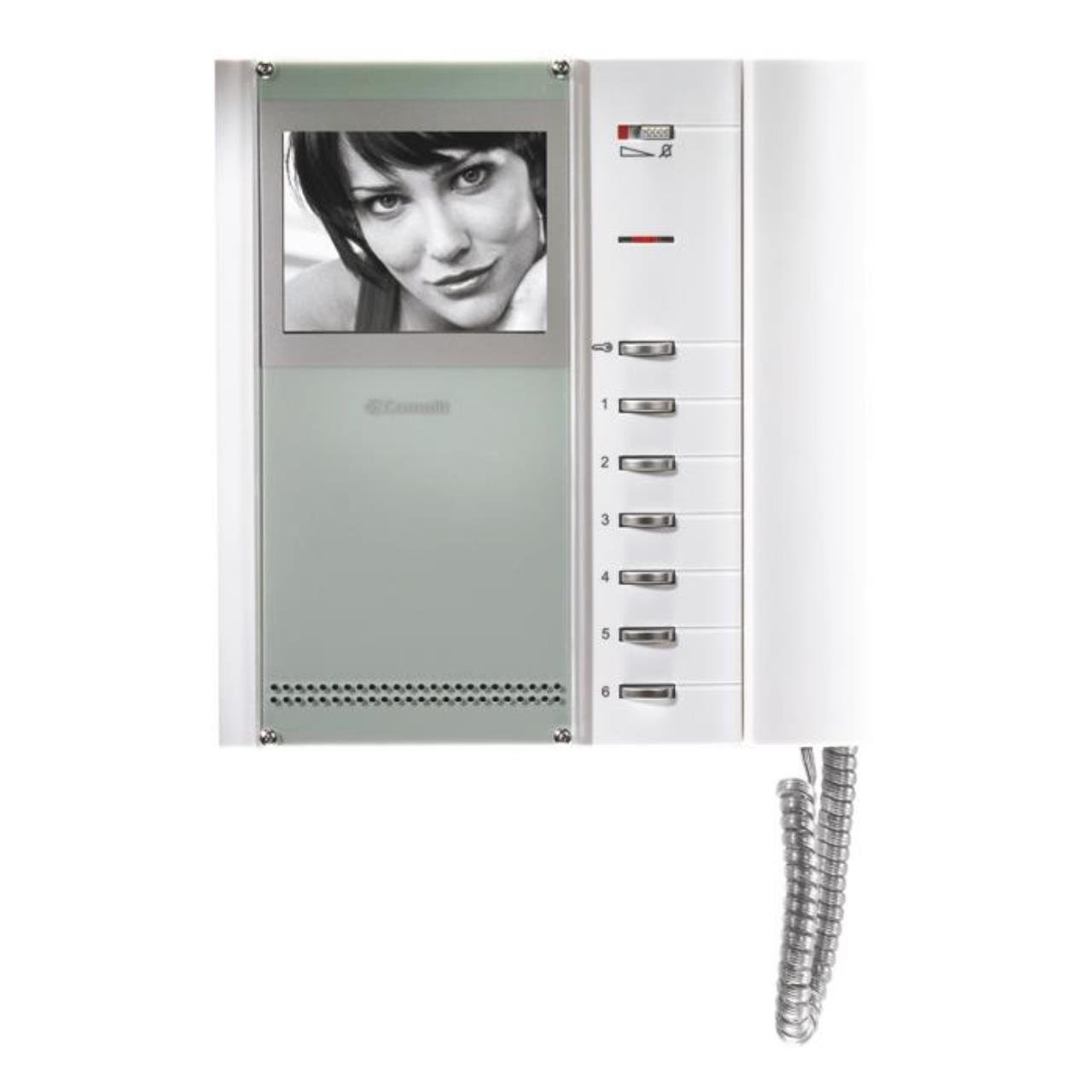
Figura 1: Comelit Bravo Series 5701 Black and White Video Intercom Monitor. This image shows the front view of the monitor with its handset, 4-inch black and white screen, and control buttons.
4. Configuració i instal·lació
This section outlines the general steps for setting up your video intercom. For detailed wiring diagrams and specific installation instructions, please refer to the separate installation guide provided with your system or consult a qualified electrician.
4.1 Muntatge del monitor
- Choose a suitable location for the monitor, typically near the entrance or in a central area of the property.
- Mark the drilling points on the wall using the mounting bracket (if supplied) or the monitor's backplate as a template.
- Perforar forats i inserir taps de paret.
- Secure the mounting bracket or monitor backplate to the wall with screws.
4.2 Connexions de cablejat
ADVERTIMENT: Assegureu-vos que l'alimentació estigui desconnectada abans de fer qualsevol connexió elèctrica.
- Connect the system's main bus wires to the designated terminals on the monitor.
- Connect the power supply wires according to the system's wiring diagram.
- Assegureu-vos que totes les connexions estiguin ben assegurades i polaritzades correctament.
4.3 Engegada inicial
- Once all wiring is complete and checked, restore power to the system.
- The monitor should power on, and you may hear an initial tone or see a display.
- Test the basic functions such as receiving a call and opening the door.
5. Instruccions de funcionament
5.1 Recepció d'una trucada
- When a visitor calls from the outdoor station, the monitor will ring, and the screen will display the visitor's image.
- Lift the handset to answer the call and speak with the visitor.
5.2 Obrir la porta
- Durant una trucada, premeu el botó botó de l'obertura de la porta (usually marked with a key symbol) to unlock the entrance.
- The door will remain unlocked for a short period, then automatically re-lock.
5.3 Ajustar la configuració
- Control de brillantor: Use the dedicated knob or slider to adjust the screen brightness.
- Control de contrast: Use the dedicated knob or slider to adjust the screen contrast.
- Volum de trucades: The slide control allows adjustment of the incoming call volume.
- Privacy Function: Set the call volume to zero using the slide control to activate the privacy function. This will temporarily disable incoming call ringing.
- Botons de funció addicionals: The two extra buttons can be programmed for various functions depending on your system configuration (e.g., activating a secondary gate, turning on a light). Refer to your system's main manual for specific programming details.
6. Manteniment
Regular maintenance ensures optimal performance and longevity of your Comelit Bravo Series 5701 video intercom.
- Neteja: Clean the monitor's screen and casing amb un to suau, sec o lleugerament damp cloth. Do not use abrasive cleaners, solvents, or aerosol sprays.
- Inspecció: Reviseu periòdicament tots els cables i connexions visibles per detectar qualsevol signe de desgast o dany.
- Actualitzacions de programari: This model typically does not require software updates. If your system is part of a larger network, consult your installer for any system-wide updates.
7. Solució De Problemes
If you encounter issues with your video intercom, refer to the following common problems and solutions:
| Problema | Causa possible | Solució |
|---|---|---|
| No hi ha imatge a la pantalla | No power; loose connection; brightness/contrast too low. | Check power supply; verify wiring connections; adjust brightness/contrast controls. |
| No sound from speaker/microphone | Volume too low; faulty handset connection. | Adjust call volume; ensure handset is properly seated; check wiring. |
| Door opener not working | Wiring issue; faulty door strike; system not in call mode. | Verify door opener wiring; ensure you are in an active call before pressing the button. |
| Monitor not ringing | Call volume set to zero (privacy mode); faulty outdoor station. | Increase call volume; check outdoor station functionality. |
Si el problema persisteix després d'intentar aquestes solucions, poseu-vos en contacte amb el servei d'assistència tècnica qualificat.
8. Especificacions
Key technical specifications for the Comelit Bravo Series 5701 Video Intercom:
- Número de model: 5701
- Tipus de pantalla: Black and White (B/W)
- Mida de la pantalla: 4 polzades
- Color: Glossy White with Silver lower shell
- Característiques: Door opener button, 2 additional function buttons, signal LED, brightness adjustment, contrast adjustment, slide call volume control, privacy function.
- Dimensions (AxAxP): 212 x 225 x 55 mm
- Pes: 700 grams
- Font d'alimentació: System powered (not battery-operated)
- Eficiència: A
- Funcions especials: Tweeter
- Descapotable: Can be transformed into a desktop version with article 5712.