
1. Introducció
This manual provides essential information for the proper installation, operation, and maintenance of the Bosch ARD-AYK12 Mini Mullion EM Card Reader. This device is designed for use in security and access control systems, offering reliable EM card authentication in a compact form factor.
Si us plau, llegiu aquest manual detingudament abans d'intentar instal·lar o fer funcionar el dispositiu. Conserveu aquest manual per a futures consultes.
2. Informació de seguretat
Observeu les següents precaucions de seguretat per evitar danys al producte i garantir la seguretat de l'usuari:
- Seguretat elèctrica: Installation must be performed by qualified personnel in accordance with all local and national electrical codes. Disconnect power before wiring.
- Medi ambient: Do not expose the device to extreme temperatures, humidity, or direct water contact unless specifically rated for such conditions.
- Manipulació: Manipuleu el dispositiu amb cura. Eviteu deixar-lo caure ni sotmetre'l a impactes forts.
- Modificacions: Do not attempt to modify or repair the device. Refer all servicing to authorized personnel.
3. Contingut del paquet
Verifiqueu que tots els elements siguin presents al paquet:
- Bosch ARD-AYK12 Mini Mullion EM Card Reader
- Maquinari de muntatge (cargols, ancoratges)
- Guia d'instal·lació (aquest document)
Si falta algun article o està malmès, contacteu immediatament amb el vostre proveïdor.
4. Producte acabatview
The Bosch ARD-AYK12 is a compact EM card reader designed for discreet installation on door frames (mullions) or other narrow surfaces. It provides secure and reliable access control by reading EM (125 kHz) proximity cards and transmitting data to a compatible access control panel.
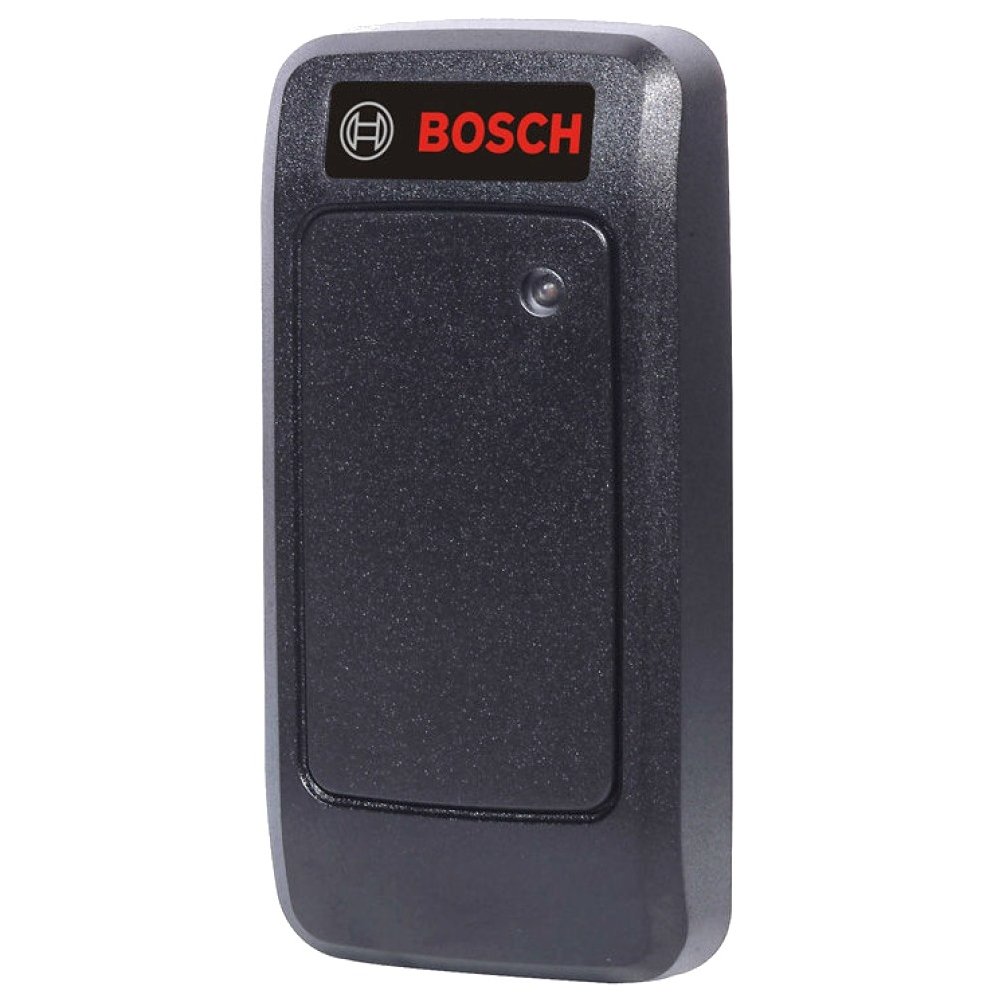
Figure 1: Bosch ARD-AYK12 Mini Mullion EM Card Reader. This image shows the compact design of the card reader, suitable for narrow installations.
4.1 Característiques clau
- Compact mullion design
- EM (125 kHz) proximity card compatibility
- Wiegand output for integration with access control panels
- LED indicator for status feedback
- Weather-resistant construction (check specific IP rating if available)
5. Configuració i instal·lació
Proper installation is crucial for the reliable operation of the card reader.
5.1 Ubicació de muntatge
Trieu una ubicació de muntatge que sigui:
- On a stable, flat surface, typically a door frame (mullion).
- Within reach for card presentation.
- Away from strong electromagnetic interference sources.
- Protected from direct heavy rain or extreme weather if not rated for outdoor exposure.
5.2 Connexions de cablejat
The ARD-AYK12 typically uses a standard Wiegand interface for communication with an access control panel. Refer to the wiring diagram below for typical connections. Always disconnect power before making any wiring connections.
| Color del filferro | Funció | Es connecta a |
|---|---|---|
| Vermell | +VDC (Power Input) | Access Control Panel +12VDC |
| Negre | GND (terra) | Access Control Panel GND |
| Verd | Dades 0 | Access Control Panel Data 0 Input |
| Blanc | Dades 1 | Access Control Panel Data 1 Input |
| marró | LED Control (Optional) | Access Control Panel LED Output |
| Taronja | Beeper Control (Optional) | Access Control Panel Beeper Output |
Note: Specific wire colors and functions may vary slightly. Always consult the wiring diagram provided with your specific access control panel.
5.3 Passos de muntatge
- Drill appropriate holes for mounting screws and cable routing at the chosen location.
- Feed the reader's cable through the wall/mullion.
- Secure the reader to the surface using the provided mounting hardware.
- Connect the reader's wires to the access control panel as per the wiring diagram.
- Apply power to the access control system and test the reader.
6. Funcionament
Once installed and powered, the ARD-AYK12 card reader is ready for operation.
6.1 Presenting a Card
To gain access, present a valid EM proximity card directly in front of the card reader. The optimal reading distance may vary slightly depending on the card type and environmental factors.
6.2 LED and Beeper Feedback
The reader provides visual and audible feedback:
- LED verd: Typically indicates access granted or reader idle.
- LED vermell: Typically indicates access denied or an error state.
- Beeper: A short beep usually confirms a successful card read. Multiple beeps or a continuous tone may indicate an error.
Note: The exact behavior of the LED and beeper can be configured via the access control panel.
7. Manteniment
The Bosch ARD-AYK12 card reader requires minimal maintenance to ensure long-term performance.
- Neteja: Periodically wipe the reader's surface with a soft, damp tela. No utilitzeu netejadors abrasius ni dissolvents.
- Inspecció: Regularly inspect the reader for any signs of physical damage or tampering. Check cable connections for integrity.
- Firmware: Firmware updates, if available, should only be performed by authorized service personnel.
8. Solució De Problemes
If you encounter issues with your ARD-AYK12 card reader, refer to the following table:
| Problema | Causa possible | Solució |
|---|---|---|
| Reader does not respond (no LED, no beep) | No power; faulty wiring; reader malfunction. | Check power supply to the access control panel. Verify wiring connections. If problem persists, contact support. |
| Card read but access denied | Invalid card; card not enrolled; access control panel configuration issue. | Ensure the card is valid and enrolled in the access control system. Check access control panel settings. |
| Intermittent card reads | Electromagnetic interference; faulty card; reader placement. | Check for nearby sources of interference. Try a different card. Ensure proper card presentation. |
If the problem cannot be resolved using this guide, contact Bosch technical support or your authorized dealer.
9. Especificacions
Technical specifications for the Bosch ARD-AYK12 Mini Mullion EM Card Reader:
- Número de model: ARD-AYK12
- Dimensions (producte): 1 x 1 x 1 polzades (aproximadament)
- Pes (article): 1.6 unces (aproximadament)
- Card Technology: EM (125 kHz) Proximity
- Interfície de sortida: Wiegand
- Requisit d'energia: Typically 5-16 VDC (refer to product label for exact range)
- Temperatura de funcionament: Consult product datasheet for specific range
- Fabricant: VÍDEO DE SEGURETAT BOSCH
- Data de primera disponibilitat: 31 de desembre de 2010
10. Garantia i Suport
Bosch products are manufactured to high standards and are backed by a limited warranty. For detailed warranty information, please refer to the official Bosch Security Systems website or contact your local Bosch representative.
For technical support, service, or to report issues, please contact your authorized Bosch dealer or visit the Bosch Security Systems support portal. When contacting support, please have your product model number (ARD-AYK12) and serial number ready.
Recursos en línia:
- Bosch Security Systems Official Weblloc: www.boschsecurity.com
- Suport al producte: www.boschsecurity.com/xc/en/support/