
1. Introducció
Thank you for choosing the Magnum Energy ME-RC50 Remote Panel. This manual provides detailed instructions for the proper installation, operation, and maintenance of your remote panel. Please read this manual thoroughly before attempting to install or operate the device to ensure safe and efficient use.
2. Producte acabatview
The Magnum Energy ME-RC50 is a remote control panel designed to provide convenient monitoring and control of compatible Magnum Energy inverters or inverter/chargers. It features an intuitive interface for easy system management.
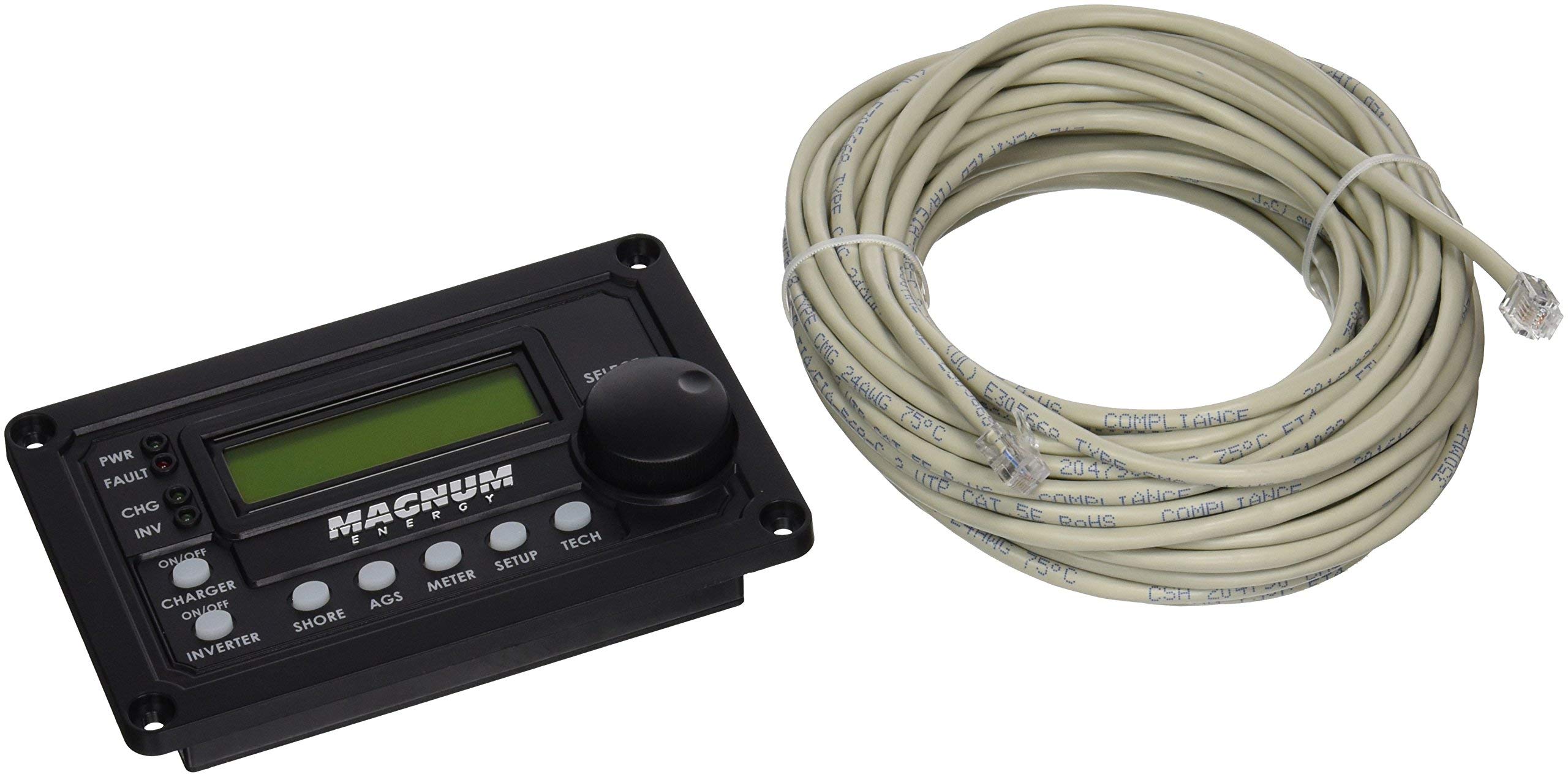
Figure 1: Magnum Energy ME-RC50 Remote Panel with its communication cable.
Característiques principals:
- Pantalla LCD: A 16 x 2 line (32 characters total) alphanumeric display for clear information readout.
- Menu Push Buttons (x5): Five dedicated buttons for navigating menus and adjusting settings.
- Connectivitat: Utilizes a 4-conductor (twisted-pair) telephone cable for reliable communication.
- Disseny ergonòmic: Engineered for user comfort and ease of use.

Figure 2: Close-up of the ME-RC50 Remote Panel's display and control buttons.
3. Configuració
Follow these steps to properly set up your ME-RC50 Remote Panel:
- Muntatge: Choose a suitable location for the remote panel. Ensure it is easily accessible and visible. The panel can be flush-mounted or surface-mounted depending on your preference and installation kit (sold separately).
- Connexió per cable: Connect one end of the provided 4-conductor (twisted-pair) telephone cable to the RJ11 port on the back of the ME-RC50 remote panel.
- Connexió del sistema: Connect the other end of the telephone cable to the designated remote port on your compatible Magnum Energy inverter or inverter/charger. Ensure the connection is secure.
- Encès: Once the cable is securely connected, power on your Magnum Energy inverter/charger system. The remote panel should automatically power on and display system information.
Nota: The ME-RC50 is compatible with various Magnum Energy inverters and inverter/chargers, often used in conjunction with generators for power management.
4. Instruccions de funcionament
The ME-RC50 Remote Panel provides a user-friendly interface for monitoring and controlling your power system.
Navegació pels menús:
- Utilitza el Menu Push Buttons (X5) located below the LCD display to navigate through various screens and settings.
- Typically, there are buttons for 'Menu', 'Select', 'Up', 'Down', and 'Escape' or similar functions. Refer to your inverter/charger's specific manual for detailed button assignments and menu structures.
- El Pantalla LCD will show system status, battery voltage, charge current, inverter status, and other critical information.
Operacions bàsiques:
- Viewing Status: Press the 'Menu' button to cycle through different status screens.
- Ajust de la configuració: Enter the 'Settings' menu (if available) and use the 'Up'/'Down' buttons to select parameters, then 'Select' to confirm changes.
- Inversor On/Off: Some systems allow you to turn the inverter on or off directly from the remote panel. Consult your system's manual for this functionality.
5. Manteniment
The ME-RC50 Remote Panel requires minimal maintenance to ensure long-term performance.
- Neteja: Wipe the panel surface and LCD display with a soft, dry cloth. Avoid using abrasive cleaners or solvents, which can damage the plastic and screen.
- Inspecció del cable: Periodically check the communication cable for any signs of wear, damage, or loose connections. Replace damaged cables immediately.
- Condicions ambientals: Ensure the panel is not exposed to extreme temperatures, direct sunlight for prolonged periods, or excessive moisture.
6. Solució De Problemes
If you encounter issues with your ME-RC50 Remote Panel, try the following steps:
| Problema | Causa possible | Solució |
|---|---|---|
| El panell no s'encén | Loose cable connection; Inverter/charger not powered; Damaged cable | Check cable connections at both ends; Ensure inverter/charger is powered; Replace cable if damaged. |
| La pantalla està en blanc o il·legible | Poor connection; Extreme temperature; Internal fault | Reseat cable; Move panel to a moderate temperature environment; Contact support if problem persists. |
| Els botons no responen | Stuck button; Internal fault | Gently press buttons to ensure they are not stuck; If unresponsive, contact support. |
| Lectures incorrectes | Communication error; Inverter/charger fault | Check cable connections; Refer to your inverter/charger manual for troubleshooting its readings. |
7. Especificacions
| Característica | Especificació |
|---|---|
| Marca | Energia Magnum |
| Número de model | ME-RC50 |
| Pes de l'article | 1.4 lliures |
| Tecnologia de connectivitat | Infrared (for communication with inverter/charger) |
| Quantitat de botons | 5 |
| Tipus de controlador | Control de botons |
| Interval màxim | 50 Feet (cable length dependent) |
| Dispositius compatibles | Magnum Energy Inverters/Inverter/Chargers (e.g., Generator systems) |
| Tipus de visualització | 16 x 2 line Alphanumeric LCD |
| Tipus de cable | 4-conductor (twisted-pair) telephone cable |
8. Garantia i Suport
Magnum Energy, INC. provides a warranty for the ME-RC50 Remote Panel. For any issues experienced within 30 days of receipt, please contact your retailer or Magnum Energy customer support directly. For warranty claims or technical assistance beyond this period, please refer to the official Magnum Energy weblloc o poseu-vos en contacte amb el seu departament d'atenció al client.
Advertència de la proposta 65: Aquest producte pot contenir materials advertits per la Proposició 65 de Califòrnia.