
Introducció
The Philips SRP5107/27 Universal Remote Control is designed to consolidate control of up to seven audio/video devices into a single unit. This remote offers advanced functionality for DVR and HD devices, along with a learning capability to adapt to various equipment. Its primary buttons feature LED backlighting for improved visibility in low-light conditions.
Les característiques clau inclouen:
- Consolidates control for up to 7 AV devices.
- Compatible with devices manufactured since 1990.
- Specifically designed for use with DVR/HD devices.
- LED illumination on primary keys for ease of use.
- Integrated learning keys for future device compatibility.
- Memorizes setup codes even after battery changes.
Configuració
1. Instal·lació de la bateria
The Philips SRP5107/27 remote requires two AA batteries. Ensure correct polarity when inserting the batteries. The remote is designed to retain programmed codes even when batteries are removed or replaced.
2. Device Programming (Code Search Method)
To program the remote for your devices using the code search method:
- Engegueu el dispositiu que voleu controlar (per exemple, televisor, reproductor de DVD).
- Premeu i manteniu premut el botó del dispositiu desitjat al comandament a distància (per exemple, TV, DVD, AUX).
- Mentre manteniu premut el botó del dispositiu, premeu i manteniu premut el Poder button. The device button will illuminate.
- Release both buttons. The device button will remain illuminated.
- Apunta el comandament a distància al dispositiu i prem repetidament el botó Poder botó (o Canal amunt button) until the device turns off. This indicates the remote has found a compatible code.
- Un cop apagat el dispositiu, premeu immediatament el botó Entra button to save the code. The device button light will turn off.
- Test other functions (e.g., volume, channel) to ensure full compatibility. If not all functions work, repeat the process to find an alternative code.
3. Funció d'aprenentatge
The learning function allows the universal remote to learn commands directly from your original device remote. This is useful for commands not covered by pre-programmed codes or for devices not listed in the code database.
- Place the Philips universal remote and your original remote on a flat surface, facing each other, with their IR emitters aligned and about 1-2 inches apart.
- Manteniu premut el botó Configuració button on the universal remote until the device button (e.g., TV) il·lumina.
- Premeu el botó del dispositiu que voleu programar (per exemple, TV). The device button will flash.
- Press the button on the universal remote that you want to teach a function to (e.g., Puja el volum). The device button will now flash rapidly.
- Press and hold the corresponding button on your original remote (e.g., Puja el volum) until the device button on the universal remote flashes twice and then stays solid. This indicates successful learning.
- Repeat steps 4 and 5 for any other buttons you wish to teach.
- Premeu el botó Configuració button again to exit learning mode.
Nota: The remote has a finite limit on the number of custom buttons that can be learned. If you have multiple devices without control codes, the device may run out of memory for new learned commands.
Funcionament del comandament a distància
1. Selecció de dispositius
Per controlar un dispositiu específic, premeu el botó del dispositiu corresponent a la part superior del comandament a distància (per exemple, TV, DVD, Ds, AUX). The selected device button will illuminate, indicating it is active.
2. Funcions bàsiques
Once a device is selected, use the corresponding buttons for common functions:
- Potència: Encén o apaga el dispositiu seleccionat.
- Pujar/baixar el volum: Ajusta el volum del dispositiu seleccionat.
- Canal amunt/avall: Canvia els canals del dispositiu seleccionat.
- Bloc numèric: Introdueix números de canal o altres entrades numèriques.
- Silenciar: Silencia l'àudio.
3. Punch-Through Volume
The remote may feature a punch-through volume function, allowing volume control of a primary audio device (e.g., TV or audio receiver) regardless of the currently selected device mode. If this function does not operate as desired, you may need to use the learning function to remap the volume buttons for specific modes to your preferred audio device.
Manteniment
1. Substitució de la bateria
When the remote's performance degrades or the LED indicators dim, it is time to replace the batteries. Open the battery compartment on the back of the remote and replace the two AA batteries with new ones, ensuring correct polarity. The remote is designed to retain all programmed settings during battery replacement.
2. Neteja
To clean the remote, use a soft, slightly damp cloth. Do not use abrasive cleaners or solvents, as these can damage the remote's finish or internal components. Ensure no liquid enters the remote's casing.
Resolució de problemes
- Remote does not control device:
- Assegureu-vos que el comandament a distància estigui apuntant directament al dispositiu i que no hi hagi obstacles.
- Verifiqueu que esteu seleccionat el botó de mode de dispositiu correcte (per exemple, TV, DVD).
- Re-attempt the device programming steps to ensure the correct code is entered. Try alternative codes for the same brand if available.
- Check if the batteries are fresh and correctly installed.
- Some buttons do not work after programming:
- This may indicate that the selected code is not fully compatible with your device. Try repeating the programming process to find a more compatible code.
- Use the learning function to teach specific non-working buttons from your original remote.
- Learning function not working:
- Ensure the original remote's batteries are fresh.
- Verify that the IR emitters of both remotes are properly aligned and close enough (1-2 inches).
- Ensure there is no strong ambient light interfering with the IR signal.
- The universal remote has a limited memory for learned commands. If you have taught many commands, it might be full.
- No new codes can be downloaded:
This remote does not feature a mechanism to download new codes via USB or other means. All programming is done directly on the device or through its learning function.
Especificacions
| Número de model | SRP5107/27 |
| Marca | Philips |
| Dimensions del producte | 1.3 x 4.8 x 10.8 polzades |
| Pes de l'article | 3.52 unces |
| Piles necessàries | 2 piles AA |
| Nombre màxim de dispositius compatibles | 7 |
| Dispositius compatibles | Television, DVD, DVR, Cable, Satellite, VCR, AUX (general audio/video devices) |
| Característica especial | Universal, Learning Function, LED Backlit Keys |
Garantia i Suport
For specific warranty information, please refer to the documentation included with your purchase or contact Philips customer support. General product support and additional resources may be available on the official Philips weblloc.
Imatge del producte
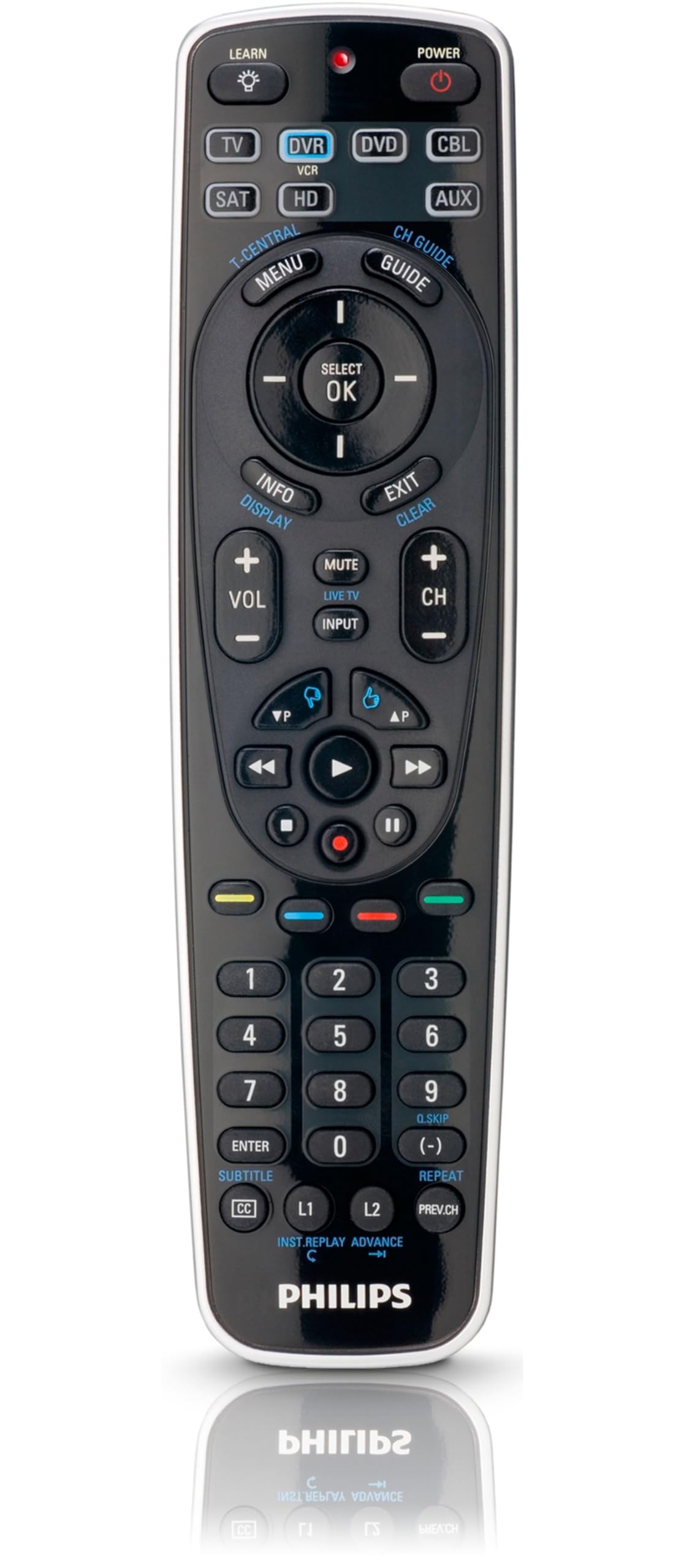
Image: Philips SRP5107/27 Universal Remote Control. This image displays the remote's ergonomic design and button layout, highlighting the device selection buttons at the top, the central navigation cluster, and the numeric keypad.