
1. Introducció
The Philips SDV6122T/27 Digital TV Antenna is designed to receive free over-the-air digital and HDTV broadcasts. This amplified indoor antenna provides stable, high-quality signal reception for UHF and VHF channels. It is an ideal solution for accessing local channels without a monthly subscription.
This manual provides instructions for the proper installation, operation, and maintenance of your Philips Digital TV Antenna. Please read it thoroughly before use and retain it for future reference.
2. Informació de seguretat
- Només per a ús interior: This antenna is designed for indoor use. Do not install it outdoors.
- Font d'alimentació: Connect the antenna's power adapter only to a standard wall outlet. Ensure the voltage coincideix amb els requisits especificats a l'adaptador.
- Eviteu la humitat: Do not expose the antenna to rain, moisture, or extreme humidity.
- Ventilació: Ensure proper ventilation around the antenna. Do not cover it or place it in an enclosed space that restricts airflow.
- Neteja: Desconnecteu l'alimentació abans de netejar. Feu servir un drap suau i sec. No utilitzeu netejadors líquids ni en aerosol.
- Manteniment: No intenteu atendre aquest producte vosaltres mateixos. Consulteu tots els serveis a personal de servei qualificat.
- Col·locació: Place the antenna away from heat sources such as radiators, heat registers, stoves, or other heat-producing appliances. Avoid placing it near strong electromagnetic fields.
3. Contingut del paquet
Verifiqueu que tots els elements siguin presents al paquet:
- Philips SDV6122T/27 Digital TV Antenna
- Adaptador d'alimentació
- Cable coaxial
- Manual d'usuari (aquest document)

Image: The retail packaging for the Philips SDV6122T/27 Digital TV Antenna, showing the antenna itself and key features.
4. Producte acabatview
Familiarize yourself with the components of your Philips Digital TV Antenna:
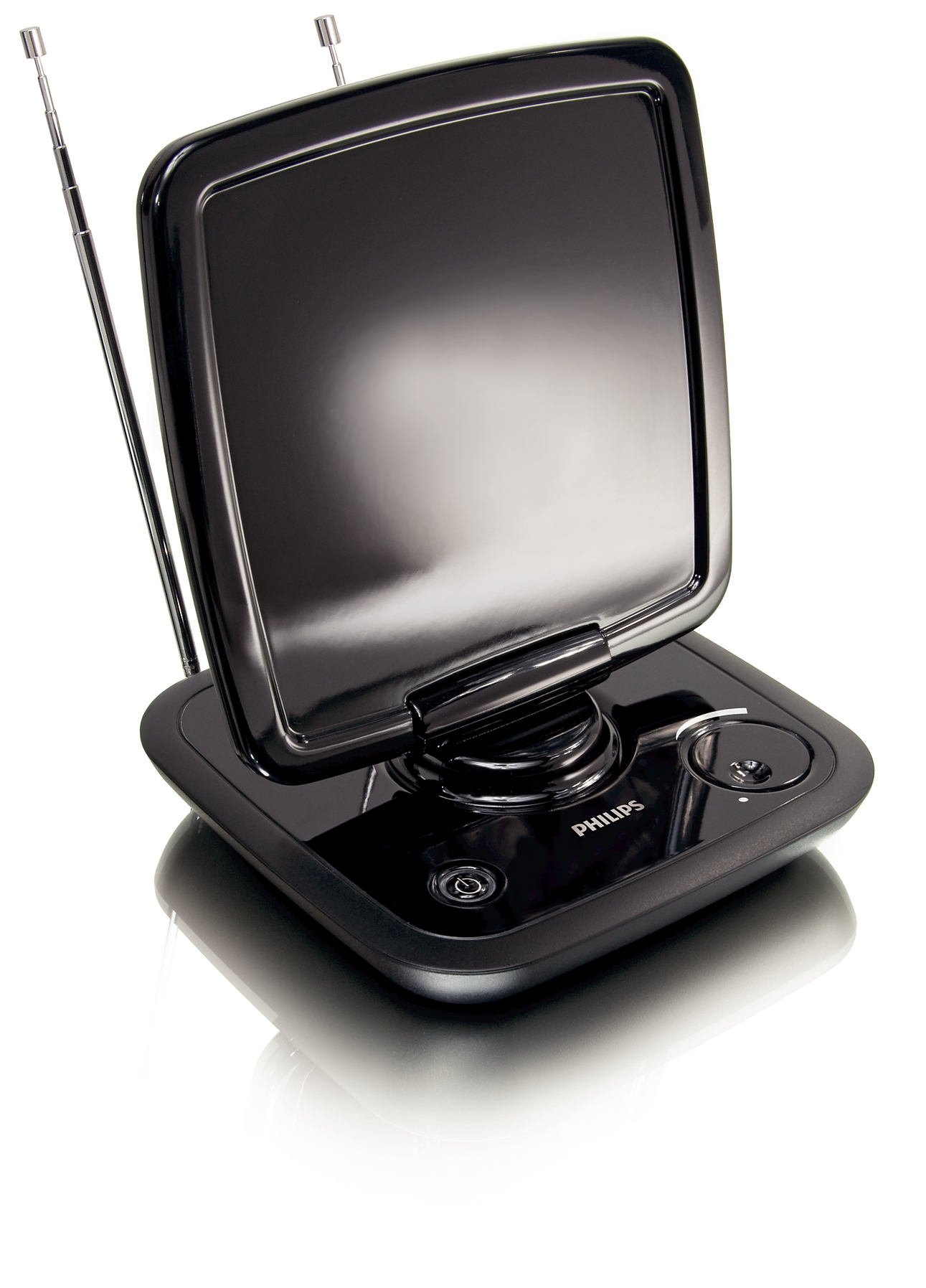
Imatge: Frontal view of the Philips SDV6122T/27 Digital TV Antenna, showing the main panel, telescopic dipoles, and base controls.
- Panell principal: The flat, rectangular surface designed for optimal signal reception.
- Telescopic Dipoles: Extendable rods for enhanced VHF signal reception.
- Unitat base: Contains controls and connection ports.
- Control de guany: Adjusts signal amplification (if applicable).
- Indicador LED d'alimentació: Illuminates when the antenna is powered on.
- Sortida coaxial: Connects to your TV or digital converter box.
- Entrada d'alimentació: Es connecta a l'adaptador de corrent proporcionat.

Imatge: Anglesa view of the Philips SDV6122T/27 Digital TV Antenna, highlighting its sleek design and adjustable panel.
5. Configuració
Follow these steps to set up your Philips Digital TV Antenna:
- Trieu una ubicació: Place the antenna in a location that provides the best possible reception. Generally, higher locations and positions near a window facing the broadcast towers are ideal. Avoid placing it near large metal objects or other electronic devices that may cause interference.
- Connecteu el cable coaxial: Connect one end of the supplied coaxial cable to the "ANT IN" or "RF IN" port on your television or digital converter box. Connect the other end of the coaxial cable to the coaxial output port on the Philips antenna.
- Connecteu l'adaptador d'alimentació: Plug the small end of the power adapter into the power input port on the antenna. Plug the other end of the power adapter into a standard electrical wall outlet. The Power LED indicator on the antenna should illuminate.
- Extend Dipoles: Fully extend the telescopic dipoles for optimal VHF signal reception. Adjust their angle for best results.
- Posició de l'antena: Adjust the main panel of the antenna by tilting and swiveling it to find the best orientation for signal reception.
6. Funcionament
After setup, perform a channel scan on your television:
- Accés al menú del televisor: Turn on your television and press the "Menu" or "Settings" button on your TV remote control.
- Select Input/Source: Navigate to the input or source selection and ensure it is set to "Antenna" or "Air".
- Realitza l'escaneig de canals: Look for an option like "Channel Scan," "Auto Program," "Auto Tune," or "Cerca Channels" in your TV's menu. Select this option to begin scanning for available channels. This process may take several minutes.
- Adjust Antenna for Best Reception: After the scan, if you are not receiving all desired channels or if the picture quality is poor, try repositioning the antenna (tilting, swiveling, adjusting dipoles) and then perform another channel scan. Repeat this process until you achieve the best possible reception.
- Adjust Gain Control (if applicable): If your antenna has a gain control knob, experiment with different settings. A higher gain may boost weak signals, but too high a gain can sometimes overload strong signals, leading to distortion.
Nota: The number and quality of channels received depend on various factors, including distance from broadcast towers, terrain, building materials, and electromagnetic interference.
7. Manteniment
To ensure the longevity and optimal performance of your antenna:
- Neteja: Disconnect the antenna from the power outlet before cleaning. Use a soft, dry, lint-free cloth to wipe the exterior surfaces. Do not use abrasive cleaners, waxes, or solvents.
- Emmagatzematge: If storing the antenna for an extended period, disconnect it from power and your TV, and store it in a cool, dry place.
- Inspecció del cable: Periodically check the coaxial cable and power adapter for any signs of damage. Replace damaged components immediately.
8. Solució De Problemes
| Problema | Causa possible | Solució |
|---|---|---|
| No s'han trobat canals o la recepció és deficient. |
|
|
| Power LED not illuminated. |
|
|
| La imatge està pixelada o es congela. |
|
|
9. Especificacions
| Número de model | SDV6122T/27 |
| Tipus d'antena | Interior AmpAntena de televisió digital millorada |
| Interval de freqüència | UHF, VHF, HDTV |
| Impedància | 75 ohms |
| Dimensions (L x A x A) | 2.6 x 8.3 x 14 polzades (aproximadament) |
| Pes | 1.62 lliures (aproximadament) |
| Color | Negre |
| Font d'alimentació | Adaptador d'alimentació extern (inclòs) |
10. Garantia i Suport
For warranty information and technical support, please refer to the documentation provided with your purchase or visit the official Philips support weblloc web. Conserveu el comprovant de compra per a reclamacions de garantia.
Assistència en línia: For the most up-to-date information, FAQs, and troubleshooting guides, please visit the Philips support weblloc.
Informació de contacte: Specific contact details for customer service may vary by region. Please check the Philips website for local support numbers or email addresses.