
1. Introducció
The Intellitronix M9999-W Digital Gauge Set provides a comprehensive solution for monitoring critical vehicle parameters. This set includes six individual digital gauges designed for accuracy and clear readability. Please read this manual thoroughly before installation and operation to ensure proper functionality and longevity of your gauges.
Components inclosos:
- Speedometer with Bar Graph (3 3/8")
- Tachometer with Bar Graph (3 3/8")
- Fuel Level Gauge (2 1/16")
- Voltmeter (2 1/16")
- Oil Pressure Gauge (2 1/16")
- Water Temperature Gauge (2 1/16")
- Oil Pressure Sending Unit
- Water Temperature Sending Unit
Nota: A speedometer sending unit is not included and must be purchased separately if installing on a mechanical cable-driven system. Refer to part #S9013 for compatibility.
2. Configuració i instal·lació
Proper installation is crucial for the accurate operation of your digital gauges. It is recommended that installation be performed by a qualified automotive technician.
2.1 General Wiring Guidelines
- Power (12V Switched): Connect the red wire to a switched 12-volt power source that is active when the ignition is on.
- Terra: Connect the black wire to a reliable chassis ground point. Ensure a clean, secure connection.
- Il·luminació: Connect the white wire to the vehicle's headlight switch or dimmer circuit for gauge backlighting.
- Entrades de senyal: Each gauge will have specific signal input wires. Refer to the individual gauge instructions for detailed connections.
2.2 Sending Unit Installation
Oil Pressure Sending Unit
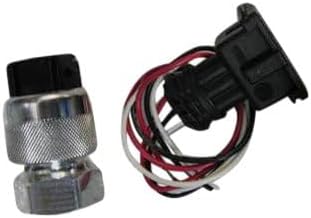
The oil pressure sending unit (pictured above) connects to the engine's oil pressure port. Ensure the threads are clean and apply thread sealant if necessary. Connect the signal wire from the oil pressure gauge to this sending unit.
Water Temperature Sending Unit

The water temperature sending unit (pictured above) installs into a suitable port in the engine's cooling system, typically near the thermostat housing. Use appropriate adapters if needed. Connect the signal wire from the water temperature gauge to this sending unit.
Speedometer Sending Unit (Optional)
If your vehicle uses a mechanical speedometer cable, a separate electronic speedometer sending unit (Intellitronix part #S9013) is required. This unit typically threads into the transmission where the original cable was connected. Follow the instructions provided with the speedometer sending unit for its specific installation and wiring.
3. Instruccions de funcionament
Once properly installed and wired, your Intellitronix digital gauges will display real-time vehicle information. Upon turning the ignition on, the gauges will perform a self-test sequence before displaying readings.
3.1 Reading the Gauges
- Pantalla digital: The primary numerical display shows the precise value for each parameter (e.g., speed in MPH, RPM, temperature in °F/°C).
- Gràfic de barres: The speedometer and tachometer feature an integrated bar graph for quick visual reference of the current value within its operating range.
- Il·luminació: The gauge backlighting will activate when the vehicle's headlights are turned on, or according to its connection to the dimmer circuit.
3.2 Calibration (Speedometer)
The speedometer may require calibration for accurate speed readings, especially after installing a new sending unit or if tire sizes have changed. Refer to the specific instructions provided with your Intellitronix speedometer for its calibration procedure, which typically involves a short drive over a known distance or using a GPS reference.
4. Manteniment
Intellitronix digital gauges are designed for durability and require minimal maintenance.
- Neteja: Utilitzeu un suau, damp cloth to clean the gauge faces. Avoid abrasive cleaners or solvents, which can damage the display.
- Connexions: Reviseu periòdicament totes les connexions del cablejat per assegurar-vos que estiguin ben fixades i sense corrosió.
- Factors ambientals: While designed for automotive use, extreme temperatures or moisture can affect electronic components. Ensure proper sealing and protection where necessary.
5. Solució De Problemes
If you encounter issues with your Intellitronix digital gauges, review els següents problemes i solucions habituals:
| Problema | Causa possible | Solució |
|---|---|---|
| Gauges do not power on. | No power to the red wire, poor ground connection, blown fuse. | Check 12V switched power source, verify ground connection, inspect vehicle fuses. |
| Incorrect or erratic readings. | Loose signal wire connection, faulty sending unit, improper calibration (speedometer). | Verify all signal wire connections, test sending units, recalibrate speedometer if applicable. |
| Backlighting not working. | White wire not connected to illumination circuit, dimmer switch issue. | Check connection to headlight/dimmer circuit, ensure dimmer is not set to minimum. |
If troubleshooting steps do not resolve the issue, contact Intellitronix customer support for further assistance.
6. Especificacions
| Característica | Detall |
|---|---|
| Marca | Intellitronix |
| Número de model | M9999-W |
| Gauge Types Included | Speedometer, Tachometer, Fuel Level, Voltmeter, Oil Pressure, Water Temperature |
| Gauge Sizes | 3 3/8" (Speedometer, Tachometer), 2 1/16" (Fuel Level, Voltmeter, Oil Pressure, Water Temperature) |
| Material | Copper, Fiberglass, Acrylic |
| Dimensions de l'article (L x A x A) | 12.4 x 12.2 x 12.8 polzades |
| Pes de l'article | 4 lliures |
| UPC | 818731010591 |
7. Informació de la garantia
Intellitronix offers a Garantia de per vida on this digital gauge set. This warranty covers defects in materials and workmanship under normal use. For complete details regarding warranty claims, coverage, and procedures, please refer to the official Intellitronix weblloc web o contacteu directament amb el seu servei d'atenció al client.
8. Atenció al client
For technical assistance, installation questions, or warranty inquiries, please contact Intellitronix customer support. Contact information can typically be found on the official Intellitronix weblloc.