
Introducció
This manual provides detailed instructions for the installation, configuration, and operation of your ZyXEL NWA3160-N IEEE 802.11n 300 Mbps Wireless Access Point. Please read this manual thoroughly before using the device to ensure proper setup and optimal performance. Keep this manual for future reference.
Producte acabatview
The ZyXEL NWA3160-N is a high-performance wireless access point designed to provide reliable 802.11n wireless connectivity. It supports Power over Ethernet (PoE) for flexible deployment and offers a wireless transmission speed of up to 300 Mbps across dual-band frequencies (2.4 GHz and 5 GHz).
Contingut del paquet
- ZyXEL NWA3160-N Wireless Access Point
- Adaptador d'alimentació (si no feu servir PoE)
- Cable Ethernet
- Guia d'inici ràpid
- Wall Mount Kit (if applicable)
Disseny del dispositiu
Familiarize yourself with the ports and indicators on your NWA3160-N device.
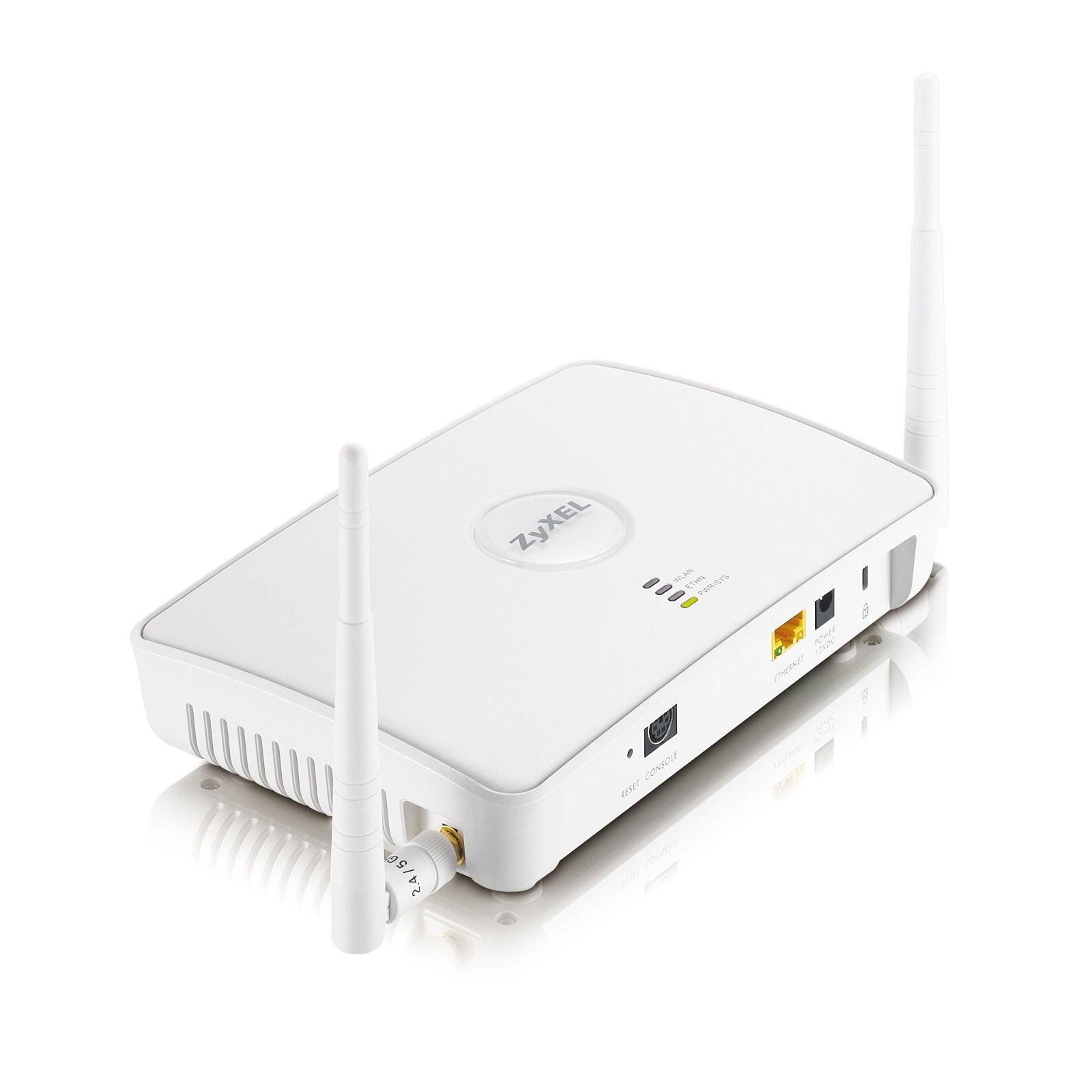
Figura 1: Davant view of the ZyXEL NWA3160-N Wireless Access Point, showing LED indicators for power, WLAN, and LAN status. The device features a compact design suitable for desktop or wall mounting.
Els components clau solen incloure:
- LED d'alimentació: Indica l'estat d'alimentació.
- LED WLAN: Indicates wireless activity.
- LED LAN: Indica l'activitat del port Ethernet.
- Port Ethernet (RJ-45): For network connection and PoE input.
- Botó de restabliment: Per restabliment de fàbrica.
- Antenes: Two dipole antennas for wireless signal transmission.
Configuració
1. Instal·lació física
The NWA3160-N can be placed on a desktop or mounted on a wall. Choose a central location for optimal wireless coverage, away from obstructions and sources of interference.
- Ubicació d'escriptori: Col·loqueu el dispositiu sobre una superfície plana i estable.
- Muntatge a la paret: Use the provided wall mount kit. Mark the desired positions for screws, drill pilot holes, insert anchors, and secure the device.
2. Connexió d'alimentació
The NWA3160-N supports Power over Ethernet (PoE).
- Ús de PoE: Connect an Ethernet cable from a PoE-enabled switch or injector to the Ethernet port on the NWA3160-N. The device will power on automatically.
- Using Power Adapter (Optional): If PoE is not available, connect the included power adapter to the device's power input and then to a power outlet.
3. Connexió a la xarxa
Connect an Ethernet cable from your network router or switch to the Ethernet port on the NWA3160-N. This provides network access to the access point.
4. Configuració Inicial
To configure the NWA3160-N, you will typically access its webinterfície de gestió basada en
- Connect a computer to the same network as the NWA3160-N.
- Obre a web browser and enter the default IP address of the access point (refer to the Quick Start Guide or manufacturer's website for the default IP and login credentials).
- Inicieu sessió amb el nom d'usuari i la contrasenya predeterminats.
- Follow the on-screen wizard or navigate to the wireless settings to configure your Wi-Fi network.
Instruccions de funcionament
Configuració de la xarxa sense fil
Un cop iniciat sessió a web interface, navigate to the wireless settings section to configure your Wi-Fi network.
- SSID (nom de la xarxa): Set a unique name for your wireless network.
- Mode de seguretat: Select a strong security protocol, such as WPA2-PSK or WPA3-PSK, and set a strong password.
- Banda de freqüència: Configure settings for both 2.4 GHz and 5 GHz bands if desired.
- Canal: For optimal performance, select a less congested wireless channel.
Mode de punt d'accés
The NWA3160-N primarily functions as an Access Point, extending your existing wired network wirelessly. Ensure it is connected to your main router or switch.
WPS (configuració protegida per Wi-Fi)
WPS allows for easy connection of WPS-compatible devices to your wireless network without manually entering the password. Refer to the device's web interface for WPS activation and instructions.
- Press the WPS button on the NWA3160-N (if available, or activate via software).
- Within two minutes, press the WPS button on your client device.
- The devices will automatically establish a secure connection.
Manteniment
Actualitzacions de firmware
Comproveu regularment el suport de ZyXEL weblloc web per a actualitzacions de firmware. Les actualitzacions de firmware poden millorar el rendiment, afegir noves funcions i solucionar vulnerabilitats de seguretat. Seguiu atentament les instruccions que s'inclouen amb el paquet d'actualització de firmware.
Neteja
Clean the device with a soft, dry cloth. Do not use liquid or aerosol cleaners, as they may damage the device.
Resolució de problemes
If you encounter issues with your NWA3160-N, refer to the following common troubleshooting steps:
- Sense energia: Ensure the power adapter is securely connected or that the PoE source is active and providing power. Check the Power LED.
- Sense connexió de xarxa: Verify that the Ethernet cable is properly connected to both the NWA3160-N and your network device (router/switch). Check the LAN LED.
- Sense senyal Wi-Fi: Ensure the WLAN LED is active. Check wireless settings in the web interface (SSID broadcast, security).
- No es pot accedir Web Interfície: Confirm your computer is on the same network segment as the NWA3160-N. Verify the IP address. Try clearing your browser's cache.
- Velocitat sense fil lenta: Check for interference from other devices (cordless phones, microwaves). Try changing the wireless channel. Ensure client devices support 802.11n.
- Restabliment de fàbrica: If all else fails, use a paperclip to press and hold the Reset button for 5-10 seconds while the device is powered on. This will restore default settings.
Especificacions
| Model | NWA3160-N |
| Wi-Fi estàndard | IEEE 802.11n |
| Velocitat de transmissió sense fil | 300 Mbps (Maximum Upstream Data Transfer Rate) |
| Bandes de freqüència | 2.4 GHz (2.41 GHz - 2.46 GHz), 5 GHz (5.15 GHz - 5.85 GHz) |
| Nombre d'antenes | 2 |
| Tipus d'antena | Dipole Antenna (2 dBi Gain) |
| Ports Ethernet | 1 x Network (RJ-45) Port (Fast Ethernet, PoE capable) |
| Factor de forma | Escriptori, Muntable a la paret |
| Dimensions (A x A x P) | 1.8" x 7.8" x 5.4" (Approximate) |
| Pes | 15.49 oz (Approximate) / 0.3 kg |
| Green Compliant | Yes (RoHS, WEEE) |
| Protocol de seguretat | WPS |
Informació de la garantia
The ZyXEL NWA3160-N Wireless Access Point comes with a Garantia limitada d'2 any. Please retain your proof of purchase for warranty claims. For full warranty terms and conditions, refer to the official ZyXEL weblloc web o la documentació inclosa amb el producte.
Suport
For technical support, additional documentation, or frequently asked questions, please visit the official ZyXEL support weblloc:
When contacting support, please have your product model (NWA3160-N) and serial number ready.