
Introducció
This manual provides essential instructions for the safe and efficient operation of your Sunstech XD TH-20 Home Cinema 5.1 Subwoofer System. Please read this manual thoroughly before using the product and retain it for future reference.
Instruccions importants de seguretat
- Font d'alimentació: Assegureu-vos que la font d'alimentació coincideixi amb el voltage especificat a la unitat.
- Ventilació: No bloquegeu cap obertura de ventilació. Instal·leu-ho d'acord amb les instruccions del fabricant.
- Aigua i humitat: Do not expose this apparatus to rain or moisture. Do not use near water.
- Calor: No instal·leu a prop de cap font de calor com ara radiadors, registres de calor, estufes o altres aparells (inclosos amplificadors) que produeixen calor.
- Neteja: Netegeu només amb un drap sec.
- Manteniment: Demaneu tot el servei a personal de servei qualificat. Cal fer servei quan l'aparell s'hagi fet malbé d'alguna manera.
Contingut del paquet
Verifiqueu que tots els elements que s'enumeren a continuació siguin presents al vostre paquet:
- 1 x Sunstech XD TH-20 Subwoofer Unit
- 5 altaveus satèl·lit
- 1 x Remote Control (with batteries)
- Cables d'altaveus
- Audio Input Cables
- Manual d'usuari (aquest document)
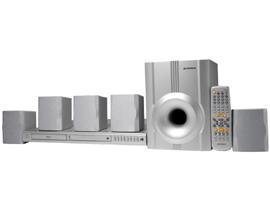
Image: Sunstech XD TH-20 Home Cinema 5.1 Subwoofer System components.
Instruccions de configuració
1. Col·locació d'altaveus
For optimal 5.1 surround sound experience, position the speakers as follows:
- Ponent del centre: Place directly above or below your TV/monitor.
- Altaveus frontals esquerre/dret: Position to the left and right of your TV, equidistant from the listening position.
- Altaveus posteriors esquerre/dret: Place behind the main listening position, slightly to the sides.
- subwoofer: Can be placed anywhere in the room, typically near the front speakers. Experiment with placement for best bass response.
2. Connexió dels altaveus
- Connect each satellite speaker to the corresponding output terminals on the subwoofer unit using the provided speaker cables. Ensure correct polarity (+ to + and - to -).
- Connect the subwoofer to your audio source (e.g., TV, DVD player, PC) using the appropriate audio input cables. The system supports MP3 playback.
3. Connexió d'alimentació
- Assegureu-vos que totes les connexions d'àudio siguin segures.
- Plug the subwoofer's power cord into a wall outlet.
- Turn on the power switch on the subwoofer unit.
Instruccions de funcionament
Funcionament bàsic
- Encès/apagat: Use the power button on the front panel of the subwoofer or the remote control.
- Control de volum: Adjust the master volume using the knob on the subwoofer or the VOL+/- buttons on the remote.
- Selecció d'entrada: Press the "Input" or "Source" button on the remote or front panel to cycle through available audio inputs (e.g., AUX, MP3).
- Control de graves/aguts: Use the dedicated controls on the remote or subwoofer to adjust bass and treble levels to your preference.
Reproducció MP3
The Sunstech XD TH-20 supports MP3 audio playback. Connect your MP3 device to the designated MP3 input port on the subwoofer unit. Select the MP3 input source using the input selection button.
Manteniment i cura
- Neteja: Disconnect the power before cleaning. Use a soft, dry cloth to wipe the surfaces of the speakers and subwoofer. Do not use liquid cleaners or aerosol sprays.
- Col·locació: Eviteu col·locar la unitat sota la llum solar directa, a prop de fonts de calor o en zones amb molta humitat o pols.
- Ventilació: Ensure adequate airflow around the subwoofer to prevent overheating. Do not cover ventilation openings.
- cables: Periodically check all cable connections for security and damage.
Guia de resolució de problemes
| Problema | Causa possible | Solució |
|---|---|---|
| No hi ha so dels altaveus |
|
|
| So distorsionat |
|
|
| El comandament a distància no funciona |
|
|
Especificacions
| Nom del model | TH-XD 20 |
| Marca | Sunstech |
| Configuració del canal de so envoltant | 5 + Subwoofer (5.1) |
| Característica especial | Reproducció de MP3 |
| Pes de l'article | 5.2 quilos |
| ASIN | B0055ZKOYW |
Garantia i Suport
For warranty information and technical support, please refer to the warranty card included with your product or contact Sunstech customer service directly. Keep your purchase receipt as proof of purchase.
For further assistance, visit the official Sunstech weblloc web o contacteu amb els seus canals d'assistència.