
Introducció
This manual provides essential information for the safe and efficient operation of your Time DPA-195 portable media player. Please read it thoroughly before using the device and keep it for future reference.
Informació de seguretat
- No exposar the device to extreme temperatures, direct sunlight, or high humidity.
- Eviteu caure or subjecting the device to strong impacts.
- No intenteu desmuntar or repair the device yourself. Refer all servicing to qualified personnel.
- Utilitzar només the recommended accessories and power adapters.
- Ajustar el volum to a moderate level to prevent hearing damage.
Contingut del paquet
Verifiqueu que tots els elements siguin presents al paquet:
- Time DPA-195 Portable Media Player
- Cable de càrrega USB
- Auriculars
- Manual d'usuari (aquest document)
Producte acabatview
Familiarize yourself with the various parts of your DPA-195 player.
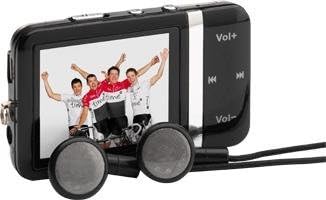
Image: The Time DPA-195 player, showing its compact black body, LCD screen displaying an image, and attached wired earphones. Buttons for volume and navigation are visible on the side.
Controls i ports:
- 1. Pantalla LCD: Displays menus, playback information, and settings.
- 2. Vol+ Button: Augmenta el volum.
- 3. Botó Vol-: Disminueix el volum.
- 4. Botó de reproducció/pausa: Inicia o posa en pausa la reproducció.
- 5. Next/Fast Forward Button: Skips to the next track or fast forwards.
- 6. Previous/Rewind Button: Skips to the previous track or rewinds.
- 7. Menu/Back Button: Navigates through menus or returns to the previous screen.
- 8. Power/Hold Switch: Turns the device on/off or locks/unlocks buttons.
- 9. Presa per a auriculars: Connects earphones.
- 10. Port USB: Per a càrrega i transferència de dades.
- 11. miniSD Card Slot: Per ampliar la capacitat d'emmagatzematge.
Configuració
1. Càrrega del dispositiu
Before first use, fully charge the DPA-195 player.
- Connect the small end of the USB charging cable to the USB port on the player.
- Connect the large end of the USB cable to a powered USB port on a computer or a compatible USB wall adapter (not included).
- La pantalla indicarà l'estat de càrrega. Una càrrega completa sol trigar aproximadament 2-3 hores.
- Desconnecteu el cable un cop finalitzada la càrrega.
2. Inserting a miniSD Card (Optional)
The DPA-195 has 4096 MB of integrated memory. You can expand storage using a miniSD card.
- Locate the miniSD card slot on the device.
- Gently insert the miniSD card into the slot with the metal contacts facing down until it clicks into place.
- To remove, gently push the card in until it clicks, then release, and it will eject slightly.
Instruccions de funcionament
1. Encendre/apagar
To power on the device, slide the Power/Hold switch to the 'On' position. To power off, slide it to 'Off'.
2. Navigating Menus
Use the navigation buttons (Next/Previous) to scroll through menu options. Press the Play/Pause button to select an option. Press the Menu/Back button to return to the previous screen.
3. Reproducció d'MP3
- From the main menu, select "Music" or "MP3".
- Navigate to the desired folder or track.
- Premeu el botó Reproduir/Pausa per iniciar la reproducció.
- Use the Next/Previous buttons to skip tracks.
- Press and hold Next/Previous to fast forward or rewind.
- Adjust volume using the Vol+ and Vol- buttons.
4. Radio Function
The DPA-195 includes an FM radio tuner.
- Connect the earphones, as they act as the antenna for the radio.
- From the main menu, select "Radio" or "FM".
- Use the navigation buttons to scan for stations or select a preset.
- Press Play/Pause to mute/unmute the radio.
5. Transferència de dades
Per transferir música o altres files to your DPA-195:
- Connecteu el dispositiu a l'ordinador mitjançant el cable USB.
- The device will appear as a removable disk drive on your computer.
- Arrossegueu i deixeu anar files into the appropriate folders on the device's internal memory or miniSD card.
- Expulseu el dispositiu de l'ordinador de manera segura abans de desconnectar el cable USB.
Manteniment
Neteja
Wipe the device with a soft, dry, lint-free cloth. Do not use liquid cleaners or abrasive materials.
Emmagatzematge
When not in use for extended periods, store the device in a cool, dry place away from direct sunlight and extreme temperatures. Ensure the battery is partially charged before storing.
Resolució de problemes
| Problema | Causa possible | Solució |
|---|---|---|
| El dispositiu no s'encén. | La bateria està esgotada. | Carregueu el dispositiu completament. |
| No se sent so dels auriculars. | Volume is too low or muted; earphones not properly connected; faulty earphones. | Increase volume; check earphone connection; try different earphones. |
| No es pot transferir files. | Problema amb el cable USB; l'ordinador no reconeix el dispositiu. | Try a different USB port or cable; ensure device is powered on and connected correctly. |
| La recepció de la ràdio és deficient. | Earphones not connected or acting as antenna; weak signal. | Ensure earphones are connected; try moving to an area with better signal. |
Especificacions
| Característica | Detall |
|---|---|
| Model | DPA-195 |
| Marca | Temps |
| Pes del producte | 51 g |
| Tipus de memòria flash | miniSD Card |
| Tecnologia de la memòria | Integrated Memory |
| Capacitat del disc dur | 4096 MB |
| Altres característiques | MP3, Radio |
| Tecnologia de visualització | LCD |
| Mida de la pantalla | 2 polzades |
| Tipus de visualització | LCD |
| Piles incloses | No |
| Tipus de suport compatible | AVI, WAV, WMA |
Garantia i Suport
For warranty information and technical support, please refer to the documentation provided at the time of purchase or visit the official Time brand weblloc web. Conserveu el comprovant de compra per a reclamacions de garantia.
For further assistance, please contact Time customer service.