
1. Introducció
Thank you for choosing the Philips AJB3552/12 DAB+ FM Clock Radio. This manual provides essential information for setting up, operating, and maintaining your device. Please read it carefully to ensure optimal performance and safe use of your clock radio.
Key features of your Philips AJB3552/12 include:
- DAB+ (Digital Audio Broadcasting) for clear, noise-free radio reception.
- FM tuner for traditional radio stations.
- Dynamic Bass Boost for enhanced low-frequency sound.
- Integrated alarm with multiple wake-up options.
- Light sensor for automatic display brightness adjustment.
- Backlit LCD display for easy readability.
2. Informació de seguretat
Please observe the following safety precautions to prevent electric shock, fire, or damage to the device:
- No exposeu el dispositiu a la pluja o la humitat.
- No col·loqueu objectes plens de líquids, com ara gerros, al dispositiu.
- Assegureu-vos que hi hagi una ventilació adequada. No bloquegeu les obertures de ventilació.
- Eviteu que el cable d'alimentació sigui trepitjat o pessigat.
- Utilitzeu només accessoris/accessoris especificats pel fabricant.
- Desconnecteu el dispositiu durant les tempestes amb llamps o quan no l'utilitzeu durant llargs períodes.
- Demaneu tot el servei a personal de servei qualificat.
3. Contingut del paquet
Comproveu que el vostre paquet contingui els elements següents:
- Philips AJB3552/12 Clock Radio
- Manual d'usuari (aquest document)
- Guia d'inici ràpid
- Unitat d'alimentació
- Certificat de garantia
4. Producte acabatview
Familiarize yourself with the components of your Philips AJB3552/12 Clock Radio.
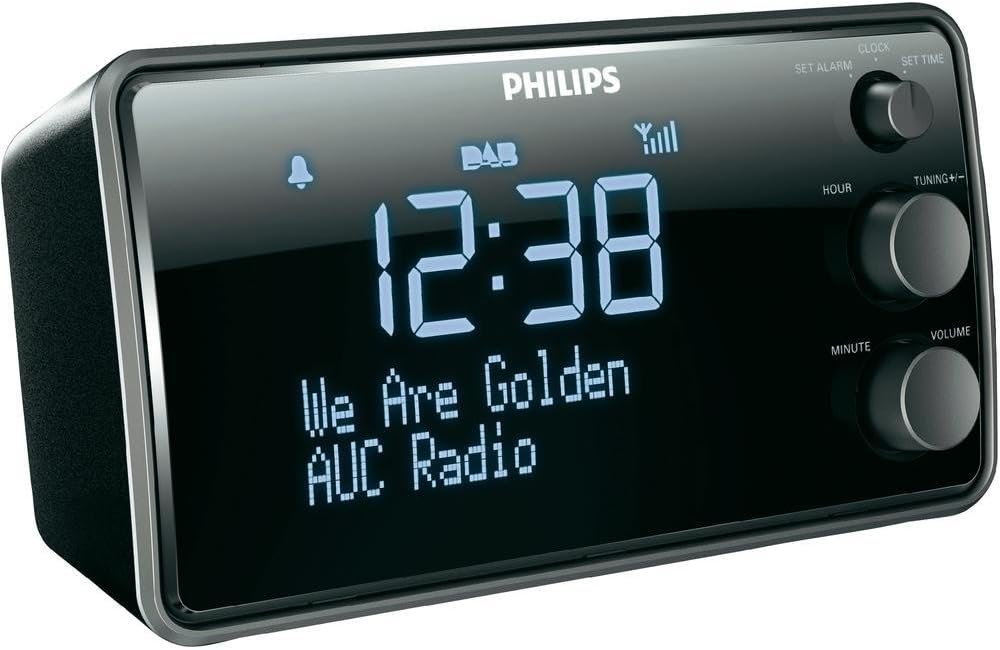
Imatge 1: Davant view of the Philips AJB3552/12 Clock Radio, showing the digital display, Philips logo, and control knobs for setting time, tuning, and volume.
Panell frontal
- Visualització: Shows time, radio station information, and alarm status.
- SET ALARM knob: S'utilitza per configurar l'hora de l'alarma.
- SET TIME knob: S'utilitza per configurar l'hora actual.
- HOUR button: Adjusts the hour.
- MINUTE button: Adjusts the minute.
- TUNING +/- knob: For tuning radio frequencies or navigating menus.
- Pom de VOLUM: Ajusta el nivell de sortida d'àudio.
Panell posterior
- Entrada d'alimentació: Es connecta a l'adaptador de corrent proporcionat.
- Antena FM/DAB: For radio signal reception.
5. Configuració
5.1 Connexió de potència
- Uncoil the FM/DAB antenna fully for optimal reception.
- Connect the power adapter to the DC IN socket on the rear of the clock radio.
- Connecteu l'adaptador de corrent a una presa de corrent.
5.2 Initial Power On and Time Synchronization
Upon first connection, the clock radio will automatically attempt to synchronize the time via DAB+ signal. This process may take a few minutes.

Imatge 2: The Philips AJB3552/12 Clock Radio positioned on a wooden bedside table next to a bed, illustrating a typical usage scenario.
5.3 Manual Time Setting (if automatic synchronization fails)
- Manteniu premut el botó SET HORA knob until the hour digits flash.
- Gira el HORA button to adjust the hour. Press HORA per confirmar.
- Gira el MINUT button to adjust the minute. Press MINUT per confirmar.
- L'hora ja està fixada.
6. Instruccions de funcionament
6.1 Encès/Apagat
- To turn on the clock radio, press the PODER button (usually integrated with the VOLUME knob).
- To turn off the clock radio, press the PODER button again. The display will show the current time.
6.2 Funcionament de la ràdio
Ràdio DAB+ 6.2.1
- Premeu el botó MODE button (if available, or cycle through modes using the power button) to select DAB+ mode.
- The radio will automatically scan for available DAB+ stations. This may take a few moments.
- Once scanning is complete, rotate the TUNING +/- knob to browse through the available stations.
- Premeu el botó TUNING +/- botó per seleccionar una emissora.
- To store a preset, press and hold a preset number button (if available) until the display confirms.
6.2.2 Ràdio FM
- Premeu el botó MODE botó per seleccionar el mode FM.
- Gira el TUNING +/- knob to manually tune to a frequency.
- Per cercar automàticament la següent emissora disponible, manteniu premut el botó TUNING +/- perilla.
- To store a preset, press and hold a preset number button (if available) until the display confirms.
6.2.3 Impuls dinàmic de greus
The Dynamic Bass Boost feature enhances low-frequency sounds for a richer audio experience. To activate or deactivate, press the DBB button (if available, or check menu options).
6.3 Configuració d'alarma
The Philips AJB3552/12 allows you to set an alarm to wake up to your preferred radio station or a buzzer.
- Manteniu premut el botó SET ALARMA knob until the alarm time digits flash.
- Gira el HORA button to set the alarm hour. Press HORA per confirmar.
- Gira el MINUT button to set the alarm minute. Press MINUT per confirmar.
- Select the alarm source: Rotate the TUNING +/- knob to choose between Ràdio or Zumbador. Press the knob to confirm.
- Select the alarm frequency: Rotate the TUNING +/- knob to choose between Diàriament, Dies laborables (Mon-Fri), or Caps de setmana (Sat-Sun). Press the knob to confirm.
- Per activar/desactivar l'alarma, premeu el botó ALARMA ON / OFF button (often located on top or integrated with the SET ALARM knob). An alarm icon will appear on the display when active.
6.3.1 Funció de repetició
Quan soni l'alarma, premeu el botó DORMITAR button (usually a large button on top) to temporarily silence the alarm. The alarm will sound again after a few minutes (default snooze time is typically 9 minutes).
6.3.2 Temporitzador de repòs
El temporitzador de son us permet adormir-vos amb la ràdio, que s'apagarà automàticament després d'un període de temps establert. Premeu el botó DORMIR Premeu el botó repetidament per anar passant pels temps de repòs disponibles (per exemple, 120, 90, 60, 30, 15 minuts o OFF).
6.4 Configuració de la pantalla
The clock radio features a light sensor that automatically adjusts the display brightness based on ambient light conditions. If manual adjustment is desired, consult the full user manual for specific steps, as this may vary.
7. Manteniment
7.1 Neteja
To clean the unit, use a soft, dry cloth. Do not use abrasive cleaners, alcohol, or benzene, as these can damage the surface. Ensure the device is unplugged before cleaning.
7.2 Informació sobre la bateria
The device requires 1 Lithium-ion battery for backup purposes (e.g., to retain time settings during a power outage). This battery is typically pre-installed and not user-replaceable. If the time is consistently lost after power interruptions, professional servicing may be required.
8. Solució De Problemes
If you encounter issues with your clock radio, refer to the following common problems and solutions:
| Problema | Causa possible | Solució |
|---|---|---|
| Sense poder | Cable d'alimentació no connectat correctament. | Ensure the power cord is securely plugged into the unit and the wall outlet. |
| Poor radio reception (DAB+/FM) | Antenna not fully extended or positioned incorrectly. Interference from other electronic devices. | Fully extend and adjust the antenna. Move the unit away from other electronic devices. Try repositioning the unit. |
| L'alarma no sona | Alarm not activated. Alarm volume too low. | Assegureu-vos que l'alarma estigui configurada i activada (icona d'alarma visible). Augmenteu el volum de l'alarma. |
| Display too bright/dim | Automatic light sensor adjustment. | The light sensor adjusts brightness automatically. If manual override is desired, refer to the full user manual. |
9. Especificacions
Detailed technical specifications for the Philips AJB3552/12 Clock Radio:

Imatge 3: De dalt a baix view of the Philips AJB3552/12 Clock Radio, indicating its dimensions: 9.2 cm depth and 6.3 cm height.
| Característica | Especificació |
|---|---|
| Marca | Philips |
| Número de model | AJB3552/12 |
| Fabricant | TP Vision |
| Dimensions del producte | 17.2 x 6.3 x 9.2 cm (A x A x P) |
| Pes | 658 g |
| Color | Negre |
| Tipus de visualització | Digital |
| Característiques especials | Integrated clock, Built-in speakers, Volume control, DAB+, Dynamic Bass Boost, Light sensor |
| Font d'alimentació | Battery (backup) / AC Power |
| Tipus d'habitació | Dormitori |
| Factor de forma | Prisma rectangular |
| Entorn d'ús | Interior |
| Piles necessàries | 1 Lithium ion battery (for backup) |
10. Garantia i Suport
For warranty information and customer support, please refer to the warranty certificate included in your package or visit the official Philips support weblloc web. Conserveu el comprovant de compra per a reclamacions de garantia.