
BENRO BE2155
BENRO Tripod KIT Universal A500FBH2 Instruction Manual
Model: BE2155
Introducció
Thank you for choosing the BENRO Tripod KIT Universal A500FBH2 (Model BE2155). This universal tripod kit is designed for stability and versatility, ideal for photographers and videographers. Please read this manual carefully before using your tripod to ensure proper operation and to maximize its lifespan.
Contingut del paquet
Abans de continuar amb la configuració, comproveu que tots els components estiguin presents al paquet:
- BENRO Tripod with clamps
- BH2 Ball Head (pre-attached)
- Tripod Bag with carrying handle
- 3 Foam Handles (pre-attached)
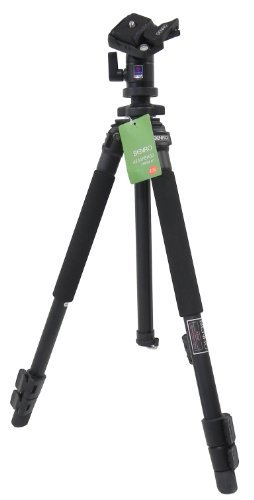
Image: BENRO Tripod KIT Universal A500FBH2 with included BH2 ball head and foam handles.
Instruccions de configuració
- Desempaquetar el trípode: Carefully remove the tripod from its carrying bag.
- Estirar les cames:
Locate the leg clamps on each tripod leg. Flip open the clamps to release the leg sections. Extend each leg section to the desired height. Close the clamps firmly to secure the leg sections in place. Ensure all clamps are securely fastened before mounting any equipment.
Image: Illustration of tripod leg extension and clamp mecanisme.
- Ajustar l'angle de les cames:
Each leg can be independently adjusted to different angles for stability on uneven terrain. Press the leg angle lock release near the top of each leg and set the leg to one of the available angle positions. Ensure all three legs are set to a stable configuration.
- Muntatge de la càmera/dispositiu:
The BH2 ball head is pre-attached. To mount your camera or cellphone (with an appropriate adapter, not included), first ensure the quick release plate is detached from the ball head. Attach the quick release plate to the bottom of your camera/device by screwing it in securely. Then, slide the quick release plate with your camera/device into the ball head receiver until it locks into place. Always double-check that your device is securely mounted before letting go.
Instruccions de funcionament
Using the BH2 Ball Head
The BH2 ball head allows for smooth and precise positioning of your camera. It features a main locking knob and a panning lock knob.
- Maneta de bloqueig principal: Loosen this knob to allow the ball to move freely, enabling you to tilt and swivel your camera to any angle. Tighten it firmly to lock the camera in the desired position.
- Botó de bloqueig de panoràmica: This knob controls the rotation of the ball head base. Loosen it to pan your camera horizontally (360 degrees). Tighten it to lock the panning movement.
Adjusting Center Column Height
The tripod features a center column for additional height adjustment. Loosen the center column locking knob (usually located below the ball head mount) and extend or retract the center column to the desired height. Tighten the knob firmly to secure the column.
Precaució: Extending the center column too high can reduce the tripod's stability, especially with heavy equipment. Always ensure the tripod remains stable.
Manteniment
- Neteja: After each use, especially in dusty or sandy environments, wipe down the tripod legs and head with a soft, dry cloth. For stubborn dirt, a slightly damp es pot utilitzar un drap, seguit d'assecat immediat.
- Lubricació: Moving parts, such as leg clamps and the ball head mechanism, may benefit from occasional light lubrication with a silicone-based lubricant. Avoid using oil-based lubricants as they can attract dust.
- Emmagatzematge: Guardeu el trípode a la seva bossa de transport en un lloc fresc i sec, allunyat de la llum solar directa i de temperatures extremes.
- Inspecció: Inspeccioneu periòdicament tots els cargols, clamps, and joints for tightness. Tighten any loose components to ensure safe operation.
Resolució de problemes
| Problema | Causa possible | Solució |
|---|---|---|
| El trípode és inestable. | Cama clamps not fully secured; legs not spread wide enough; center column extended too high; uneven ground. | Ensure all leg clamps are locked. Spread legs to maximum stable angle. Retract center column if possible. Adjust leg lengths for uneven surfaces. |
| El moviment del capçal esfèric és rígid o brusc. | Dust/dirt in mechanism; insufficient lubrication; main locking knob too tight. | Clean the ball head thoroughly. Apply a small amount of silicone lubricant. Loosen the main locking knob slightly. |
| Camera not securely attached to ball head. | Quick release plate not tightened to camera; quick release plate not fully engaged in ball head. | Ensure the quick release plate screw is tight on the camera. Re-insert the quick release plate into the ball head until it clicks or locks securely. |
Especificacions
| Número de model | BE2155 (Kit A500FBH2) |
| Capacitat de càrrega màxima | 8 kg |
| Seccions de cames | 3 segments (2 pull-outs) |
| Tipus de capçal | BH2 Ball Head |
| Material | Rubber (for foam handles), other components typically aluminum alloy. |
| Color | Negre |
| Dimensions del producte (LxWxH) | 30 x 10 x 20 cm (plegat) |
| Pes de l'article | 1.5 kg |
| Dispositius compatibles | Camera, Cellphone (with adapter) |
| Fabricant | BENRO, Benro Usa |
| País d'origen | Xina |
Informació de la garantia
BENRO products are manufactured to high quality standards. For specific warranty terms and conditions applicable to your region, please refer to the warranty card included with your product or visit the official BENRO website. Typically, BENRO offers a limited warranty against manufacturing defects from the date of purchase. Keep your purchase receipt as proof of purchase for any warranty claims.
Atenció al client
Should you encounter any issues or have questions regarding your BENRO Tripod KIT Universal A500FBH2, please contact BENRO customer support or your local distributor. Contact information can usually be found on the BENRO official weblloc web o a l'embalatge del producte.
Recursos en línia: For additional information, product registration, and frequently asked questions, please visit the official BENRO weblloc: www.benro.com
Ask a question about this manual
Ask about setup, troubleshooting, compatibility, parts, safety, or missing instructions. Manuals+ will review the question and use this page’s manual context to help answer it.