
1. Introducció
This manual provides comprehensive instructions for the installation, operation, and maintenance of the Altronix AL600ULXB Power Supply/Charger Board. The AL600ULXB is designed to provide 12VDC or 24VDC at 6A, suitable for various electronic applications requiring reliable power and battery backup capabilities. Please read this manual thoroughly before installation and operation to ensure proper functionality and safety.
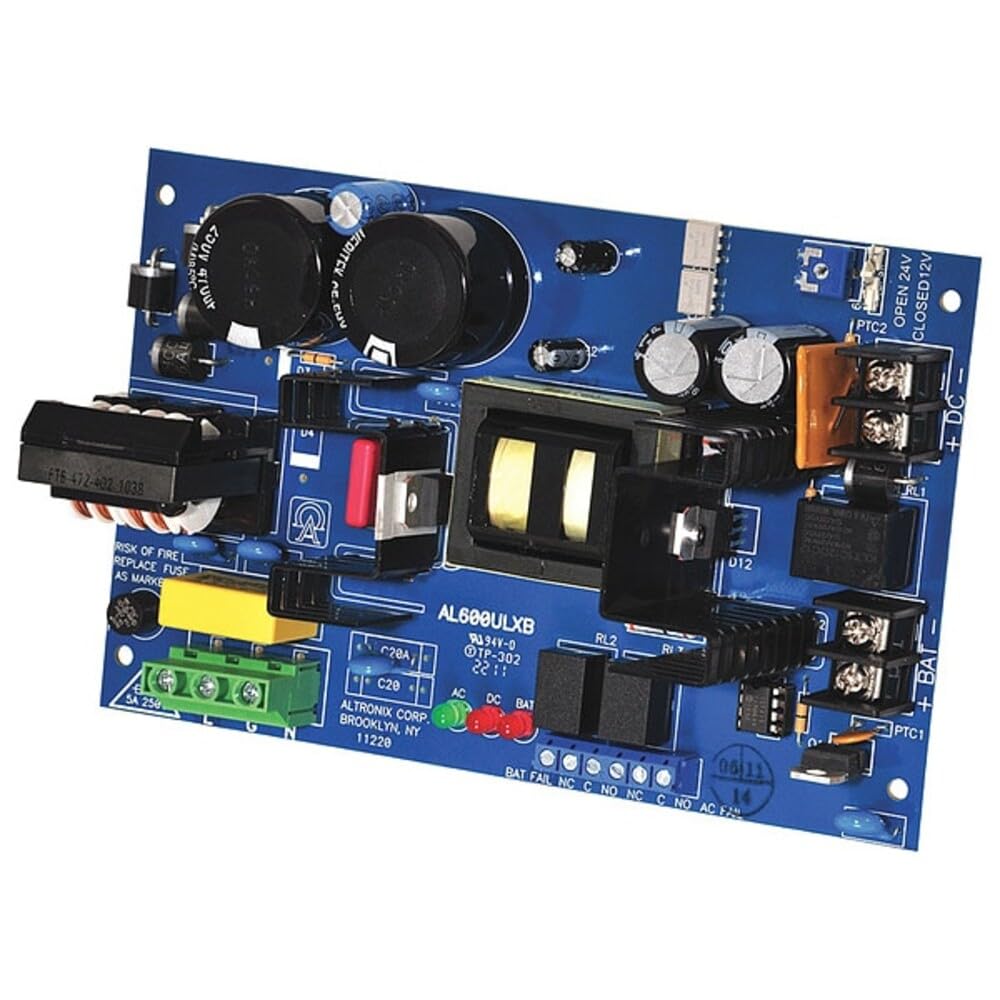
Figura 1: Altronix AL600ULXB Power Supply/Charger Board. This image displays the blue circuit board with various electronic components including capacitors, transformers, terminal blocks for DC output, battery connections, and AC input. LED indicators for AC, DC, and Battery Fail are also visible.
2. Configuració i instal·lació
Follow these steps for safe and correct installation of the AL600ULXB power supply.
2.1 Precaucions de seguretat
- Ensure all power is disconnected before installation or servicing.
- La instal·lació només l'ha de fer personal qualificat.
- Observeu tots els codis elèctrics locals i nacionals.
- Replace fuses only with the specified type and rating to prevent fire hazards. Refer to the board for fuse markings, such as "SA 250" for the fuse near the green terminal block.
2.2 Muntatge
Mount the AL600ULXB board in a suitable enclosure, ensuring adequate ventilation and protection from environmental factors. Use appropriate standoffs to prevent short circuits.
2.3 Connexió d'alimentació d'entrada
Connect the 115VAC input power to the designated AC input terminals on the board. Ensure proper grounding.
2.4 Vol. de sortidatage Selecció
The AL600ULXB can provide either 12VDC or 24VDC output. The output voltage is selected via a jumper or switch labeled PTC2 on the board:
- Per seleccionar 24VDC output: Ensure the jumper/switch at PTC2 is in the OBERT posició.
- Per seleccionar 12VDC output: Ensure the jumper/switch at PTC2 is in the TANCAT posició.
Comproveu el vol correctetage setting before connecting any devices to the output.
2.5 Connexions de sortida de CC
Connect your devices requiring DC power to the terminal block labeled "+ DC -" on the board. Observe correct polarity.
2.6 Battery Backup Connections
For battery backup functionality, connect appropriate 12V or 24V rechargeable batteries to the terminal block labeled "+ BAT -" on the board. Ensure correct polarity. The system will automatically charge the connected batteries and switch to battery power during an AC failure.
3. Funcionament
Once properly installed and connected, the AL600ULXB operates automatically.
3.1 Seqüència d'engegada
Upon applying 115VAC input power, the unit will power on. The DC output will become active, and if batteries are connected, the charging circuit will initiate.
3.2 Indicadors LED
The board features several LED indicators to show operational status:
- AC LED (Green): Illuminates when 115VAC input power is present.
- DC LED (Green): Illuminates when DC output voltage està present.
- BAT LED (Red): Illuminates when the battery is charging or fully charged.
- BAT FAIL LED (Red): Illuminates to indicate a battery fault, such as a disconnected, deeply discharged, or faulty battery.
3.3 Battery Backup Functionality
In the event of an AC power failure, the AL600ULXB will automatically switch to battery power to maintain continuous operation of connected devices. When AC power is restored, the unit will seamlessly switch back to AC power and resume battery charging.
4. Manteniment
Regular maintenance ensures optimal performance and longevity of your AL600ULXB power supply.
4.1 Comprovacions periòdiques
- Inspeccioneu periòdicament totes les connexions del cablejat per comprovar si estan ben ajustades i si hi ha signes de corrosió.
- Check LED indicators to confirm normal operation (AC, DC, BAT LEDs green, BAT FAIL LED off).
- Test battery backup functionality annually by temporarily disconnecting AC power to ensure the unit switches to battery.
4.2 Canvi de fusibles
If a fuse blows, disconnect all power (AC and battery) before attempting replacement. Replace the fuse only with the exact type and rating indicated on the board (e.g., "SA 250" for the fuse near the green terminal block). Using an incorrect fuse can cause damage or fire.
4.3 Manteniment de la bateria
Ensure batteries are kept clean and free of corrosion. Replace batteries according to the manufacturer's recommendations or if they fail to hold a charge during testing.
5. Solució De Problemes
This section provides solutions to common issues you may encounter with the AL600ULXB.
| Problema | Causa possible | Solució |
|---|---|---|
| No DC Output / No LEDs | No AC input power; Blown AC fuse. | Check AC power source and connections. Replace AC fuse if blown (refer to Section 4.2). |
| No DC Output (AC LED ON) | Internal fault; Overload on DC output. | Disconnect load and re-test. If problem persists, contact technical support. |
| BAT FAIL LED ON | Battery disconnected; Faulty battery; Deeply discharged battery. | Check battery connections. Test battery condition. Replace battery if faulty. Allow time for deeply discharged batteries to charge. |
| Incorrect DC Output Voltage | Vol incorrectetage selection jumper/switch setting (PTC2). | Verify the position of the PTC2 jumper/switch (OPEN for 24V, CLOSED for 12V). |
6. Especificacions
Key technical specifications for the Altronix AL600ULXB Power Supply/Charger Board:
- Entrada Voltage: 115 VCA, 60 Hz
- Vol. De sortidatage: Selectable 12VDC or 24VDC
- Corrent de sortida: 6 Amps (total)
- Potència de sortidatage: 600 watts
- Material: Phenolic or Fiberglass
- Dimensions (L x A x A): 9.7 x 5.7 x 3.3 inches (board only)
- Pes de l'article: 16 unces
- Temperatura de funcionament: Fins a 49 °C (120 °F)
- Estàndards: UL Recognized, UL294, UL1481
- Dispositius compatibles: Personal Computer (general power supply applications)
- Tipus de connector: Generic 12V/24V DC power connector
- System Bus Connector Type: ATX (for internal power supply design context)
7. Informació de la garantia
Altronix products are backed by a limited lifetime warranty against defects in material and workmanship. For specific warranty terms and conditions, please refer to the official Altronix website or contact their customer service. This warranty typically covers repair or replacement of defective units under normal use and service.
8. Suport tècnic
If you require technical assistance or have questions regarding the Altronix AL600ULXB, please contact Altronix customer support. You can typically find contact information, including phone numbers and email addresses, on the official Altronix weblloc (www.altronix.com). Please have your product model number (AL600ULXB) and a description of the issue ready when contacting support.