
1. Introducció
The D-Link Wireless N300 Dual Band PCI Express Desktop Adapter (DWA-566) provides high-speed wireless connectivity for your desktop computer. Utilizing Wireless N technology, it maximizes the speed and range of your wireless signal, offering superior performance compared to Wireless G devices. The dual-band capability supports both 2.4GHz and 5GHz wireless signals, allowing for flexible network usage, such as browsing on 2.4GHz and HD streaming or gaming on the clearer 5GHz band.
This adapter is designed to fit into any standard PCI Express slot, offering a higher performance interface than legacy PCI. It supports secure wireless networks with WPA or WPA2 encryption.

Figure 1.1: D-Link DWA-566 Wireless N300 Dual Band PCI Express Desktop Adapter with antennas.
2. Característiques
The DWA-566 adapter includes the following key features:
- IEEE 802.11n, 802.11g, and 802.11a Compliant
- Dual Band Technology for Superior Wireless Performance (2.4GHz or 5GHz)
- Access secure wireless networks using advanced WPA or WPA2 encryption
- Fits into any standard PCI Express slot
- PCI Express Interface provides higher performance than a legacy PCI interface
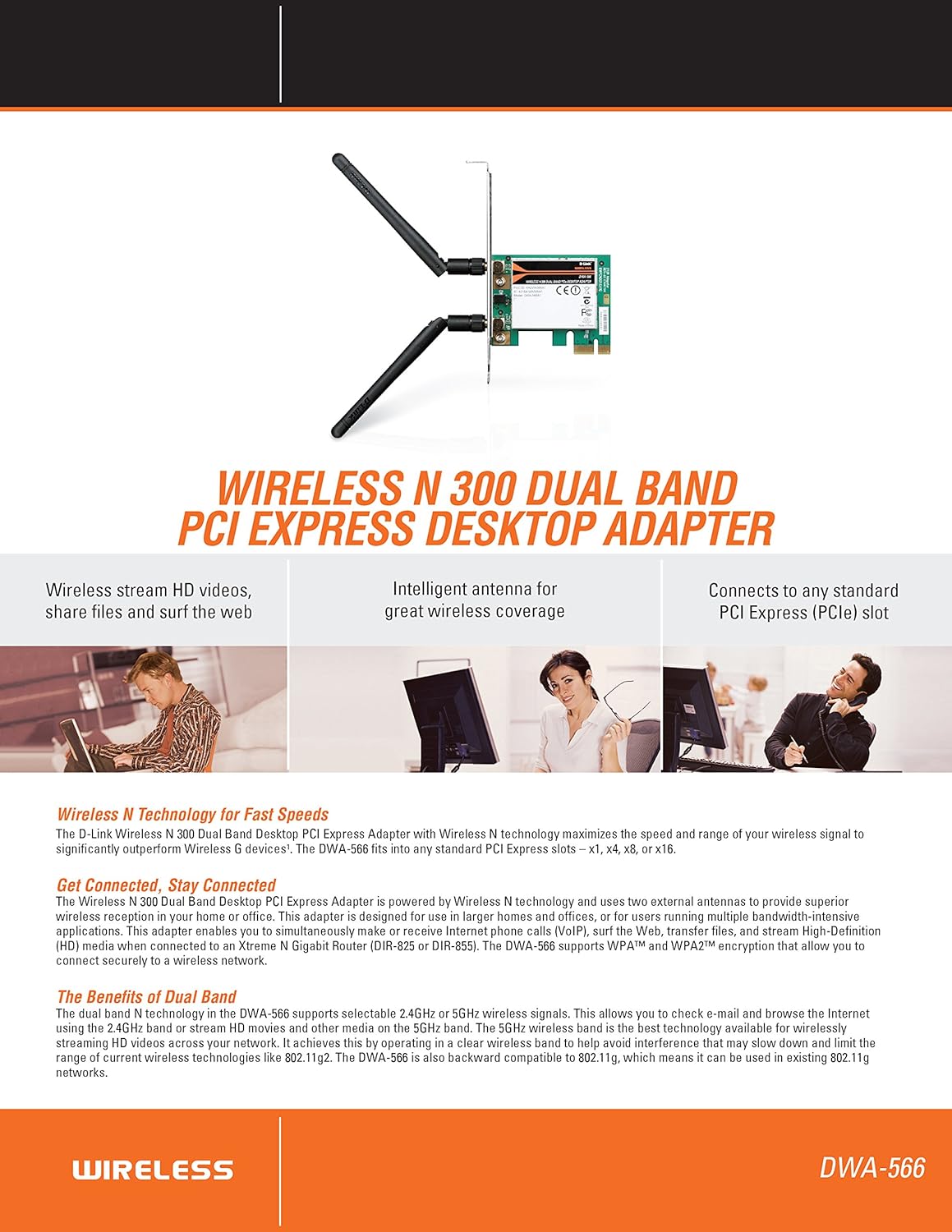
Figura 2.1: Mésview of DWA-566 features and benefits.
3. Contingut del paquet
Comproveu que el vostre paquet contingui els elements següents:
- Wireless N 300 Dual Band PCI Express Adapter (DWA-566)
- Two detachable antennas
- Pro baixfile suport de muntatge
- Guia d'instal·lació ràpida
- CD-ROM with:
- D-Link Wireless Connection Manager
- Conductors
- Documentació del producte
4. Requisits del sistema
Before installing the DWA-566, ensure your system meets the following minimum requirements:
- Computer with an available PCI Express slot
- Windows operating system (Windows XP, Vista, 7, 8, 10)
- CD-ROM drive (for driver installation from included CD)
- Internet Explorer 7 or Firefox 3.0 and above (for viewing documentation)
- Subscripció amb un proveïdor de serveis d'Internet (ISP)
For optimal performance, a D-Link Wireless N router (DIR-655 or DIR-825) is recommended.

Figure 4.1: Detailed technical specifications, minimum requirements, and network diagram.
5. Configuració i instal·lació
5.1 Instal·lació de maquinari
- Apagar l'ordinador: Apagueu l'ordinador i desconnecteu el cable d'alimentació.
- Caixa d'ordinador oberta: Traieu la coberta de la caixa de l'ordinador.
- Localitza la ranura PCI Express: Find an available PCI Express slot on your motherboard.
- Adaptador d'inserció: Carefully insert the DWA-566 adapter into the PCI Express slot, ensuring it is seated firmly.
- Adaptador segur: Secure the adapter with a screw to the computer chassis.
- Col·loca les antenes: Screw the two included antennas onto the connectors on the adapter.
- Tanqueu la carcassa i engegueu-la: Torneu a col·locar la coberta de la caixa de l'ordinador, connecteu el cable d'alimentació i engegueu l'ordinador.

Figure 5.1: DWA-566 adapter with antennas attached, ready for installation.
5.2 Instal·lació del programari
After hardware installation, proceed with driver and utility installation:
- Inseriu el CD d'instal·lació: Insert the DWA-566 installation CD into your computer's CD-ROM drive. The setup wizard should launch automatically. If not, navigate to the CD drive and run the 'Setup.exe' file.
- Seguiu les instruccions a la pantalla: Follow the prompts of the D-Link setup wizard to install the drivers and the D-Link Wireless Connection Manager utility.
- Reinicieu l'ordinador: Un cop finalitzada la instal·lació, reinicieu l'ordinador quan se us demani.
Nota: For Windows 7/8 64-bit systems, ensure you are using the latest drivers available from the official D-Link support website to avoid potential compatibility issues.
6. Instruccions de funcionament
Once the drivers are installed, you can connect to a wireless network:
- Launch Connection Manager: Open the D-Link Wireless Connection Manager utility or use the built-in Windows wireless network utility.
- Escaneja per a xarxes: La utilitat buscarà les xarxes sense fil disponibles a la vostra zona.
- Seleccioneu la xarxa: Trieu la xarxa sense fil (SSID) que vulgueu de la llista.
- Introduïu la clau de seguretat: If the network is secured, enter the correct WPA/WPA2 security key or passphrase.
- Connectar: Click 'Connect' to establish a wireless connection.
A successful connection will be indicated by a strong signal strength and internet access.
7. Manteniment
Per garantir un rendiment òptim i una llarga durada del vostre adaptador DWA-566:
- Mantenir els controladors actualitzats: Comproveu periòdicament el suport de D-Link website for the latest drivers and firmware updates.
- Assegureu-vos una ventilació adequada: Make sure your computer case has adequate airflow to prevent overheating of internal components, including the wireless adapter.
- Posicionament de l'antena: Adjust the antennas for the best possible signal reception.
- Factors ambientals: Avoid placing your computer near large metal objects or other devices that may cause wireless interference.
8. Solució De Problemes
Si teniu problemes amb l'adaptador DWA-566, tingueu en compte el següent:
8.1 No Wireless Connection
- Verify Hardware Installation: Ensure the adapter is correctly seated in the PCI Express slot and antennas are securely attached.
- Comprovar els controladors: Confirm that the drivers are installed correctly. Check Device Manager for any error symbols next to the network adapter. Reinstall drivers if necessary.
- Estat del router: Ensure your wireless router is powered on and broadcasting a signal.
- Clau de seguretat: Double-check that the correct wireless security key (WPA/WPA2 passphrase) is entered.
- Configuració del tallafocs: Temporarily disable your computer's firewall to see if it is blocking the connection. If it resolves the issue, configure your firewall to allow the D-Link utility.
8.2 Slow Connection Speed or Frequent Disconnections
- Ajust de l'antena: Try repositioning the antennas for better signal reception.
- Interferència: Move the computer away from potential sources of interference (e.g., cordless phones, microwaves, Bluetooth devices).
- Proximitat del router: Ensure the computer is within the effective range of your wireless router.
- Dual Band Usage: If your router supports it, try connecting to the 5GHz band for less interference and potentially higher speeds, especially for streaming or gaming.
- Actualització del controlador: Update the adapter drivers to the latest version from the D-Link weblloc.
9. Especificacions
| Característica | Especificació |
|---|---|
| Marca | D-Link |
| Número de model | DWA-566 |
| Interfície del maquinari | PCI Express |
| Protocol d'enllaç de dades | IEEE 802.11n, 802.11g, 802.11a |
| Velocitat de transferència de dades | Fins a 300 megabits per segon |
| Banda de freqüència | 2.4 GHz / 5 GHz (Dual Band) |
| Seguretat | WPA, WPA2 |
| Dispositius compatibles | Ordinadors d'escriptori |
| Pes de l'article | 0.4 lliures (aprox. 181 grams) |
| Certificació de proves externes | FCC B, IC B, CE, C-Tick |
10. Garantia i Suport
The D-Link Wireless N300 Dual Band PCI Express Desktop Adapter (DWA-566) comes with a Garantia limitada d'1 any. For specific terms and conditions, please refer to the warranty documentation included with your product or visit the official D-Link weblloc.
D-Link provides 24/7 Basic Installation Support to assist with initial setup and configuration. For technical assistance, driver downloads, and further product information, please visit the D-Link support weblloc o poseu-vos en contacte amb el seu servei d'atenció al client.
Suport de D-Link Weblloc: https://support.dlink.com/