
1. Introducció
This manual provides detailed instructions for the installation, operation, and maintenance of the Supermicro CSE-827HD-R1400B 1400W 2U Rackmount Server Chassis. This high-performance chassis is designed to house server components, offering robust power delivery and efficient cooling for demanding applications. Please read this manual thoroughly before proceeding with installation or operation.
2. Informació de seguretat
Observeu sempre les següents precaucions de seguretat per evitar lesions i danys a l'equip:
- Assegureu-vos que el subministrament elèctric estigui desconnectat abans de realitzar qualsevol instal·lació o manteniment.
- Wear anti-static wrist straps when handling internal components to prevent electrostatic discharge (ESD).
- Do not operate the chassis with the cover removed unless specifically instructed for troubleshooting.
- Assegureu-vos de tenir una connexió a terra adequada per a totes les connexions elèctriques.
- This chassis is heavy. Use appropriate lifting techniques or assistance when moving or installing it in a rack.
- Maintain adequate ventilation around the chassis to prevent overheating.
3. Contingut del paquet
Verifiqueu que tots els elements siguin presents al paquet:
- Supermicro CSE-827HD-R1400B 2U Rackmount Server Chassis
- 1400W High-Efficiency (1+1) Redundant Power Supply (pre-installed)
- 4x 80mm PWM Cooling Fans (pre-installed)
- Rack mounting rails (if included with your specific purchase)
- Accessory kit (screws, cables, standoffs)
- Guia d'instal·lació ràpida (aquest document)
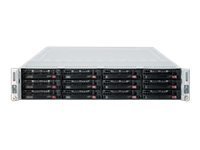
Figura 3.1: Supermicro CSE-827HD-R1400B 2U Rackmount Server Chassis. This image shows the front view of the server chassis, highlighting its rackmount design and general appearance.
4. Configuració i instal·lació
Follow these steps for proper installation of the server chassis and its components.
4.1. Muntatge en bastidor
- Attach the provided rack rails to the server chassis sides using the designated screws.
- Mount the other end of the rack rails to the server rack posts, ensuring they are securely fastened.
- Slide the chassis into the rack until it locks into place.
4.2. Instal·lació de la placa base
The chassis supports ATX motherboards.
- Remove the chassis top cover by unscrewing the retaining screws.
- Instal·leu la pantalla d'E/S al panell posterior del xassís.
- Align the motherboard with the standoffs inside the chassis.
- Fixeu la placa base amb els cargols adequats.
4.3. Instal·lació del disc dur
The chassis supports 3.5-inch hard drives.
- Locate the drive bays.
- Mount each 3.5-inch hard drive into a drive tray.
- Slide the drive tray with the installed hard drive into the designated bay until it clicks into place.
- Connect the SATA/SAS data and power cables to each hard drive.
4.4. Connexions d'alimentació
- Connect the main 24-pin ATX power connector from the power supply to the motherboard.
- Connect the 8-pin (or 4-pin) CPU power connector to the motherboard.
- Ensure all peripheral power connectors (e.g., for GPUs, additional fans) are properly connected.
- Connect the AC power cords from the redundant power supplies to separate, grounded power outlets.
5. Instruccions de funcionament
5.1. Encès / apagat
- Encès: After all connections are secure, press the power button on the front panel. The power LED should illuminate.
- Apagada normal: Perform a graceful shutdown through the operating system.
- Força de tancament: Press and hold the power button for 5-7 seconds. Use only when necessary to prevent data loss.
5.2. Indicadors LED
Refer to your motherboard manual for specific LED indicator meanings. Common indicators on the chassis front panel include:
- LED d'alimentació: Indicates system power status (On/Off/Standby).
- LED d'activitat del disc dur: Flashes when hard drives are being accessed.
- Network Activity LED: Indicates network traffic (if integrated on the front panel).
6. Manteniment
Regular maintenance ensures optimal performance and longevity of your server chassis.
- Eliminació de pols: Periodically clean dust from the chassis interior, especially fan blades and heatsinks, using compressed air. Ensure the system is powered off and unplugged before cleaning.
- Inspecció del ventilador: Check cooling fans for proper operation and excessive noise. Replace any failing fans promptly.
- Gestió de cables: Ensure internal cables are neatly routed to avoid obstructing airflow.
7. Solució De Problemes
Aquesta secció tracta problemes comuns que podeu trobar.
| Problema | Causa possible | Solució |
|---|---|---|
| El sistema no s'encén. | Power cables disconnected, faulty power supply, faulty power button. | Check all power connections. Verify power supply status LEDs. Test power button functionality. |
| Excessive fan noise. | Dust accumulation, failing fan bearing. | Clean fans. Replace noisy or failing fans. |
| Sobreescalfament del sistema. | Poor airflow, fan failure, dust buildup. | Ensure proper ventilation. Check fan operation. Clean dust from components. |
| Hard drives not detected. | Loose data/power cables, incorrect BIOS settings, faulty drive. | Verify all data and power cables are securely connected. Check BIOS/UEFI settings. Test drives in another system if possible. |
8. Especificacions
| Característica | Detall |
|---|---|
| Marca | Supermicro |
| Nom del model | CSE-827HD-R1400B |
| Factor de forma | Muntatge en rack 2U |
| Compatibilitat amb la placa base | ATX |
| Font d'alimentació | 1400W High-Efficiency (1+1) Redundant, 80 PLUS Gold Certified |
| Ventiladors de refrigeració | 4x 80mm PWM |
| Factor de forma del disc dur | 3.5 polzades |
| Color | Negre |
| Pes de l'article | 68 lliures |
| Dimensions del producte (P x A x A) | 28.5 "P x 28.5" W x 28.5" H |
| UPC | 672042062768 |
| ASIN | B005KFBPBS |
9. Garantia i Suport
For warranty information, please refer to the documentation provided with your purchase or visit the official Supermicro website. For technical support, product inquiries, or to report issues, please contact Supermicro customer service through their official channels.
Assistència en línia: www.supermicro.com/support
Informació de contacte: Consulteu el Supermicro weblloc web per obtenir dades de contacte regionals.