
1. Introducció
Gràcies per la compraasing the Hello Kitty KT2064 AM/FM Projection Alarm Clock Radio. This device combines a digital alarm clock with an AM/FM radio and a unique projection feature, allowing you to display the time on your ceiling or wall. Please read this manual carefully to ensure proper operation and to fully utilize all features of your new alarm clock radio.

Imatge 1.1: Frontal view of the Hello Kitty KT2064 Projection Alarm Clock Radio, showing the digital display and the Hello Kitty design.
2. Característiques
- Característica de projecció: Projects the time onto your ceiling or wall with adjustable focus and up to 120-degree pivot angle.
- Dual Alarm Options: Wake up to either a buzzer alarm or your favorite radio station.
- Ràdio AM/FM: Integrated radio tuner for listening to broadcast stations.
- Funció de posposar: Allows for an additional 9 minutes of sleep before the alarm sounds again.
- Sleep to Radio: Set a timer (up to 2 hours) for the radio to play before automatically turning off.
- Còpia de seguretat de la bateria: Maintains time and alarm settings during power outages (requires 3 CR2025 button cell batteries, not included).
- Pantalla LED de temps: Clear red LED display for current time.
3. Contingut del paquet
Si us plau, comproveu el paquet per veure si hi ha els elements següents:
- Hello Kitty KT2064 Projection Alarm Clock Radio Unit
- Adaptador de corrent alterna
- Manual d'usuari (aquest document)
Note: 3 CR2025 button cell batteries for backup are not included and must be purchased separately.
4. Configuració
4.1 Connexió d'alimentació
- Unpack the alarm clock radio and its accessories.
- Connect the AC power adapter to the DC input jack located on the back of the unit.
- Plug the other end of the AC power adapter into a standard wall outlet. The unit will power on, and the LED display will light up.
4.2 Installing Backup Batteries
Installing backup batteries ensures that your time and alarm settings are retained during a power outage.
- Locate the battery compartment on the bottom or back of the unit.
- Obriu la tapa del compartiment de la bateria.
- Insert 3 CR2025 button cell batteries, observing the correct polarity (+ and - markings).
- Tanqueu bé la tapa del compartiment de la bateria.

Imatge 4.2: posterior view of the alarm clock radio, showing control buttons and potential location for battery compartment.
5. Instruccions de funcionament
5.1 Configuració de l'hora
- Manteniu premut el botó HORA CONFIGURADA button (or similar button, refer to unit markings) for approximately 3 seconds until the hour digits begin to flash.
- Utilitza el HORA or + / - botons per ajustar l'hora. Presteu atenció a l'indicador AM/PM.
- Premeu el botó HORA CONFIGURADA de nou. Els dígits dels minuts parpellejaran.
- Utilitza el MINUT or + / - botons per ajustar els minuts.
- Premeu el botó HORA CONFIGURADA Premeu el botó una vegada més per confirmar i sortir del mode de configuració de l'hora.
5.2 Configuració de l'alarma (alarma 1 i alarma 2)
This unit supports two independent alarms.
- Manteniu premut el botó CONJUNT AL1 botó (per a l'alarma 1) o CONJUNT AL2 button (for Alarm 2) for approximately 3 seconds until the hour digits of the alarm time begin to flash.
- Utilitza el HORA or + / - botons per ajustar l'hora de l'alarma.
- Premeu el botó corresponent AL SET de nou. Els dígits dels minuts parpellejaran.
- Utilitza el MINUT or + / - botons per ajustar els minuts de l'alarma.
- Premeu el botó AL SET premeu el botó de nou per seleccionar la font de l'alarma: BUZZERS or RÀDIO. Utilitza el + / - buttons to toggle.
- Premeu el botó AL SET Premeu el botó una vegada més per confirmar i sortir del mode de configuració de l'alarma.
- Per activar/desactivar una alarma, premeu la tecla AL1 ENCÈS/APAGAT or AL2 ENCÈS/APAGAT button (or similar) repeatedly until the alarm indicator appears/disappears on the display.
5.3 Using the Radio
- Premeu el botó RÀDIO ON/OFF botó per encendre la ràdio.
- Premeu el botó AM/FM botó per canviar entre les bandes AM i FM.
- Utilitza el TUNE+ i TUNE- botons per sintonitzar manualment l'emissora desitjada.
- For automatic scanning, press and hold TUNE+ or TUNE- for a few seconds until the radio finds the next clear station.
- Ajusteu el volum amb el botó VOLUM + i VOLUM - botons.
- Per apagar la ràdio, premeu el botó RÀDIO ON/OFF botó de nou.
5.4 Funció de projecció
- Locate the projector lens on top of the unit.
- Premeu el botó PROJECTOR ON/OFF button to activate the time projection.
- Adjust the angle of the projector head (up to 120 degrees) to direct the time display onto your ceiling or wall.
- Gira el ENFOCAR ring around the projector lens to achieve a clear image.
- To turn off the projection, press the PROJECTOR ON/OFF botó de nou.

Image 5.4: The alarm clock radio actively projecting the time and Hello Kitty logo onto a surface.
5.5 Funció de repetició
Quan soni l'alarma, premeu el botó gran DORMITAR button (usually located on top of the unit). The alarm will pause for approximately 9 minutes and then sound again.
5.6 Sleep to Radio Function
This feature allows you to fall asleep to the radio, which will automatically turn off after a set period.
- Turn on the radio and tune to your desired station.
- Premeu el botó DORMIR button repeatedly to cycle through the available sleep timer durations (e.g., 120, 90, 60, 30, 15 minutes, or OFF). The selected duration will appear on the display.
- The radio will play for the chosen duration and then automatically turn off.
6. Manteniment
- Neteja: Netegeu la unitat amb un drap suau i sec. No utilitzeu productes de neteja abrasius ni dissolvents.
- Exposició a l'aigua: Keep the unit away from water or excessive moisture.
- Temperatura: Eviteu exposar la unitat a temperatures extremes o a la llum solar directa.
- Substitució de la bateria: Replace backup batteries annually or when the low battery indicator appears to ensure continuous functionality during power outages.
7. Solució De Problemes
| Problema | Causa possible | Solució |
|---|---|---|
| La unitat no s'encén. | L'adaptador de corrent no està connectat o la presa de corrent està defectuosa. | Ensure the power adapter is securely plugged into the unit and a working wall outlet. Test the outlet with another device. |
| Time/alarm settings are lost after power outage. | Les bateries de reserva estan gastades o no estan instal·lades. | Install new CR2025 button cell batteries or replace existing ones. |
| La projecció és borrosa. | Focus is not adjusted correctly. | Gira el ENFOCAR ring around the projector lens until the image is clear. |
| La recepció de la ràdio és deficient. | Antena no estesa o interferències. | Extend the FM wire antenna fully. For AM, try repositioning the unit. Avoid placing near electronic devices that may cause interference. |
| L'alarma no sona. | L'alarma no està activada o està configurada incorrectament. | Ensure the alarm is set and activated (alarm indicator visible). Check alarm volume if set to radio. |
8. Especificacions
| Marca | Hola Kitty |
| Número de model | KT2064P |
| Tipus de visualització | LED digital |
| Font d'alimentació | Adaptador de corrent alterna |
| Bateria de seguretat | 3 x CR2025 Button Cell (not included) |
| Freqüència de ràdio | AM/FM (FM up to 108 MHz) |
| Dimensions del producte (L x A x A) | 14.5 x 11.9 x 17.3 cm (aproximadament 5.7 x 4.7 x 6.8 polzades) |
| Pes del producte | 885 g (aproximadament 1.95 lliures) |
| Angle de projecció | Fins a 120 graus |
| Durada de la posposar | 9 minuts |
| Temporitzador de dormir | Fins a 2 hores |
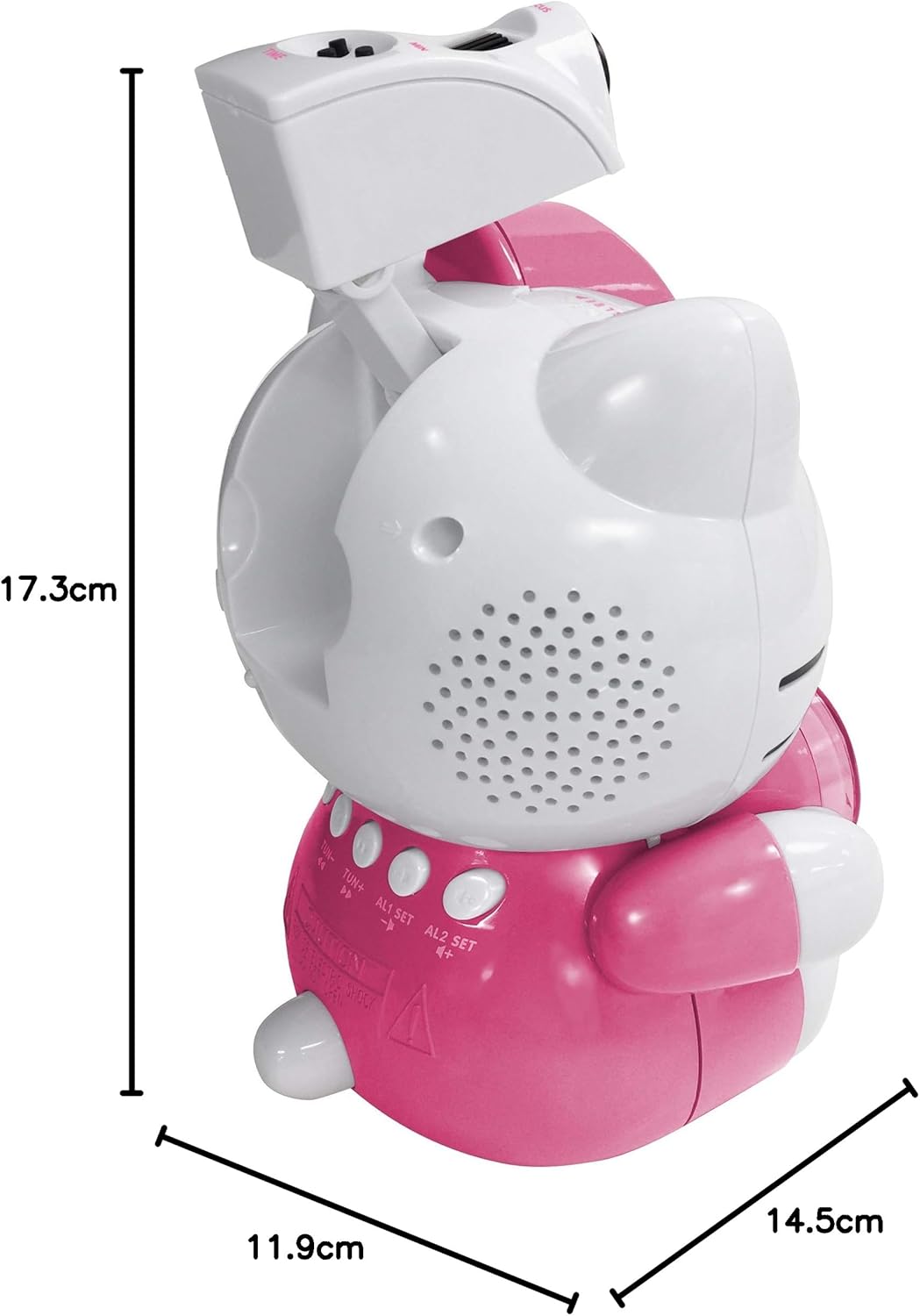
Image 8.1: Dimensions of the Hello Kitty KT2064 Projection Alarm Clock Radio.
9. Garantia i Suport
This product comes with a standard manufacturer's warranty. For specific warranty details, please refer to the documentation provided at the time of purchase or contact your retailer. If you encounter any issues not covered in the troubleshooting section, please contact customer support for assistance.
For support inquiries, please visit the official Hello Kitty product support weblloc web o poseu-vos en contacte amb el vostre distribuïdor local.