1. Introducció
This instruction manual provides comprehensive guidance for the Sanyo VPC-E2100BK 14MP Digital Camera. It covers essential information regarding the camera's setup, operation, maintenance, and troubleshooting. Please read this manual thoroughly to ensure proper use and to maximize the camera's capabilities.
2. Producte acabatview
The Sanyo VPC-E2100BK is a 14-megapixel digital camera featuring a powerful 21x optical zoom lens, a 3-inch LCD display, and CCD Sensor Shift image stabilization. It is capable of recording 720p HD video and includes intelligent scene modes for various shooting conditions.
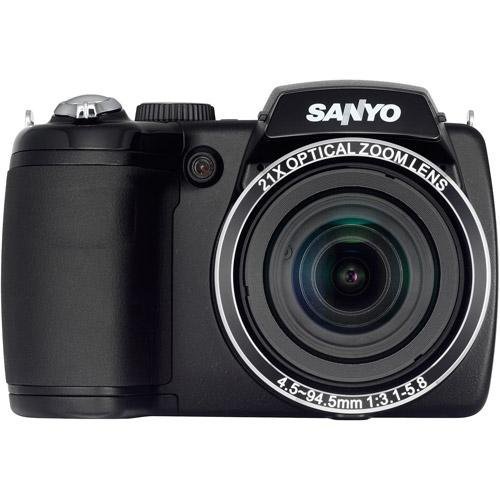
Figura 2.1: Frontal view of the Sanyo VPC-E2100BK Digital Camera. This image displays the camera from the front, highlighting the large optical zoom lens, the built-in flash, and the ergonomic grip on the left side. The SANYO brand name is prominently displayed above the lens.
3. Configuració
3.1. Instal·lació de la bateria
- Localitzeu la tapa del compartiment de la bateria a la part inferior de la càmera.
- Feu lliscar el pestell de la tapa per obrir el compartiment.
- Introduïu dues piles AA, assegurant-vos de la polaritat correcta (+/-) tal com s'indica a l'interior del compartiment.
- Tanqueu la tapa del compartiment de la bateria de manera segura fins que quedi encaixada.
3.2. Inserció de la targeta de memòria
- Open the memory card slot cover, typically located on the side or bottom of the camera.
- Insert a compatible SD/SDHC memory card into the slot with the metal contacts facing the correct direction, usually towards the front of the camera. Push until it clicks into place.
- Tanqueu bé la tapa de la ranura de la targeta de memòria.
3.3. Engegada inicial
- Press the Power button, usually located on the top panel of the camera.
- The LCD screen will illuminate, and the lens will extend.
- Seguiu les instruccions que apareixen a la pantalla per a la configuració inicial, com ara definir la data i l'hora.
4. Funcionament de la càmera
4.1. Fer fotos
- Enceneu la càmera.
- Enquadra la teva foto amb la pantalla LCD.
- Press the shutter button halfway down to allow the camera to focus. A green frame or beep indicates focus lock.
- Premeu el botó de l'obturador completament cap avall per capturar la imatge.
4.2. Gravació de vídeo
- Ensure the camera is in video recording mode (if applicable, often indicated by a dedicated button or mode dial setting).
- Press the dedicated video record button to start recording.
- Press the video record button again to stop recording.
4.3. Funció de zoom
Use the zoom lever, typically located around the shutter button, to adjust the optical zoom. Push the lever towards 'W' for wide-angle and 'T' for telephoto to zoom in or out.
4.4. Estabilització d'imatge
The camera features CCD Sensor Shift image stabilization to reduce blur caused by camera shake, especially in low light or when using the telephoto zoom. This function operates automatically.
4.5. Modes d'escena
The Sanyo VPC-E2100BK includes various scene modes, such as Intelligent Scene Mode, to optimize settings for different shooting environments. Access these modes via the camera's menu or mode dial to select the most appropriate setting for your subject (e.g., Portrait, Landscape, Night Scene).
4.6. Reproducció
- Press the Playback button (often marked with a triangle icon).
- Use the directional pad or control buttons to navigate through your captured photos and videos.
- Press the Playback button again or the Shutter button to return to shooting mode.
5. Manteniment
5.1. Neteja
- Lent: Use a soft, lint-free cloth or a lens brush to gently remove dust. For smudges, use a specialized lens cleaning solution applied to a cloth, not directly to the lens.
- Pantalla LCD: Wipe with a soft, dry cloth. Avoid harsh chemicals.
- Cos de la càmera: Use a dry, soft cloth to wipe the camera body. Do not use solvents or abrasive cleaners.
5.2. Cura de la bateria
- Traieu les piles si no fareu servir la càmera durant un període prolongat.
- Use high-quality AA alkaline or rechargeable NiMH batteries.
- Guardeu les piles en un lloc fresc i sec.
5.3. Emmagatzematge
Store the camera in a dry, dust-free environment, away from extreme temperatures and direct sunlight. Consider using a camera bag for protection during transport.
6. Solució De Problemes
- La càmera no s'encén: Comproveu la instal·lació de la bateria i assegureu-vos que la càrrega sigui suficient.
- Les imatges són borroses: Ensure the lens is clean. Check if image stabilization is active. Ensure the camera has focused correctly before fully pressing the shutter button.
- Error de la targeta de memòria: Reinsert the memory card. Ensure the card is not full or corrupted. Try formatting the card (this will erase all data).
- El flaix no es dispara: Check flash settings in the menu. Ensure the flash is not set to 'Off' or 'Red-eye Reduction' in bright conditions where it may not be needed.
7. Especificacions
| Característica | Especificació |
|---|---|
| Nom del model | VPC-E2100BK |
| Resolució del sensor fotogràfic | 14 MP |
| Zoom òptic | 21x |
| Resolució de vídeo | 720p |
| Estabilització d'imatge | CCD Sensor-shift, Digital, Optical |
| Mida de la pantalla | 3 polzades |
| Tipus de visualització | LCD |
| Admet File Format | JPEG, RAW |
| Font d'alimentació | 2 piles AA |
| Tecnologia d'enfocament automàtic | Detecció de contrast |
| Tir continu | 30 FPS |
| ISO Màxim ampliat | 3200 |
8. Garantia i Suport
For warranty information and technical support, please refer to the documentation provided at the time of purchase or visit the official Sanyo support weblloc web. Conserveu el comprovant de compra per a reclamacions de garantia.