
1. Producte acabatview
The Targus Legend IQ Backpack is designed for individuals who require a versatile and durable solution for carrying electronic devices and personal items. This backpack accommodates laptops up to 16 inches and features a dedicated, soft-lined compartment for tablets. It includes multiple pockets for organizing peripherals, cords, and other accessories. The design prioritizes comfort with padded, adjustable shoulder straps and a ventilated back panel. Its stable base allows the backpack to stand upright, providing easy access to contents.

Figura 1: Frontal view of the Targus Legend IQ Laptop Backpack.
2. Característiques clau
- Compartiment encoixinat per a portàtils: Designed to protect laptops up to 16 inches.
- Tablet Pocket: Separate, soft-lined section for tablet protection.
- Multiple Storage Pockets: Includes a media pocket with a built-in cord and headphone jack, accessory compartment, sunglasses holder, and workstation pocket.
- Upright Design: Allows the backpack to stand independently for easy access and stability.
- Característiques de comoditat: Two padded, adjustable shoulder straps and a padded, ventilated back panel for enhanced comfort.
- Trolley Strap: Convenient strap for securing the backpack to rolling luggage.
- RFID Blocking Pocket: Provides security for sensitive items.
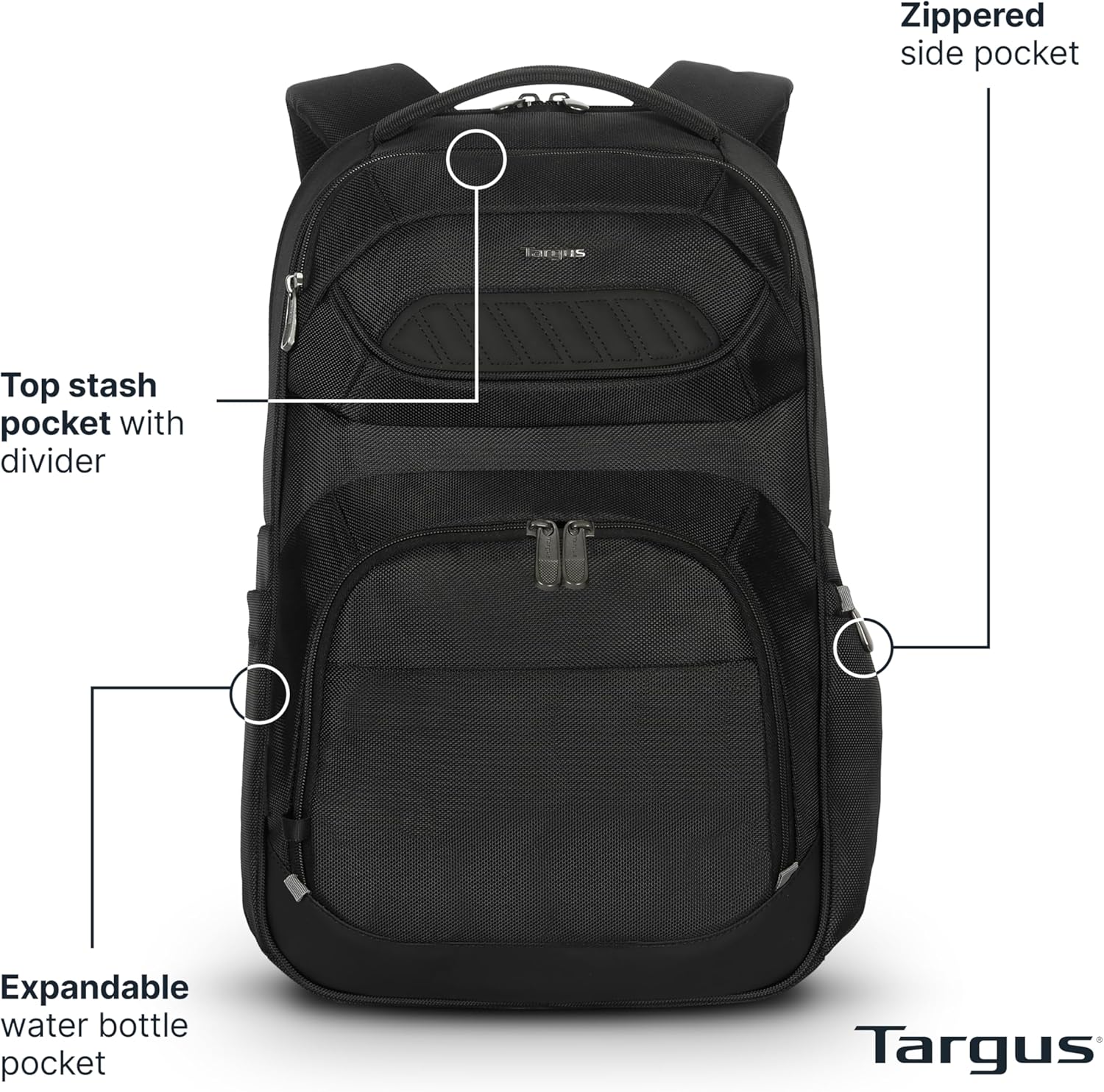
Figura 2: Frontal view highlighting external pockets and features.

Figura 3: Esquena view illustrating comfort and travel features.

Figure 4: Illustration of the Padded SafePort® Sling Protection system.

Figure 5: Backpack capacity for laptops up to 16 inches.

Figure 6: Quick Stash Pocket with RFID blocking capabilities.
3. Instruccions d'ús
3.1 Laptop and Tablet Storage
Locate the main padded compartment for your laptop. This compartment is designed to securely hold devices up to 16 inches. A separate, soft-lined pocket is available for your tablet, protecting it from scratches and impacts. Ensure devices are fully inserted and zippers are closed before transport.

Figure 7: Laptop and tablet storage within the backpack.
3.2 Organizing Pockets
The backpack features multiple pockets for organization:
- Media Pocket: Located with a built-in cord and headphone jack for easy access to audio devices.
- Workstation Pocket: Designed for pens, business cards, and other small office supplies.
- Quick Stash Pocket: For items requiring quick access, featuring an RFID blocking section for security.
- Butxaques laterals: Expandable for water bottles or other small items.
Video 1: Demonstration of the Targus Legend IQ Backpack's various compartments and features.
3.3 Carrying and Comfort
Adjust the shoulder straps to ensure a comfortable and secure fit. The padded and ventilated back panel promotes airflow, reducing discomfort during extended wear. For travel, utilize the integrated trolley strap to secure the backpack to the handle of rolling luggage.
Vídeo 2: Final oficialview of the Targus Legend IQ Laptop Backpack model TSB705US.
Video 3: Detailed look at the Targus Legend IQ Backpack's design for work and travel.
4. Manteniment
To maintain the quality and longevity of your Targus Legend IQ Backpack, follow these care instructions:
- Neteja: Hand wash only. Use a mild soap and cold water. Do not machine wash, bleach, tumble dry, or iron.
- Assecat: Air dry the backpack completely before storing or reusing.
- Emmagatzematge: Emmagatzemar en un lloc fresc i sec, lluny de la llum solar directa quan no estigui en ús.
5. Solució De Problemes
If you encounter any issues with your Targus Legend IQ Backpack, consider the following:
- Mal funcionament de la cremallera: Ensure no fabric is caught in the zipper teeth. Apply a small amount of zipper lubricant if movement is stiff.
- Molèsties de la corretja: Re-adjust shoulder straps to distribute weight evenly. Ensure the backpack is not overloaded.
- Resistència a l'aigua: While the backpack is water-resistant, it is not waterproof. Avoid prolonged exposure to heavy rain to protect contents.
For further assistance, please refer to the warranty information or contact Targus customer support.
6. Especificacions
| Característica | Detall |
|---|---|
| Nom del model | Targus Legend IQ Laptop Backpack |
| Número de model | TSB705US |
| Compatible Device Size Maximum | 15.6 polzades |
| Tipus de material | Polyester, Nylon (Outer Material, Lining) |
| Dimensions de l'article (D x W x H) | 4 "P x 15" W x 19" H |
| Pes de l'article | 0.8 kg |
| Volum d'emmagatzematge | 23 litres |
| Nombre de compartiments | 3 |
| Nombre de butxaques | 7 |
| Nivell de resistència a l'aigua | Resistent a l'aigua |
| Característiques especials | Tablet Compartment, Trolley Sleeve, Integrated Headphone Jack, RFID Blocking Pocket |
| Instruccions de cura del producte | Rentat només a mà |
7. Garantia i Suport
7.1 Garantia limitada de per vida
Targus offers a comprehensive Limited Lifetime Warranty on all its laptop backpacks, bags, and tablet cases. This warranty covers specific parts and types of damage for varying durations depending on the product type. Please retain your proof of purchase for warranty claims.
7.2 Atenció al client
For warranty claims, technical support, or any product-related inquiries, please visit the official Targus website or contact their customer service department. Contact information can typically be found on the Targus website under the 'Support' or 'Contact Us' section.