
Introducció
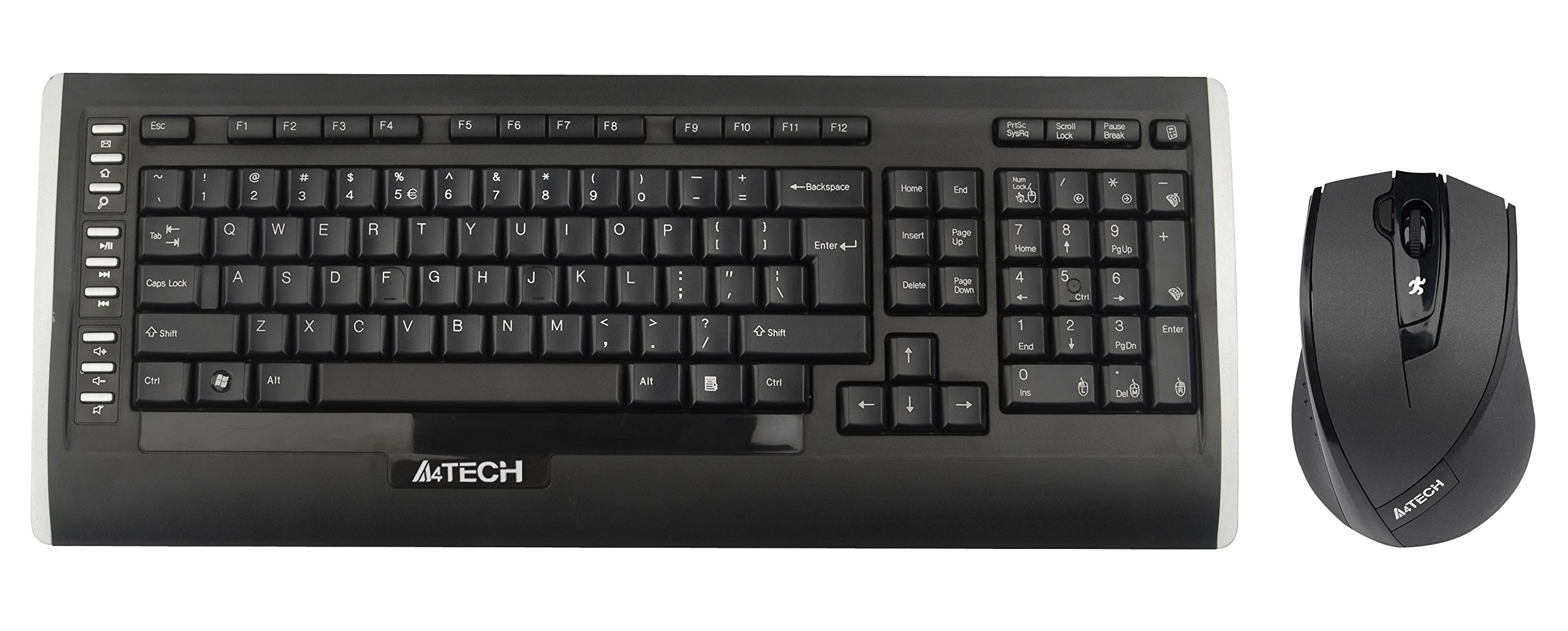
This user manual provides comprehensive instructions for the A4Tech 9300F Wireless RF Keyboard and Mouse Combo. Please read this manual thoroughly before using the product to ensure proper setup and operation. This combo features a wireless keyboard and a mouse with V-Track technology, designed for reliable performance and ease of use with your personal computer.
Configuració
Follow these steps to set up your A4Tech 9300F Wireless RF Keyboard and Mouse Combo.
1. Instal·lació de la bateria
- Localitzeu els compartiments de les piles a la part inferior tant del teclat com del ratolí.
- Obriu les tapes del compartiment de la bateria.
- Insert two AA alkaline batteries into the keyboard and two AA alkaline batteries into the mouse, ensuring correct polarity (+/-).
- Tanqueu les cobertes del compartiment de la bateria de manera segura.
2. Connexió del receptor
- Localitza el receptor USB, que normalment es guarda dins del compartiment de la bateria del ratolí o s'empaqueta per separat.
- Plug the USB receiver into an available USB port on your personal computer.
- El vostre sistema operatiu hauria de detectar i instal·lar automàticament els controladors necessaris. Aquest procés pot trigar uns instants.
- Once drivers are installed, the keyboard and mouse should be ready for use. If not, ensure the power switches on both devices are in the "ON" position.
Instruccions de funcionament
This section details the basic and advanced functions of your A4Tech 9300F combo.
Funcions del teclat
- Mecanografia estàndard: The keyboard features a standard QWERTY layout with comfortable, round-edged keycaps for general typing tasks.
- Teclat numèric: The dedicated numeric keypad allows for efficient data entry.
- Tecles de funció (F1-F12): These keys perform various system or application-specific functions. Refer to your operating system or application documentation for specific uses.
- Dual-Function Keys: Some keys may have secondary functions accessible via a modifier key (e.g., Fn key, if present). These can include media controls or quick access to applications.
Mouse Functions and V-Track Technology
- Standard Mouse Operation: The mouse provides precise cursor control with left, right, and scroll wheel buttons.
- V-Track Technology: This innovative optical technology uses vertical light to ensure smooth and accurate tracking on virtually any surface, including soft fabrics, without the need for a mouse pad. This technology is characterized by:
- Vertical light for enhanced precision.
- Short light path for lower power consumption.
- Incomparable adaptability on diverse surfaces.
- Smooth operation even on soft textiles.
- Tiny lens hole for optimal precision.
- Screen Capture Tool: The mouse may support a screen capture tool with value-added functions such as screen capture, TutorPen, 16-in-One, 4-way wheel, multi-link management, and DPI adjustment. Refer to the manufacturer's website for software download and updates related to this feature.
Manteniment
Un manteniment adequat garanteix la longevitat i el rendiment òptim del vostre auricular sense fil.
Neteja
- Desconnecteu el receptor USB de l'ordinador abans de netejar-lo.
- Use a soft, dry, lint-free cloth to wipe the surfaces of the keyboard and mouse.
- Per a la brutícia persistent, lleugerament dampNetegeu el drap amb aigua o un netejador suau i no abrasiu. Eviteu la humitat excessiva.
- No ruixeu solucions de neteja directament sobre els dispositius.
- Feu servir aire comprimit per eliminar la pols i les restes que hi ha entre les tecles del teclat.
Canvi de bateria
- When the devices exhibit reduced performance or stop responding, it is likely time to replace the batteries.
- Seguiu els passos d'instal·lació de la bateria que s'indiquen a la secció "Configuració".
- Always replace all batteries in a device at the same time with new, fresh alkaline batteries of the specified type (AA).
- Eliminar les bateries usades de manera responsable d'acord amb la normativa local.
Resolució de problemes
If you encounter issues with your A4Tech 9300F combo, refer to the following common solutions.
- Cap resposta del teclat/ratolí:
- Ensure the batteries are correctly installed and not depleted. Replace if necessary.
- Check that the power switches on both devices are turned "ON".
- Verifiqueu que el receptor USB estigui ben connectat a un port USB que funcioni de l'ordinador. Proveu-ho amb un altre port USB.
- Ensure the devices are within the 15-meter operating range of the receiver and there are no significant obstructions.
- Reinicieu l'ordinador.
- Connexió endarrerida o intermitent:
- Acosteu els dispositius al receptor USB.
- Eviteu col·locar el receptor a prop d'altres dispositius sense fil o objectes metàl·lics grans que puguin causar interferències.
- Canvieu les piles si estan baixes.
- El cursor del ratolí salta o és inexacte:
- Ensure the mouse lens is clean and free of dust or debris.
- While V-Track technology works on most surfaces, extreme textures or highly reflective surfaces might still affect performance. Try using the mouse on a different surface.
- Tecles específiques que no funcionen:
- Check for physical obstructions under the keycap.
- If multiple keys are affected, try the general troubleshooting steps for no response.
Especificacions
| Número de model | 9300F |
| Marca | A4Tech |
| Tecnologia de connectivitat | Ràdio Freqüència (RF) |
| abast sense fils | Fins a 15 metres |
| Factor de forma del teclat | Standard QWERTY |
| Mouse Tracking Technology | Optical (V-Track) |
| Font d'alimentació | Funciona amb bateria |
| Tipus de bateria | AA Alkaline (2 for keyboard, 2 for mouse) |
| Dispositius compatibles | Ordinador personal |
| Color | Negre |
| Pes de l'article | Aproximadament 1.85 lliures (0.84 kg) |
Garantia i Suport
Per obtenir informació sobre la garantia i assistència tècnica, consulteu la documentació inclosa amb el producte o visiteu el lloc web oficial d'A4Tech. weblloc web. Conserveu el rebut de compra com a comprovant de compra per a reclamacions de garantia.
Fabricant: A4Tech
Weblloc: www.a4tech.com