
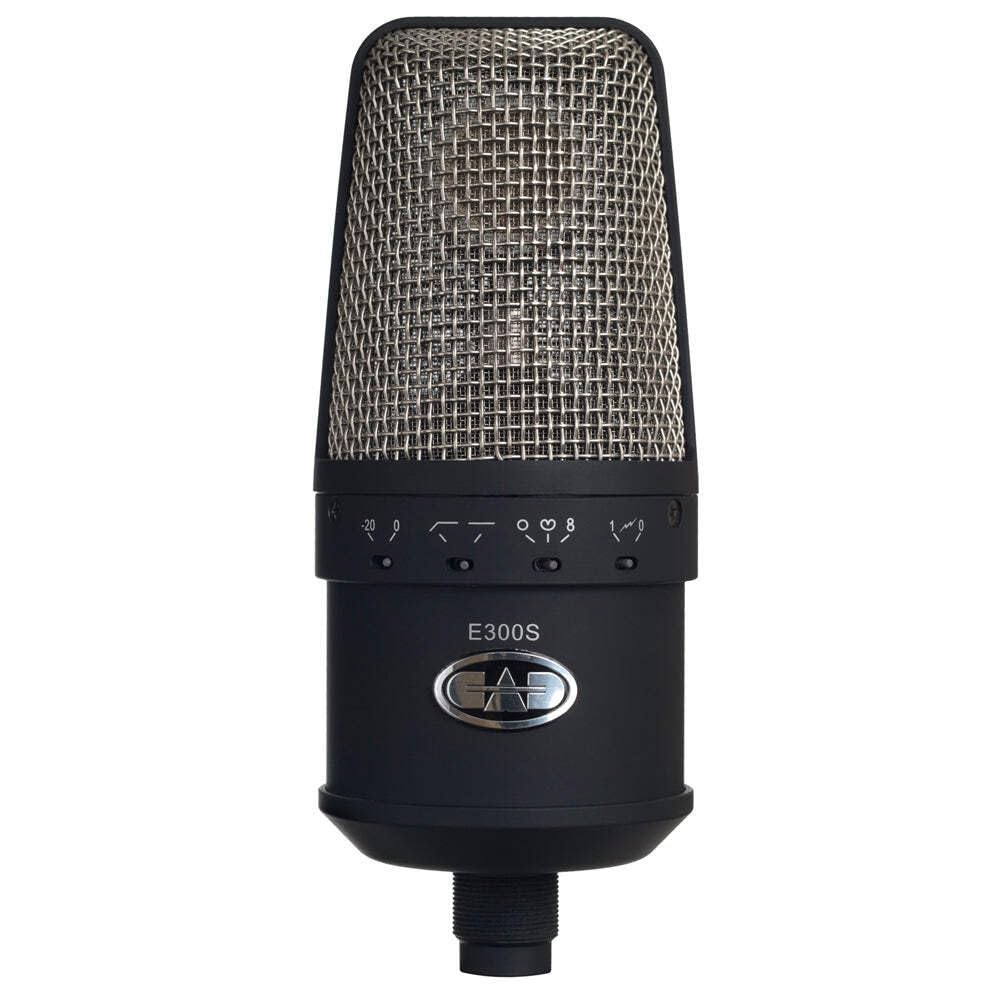
Image: The CAD Audio E300S Multi-Pattern Condenser Microphone mounted in its elastic shock mount, showcasing its design and grille.
Introducció
Thank you for choosing the CAD Audio E300S Multi-Pattern Condenser Microphone. The E300S is a high-performance, externally-biased large-diaphragm condenser microphone designed for professional audio recording. Its versatile features, including multiple polar patterns, a hi-pass filter, and an attenuator, make it suitable for a wide range of applications, from vocal recording to instrument miking.
This manual provides detailed instructions to help you set up, operate, and maintain your E300S microphone, ensuring optimal performance and longevity.
Característiques clau
- Principi de funcionament: Externally-biased condenser for precise sound capture.
- Patrons polars: Selectable Cardioid, Figure-of-Eight, and Omnidirectional patterns for versatile recording.
- Resposta de freqüència: Wide range from 20Hz to 18KHz to capture full audio spectrum.
- Alta sensibilitat: -34dBV (20mV) @ 1 Pa for detailed sound reproduction.
- High SPL Capability: Handles up to 145dB SPL at 1% THD, suitable for loud sources.
- Atenuador: 20dB pad for managing high-volume inputs.
- Hi-Pass Filter: Redueix el soroll de baixa freqüència no desitjat.
- Requisits d'alimentació: P48 (48V) phantom power.
- Rechargeable NiMH Batteries: Provides current reserve for consistent performance.
- Accessoris inclosos: Elastic shock mount and carrying case for protection and stability.
Contingut del paquet
En desempaquetar, assegureu-vos que tots els articles estiguin presents i en bon estat:
- CAD Audio E300S Condenser Microphone
- Elastic Shock Mount
- Maleta de transport
- Manual d'usuari (aquest document)

Image: The CAD Audio E300S microphone, shock mount, and user manual neatly packed within its protective carrying case.
Instruccions de configuració
- Desempaquetar el micròfon: Carefully remove the E300S microphone and its shock mount from the carrying case.
- Fixeu el suport amortidor: Securely screw the elastic shock mount onto a standard microphone stand. The shock mount helps isolate the microphone from vibrations and handling noise.
- Muntar el micròfon: Gently insert the E300S microphone into the shock mount. Ensure it is held firmly by the elastic bands.
- Connecteu el cable XLR: Connect a balanced XLR cable to the microphone's XLR output connector located at the base. Connect the other end of the XLR cable to your audio interface, mixer, or preampmés viu.
- Aplicar l'energia fantasma: The E300S requires P48 (48V) phantom power to operate. Activate the 48V phantom power on your audio interface, mixer, or preamplifier. The microphone's internal rechargeable NiMH batteries provide current reserve, but external phantom power is essential for operation and to charge the internal batteries.
- Posició del micròfon: Place the microphone in the desired recording position, considering the sound source and the chosen polar pattern.

Image: The base of the CAD Audio E300S microphone, illustrating the standard 3-pin XLR connector for audio output.
Instruccions de funcionament
The CAD Audio E300S features several controls on its body to adjust its performance for different recording scenarios.

Imatge: Una imatge detallada view of the control switches on the CAD Audio E300S, showing settings for -20dB pad, hi-pass filter, and polar patterns (cardioid, omni, figure-8).
1. Selecció del patró polar
The E300S offers three selectable polar patterns, allowing you to control the microphone's directionality and sensitivity to sound from different angles. Use the switch labeled with the polar pattern symbols.
- Cardioid (Heart-shaped symbol): Most sensitive to sound from the front, with significant rejection from the rear and sides. Ideal for isolating a single sound source, such as a vocalist or instrument, in a live or studio environment.
- Omnidirectional (Circle symbol): Equally sensitive to sound from all directions. Best for capturing ambient room sound, group vocals, or instruments where a natural, open sound is desired.
- Figure-of-Eight (Figure-8 symbol): Equally sensitive to sound from the front and rear, with strong rejection from the sides. Useful for recording two vocalists facing each other, or for capturing room reflections while minimizing side-bleed.
2. Hi-Pass Filter (Low-Cut Filter)
The hi-pass filter switch (often indicated by a sloped line symbol) reduces low-frequency content. This is useful for:
- Minimizing rumble from air conditioning, traffic, or stage vibrations.
- Reducing proximity effect (an increase in bass response when a sound source is very close to the microphone).
- Cleaning up vocal tracks by removing unwanted low-end mud.
Engage the hi-pass filter by moving the switch to the appropriate position (usually indicated by a sloped line or "HPF").
3. Attenuator (Pad)
The 20dB attenuator (often indicated by "-20dB" or "Pad") reduces the microphone's output level before it reaches your preamplifier. This prevents overloading the input stage of your mixer or interface when recording very loud sound sources, such as drums, guitar amplifiers, or loud vocals.
If you notice distortion or clipping in your recording chain, engage the 20dB pad by moving the switch to the "-20dB" position.
Manteniment
Proper care and maintenance will ensure the longevity and optimal performance of your CAD Audio E300S microphone.
- Neteja: Use a soft, dry cloth to wipe the microphone body. Do not use liquid cleaners, solvents, or abrasive materials, as these can damage the finish or internal components.
- Emmagatzematge: When not in use, store the microphone in its provided carrying case to protect it from dust, moisture, and physical damage. Avoid storing it in environments with extreme temperatures or high humidity.
- Manipulació: Always handle the microphone with care. Avoid dropping it or subjecting it to strong impacts, which can damage the delicate capsule.
- Potència fantasma: Ensure P48 phantom power is consistently supplied during operation to power the microphone and maintain the charge of its internal NiMH batteries.
Resolució de problemes
If you encounter issues with your E300S microphone, please refer to the following common problems and solutions:
| Problema | Possible causa/solució |
|---|---|
| Sense sortida de so |
|
| Baix nivell de sortida |
|
| Distortion or Clipping |
|
| Excessive Bass / Muddy Sound |
|
| Unwanted Noise / Hum |
|
Especificacions
| Característica | Detall |
|---|---|
| Principi de funcionament | Externally-biased condenser |
| Patró polar | Cardioid, Figure-of-Eight, Omnidirectional (Multipattern) |
| Resposta de freqüència | 20Hz a 18KHz |
| Sensibilitat | -34dBV (20mV) @ 1 Pa |
| Impedància | 220 ohms |
| SPL màxim | 145dB, 1% THD |
| Attenuator (Pad) | 20 dB |
| Requisits d'alimentació | P48 (48V) Phantom Power, 8mA |
| Tipus de connector | XLR |
| Pes de l'article | 5 lliures (aprox. 2.27 kg) |
| Dimensions de l'article | 12 x 9 x 9 polzades (aprox. 30.5 x 22.9 x 22.9 cm) |
| Número de model | E300S (AMS-E300S) |
| UPC / GTIN | 631922105810 |
Informació de la garantia
The CAD Audio E300S Condenser Microphone comes with a 5 any de garantia. For detailed terms and conditions, or to initiate a warranty claim, please refer to the official CAD Audio weblloc o poseu-vos en contacte amb el seu servei d'atenció al client.
Suport i Contacte
For further assistance, technical support, or inquiries regarding your CAD Audio E300S microphone, please visit the official CAD Audio weblloc o poseu-vos en contacte amb el seu departament d'atenció al client.
Oficial Weblloc: www.cadaudio.com
Please have your product model (E300S) and purchase information ready when contacting support.