
Sony DSC-W620/S
Manual d'usuari de la càmera digital Sony Cyber-shot DSC-W620
Model: DSC-W620/S
1. Introducció
Welcome to the user manual for your Sony Cyber-shot DSC-W620 digital camera. This guide provides essential information on setting up, operating, maintaining, and troubleshooting your camera to help you capture high-quality photos and videos. The DSC-W620 features a 14.1-megapixel sensor, 5x optical zoom, a 2.7-inch LCD, and various intelligent shooting modes.
2. Informació de seguretat
To ensure safe operation and prevent damage to your camera, please observe the following precautions:
- Do not expose the camera to water or moisture. This camera is not water-resistant.
- Avoid exposing the camera to direct sunlight or extreme temperatures for extended periods.
- Use only genuine Sony batteries and accessories to prevent malfunction or damage.
- Keep the camera away from strong magnetic fields or static electricity.
- No intenteu desmuntar ni modificar la càmera. Encarregueu tot el manteniment a personal qualificat.
- Clean the lens and LCD screen gently with a soft, dry cloth.
3. Components de la càmera
Familiarize yourself with the various parts of your Sony Cyber-shot DSC-W620 camera.
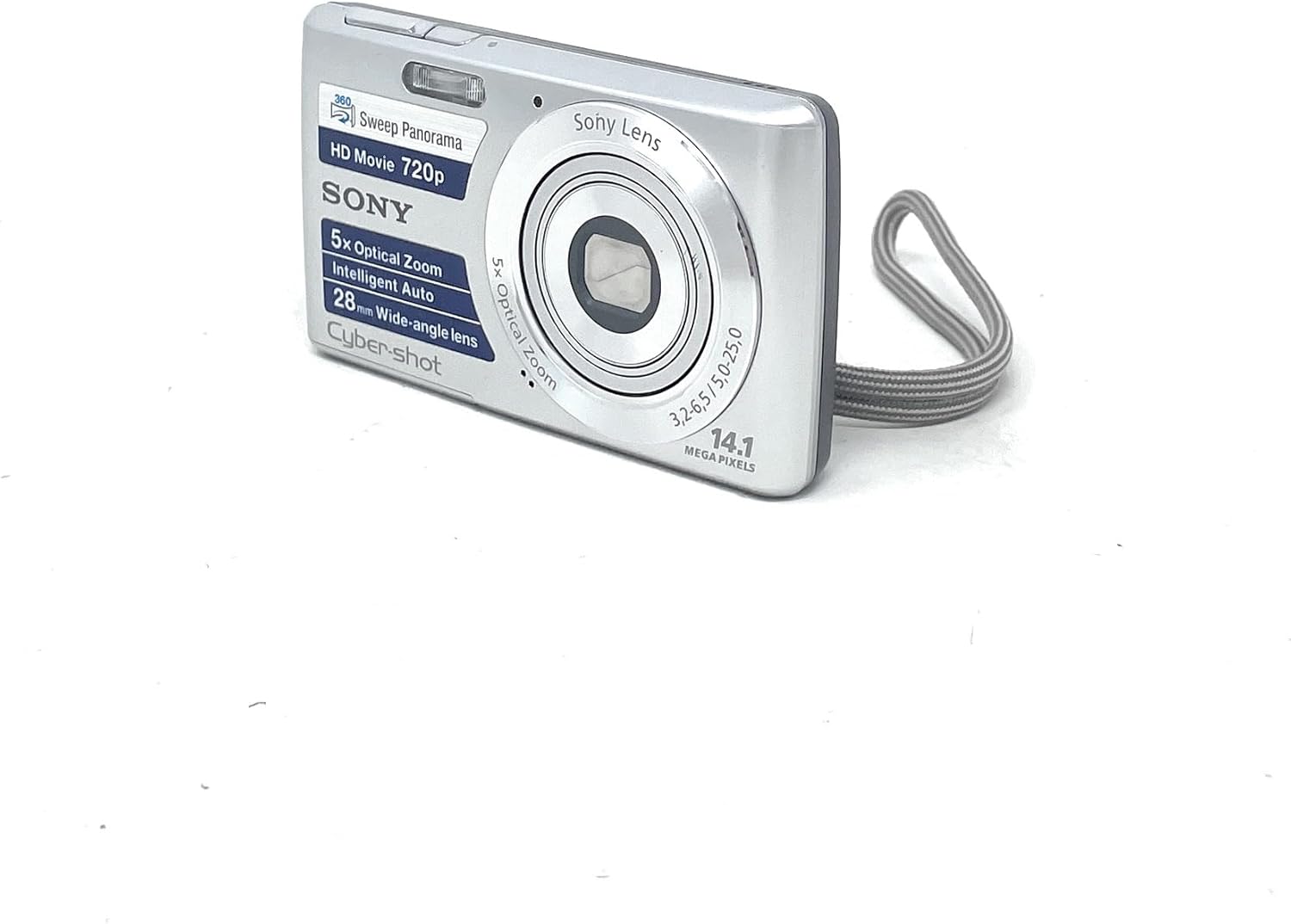
Figura 3.1: Frontal View
This image displays the front of the camera, highlighting the Sony Lens, built-in flash, and the Cyber-shot branding. Key features like 5x Optical Zoom and 14.1 Megapixels are visible.

Figura 3.2: posterior View
The rear of the camera features the 2.7-inch LCD display, along with navigation buttons, menu button, and playback controls for easy operation.

Figura 3.3: lateral View amb ports
This angle shows the side of the camera, revealing the USB port for data transfer and charging, and the AV OUT port for connecting to external displays.

Figura 3.4: A baix View
The bottom of the camera includes the battery and memory card compartment, secured by a latch, and a tripod mount for stable shooting.
Components clau:
- Lent: 5x Optical Zoom Sony Lens.
- Flash: Flaix integrat per a condicions de poca llum.
- Botó de l'obturador: Activates the camera and takes photos.
- Palanca de zoom: Controla el zoom òptic i digital.
- Pantalla LCD: 2.7-inch (230K dots) Clear Photo LCD for composing shots and reviewing imatges.
- Botons de control: Navigation, Menu, Playback, Delete, and Display buttons.
- Battery/Memory Card Compartment: Located at the bottom for battery and memory card insertion.
- Port USB: For connecting to a computer or charger.
4. Configuració
4.1. Instal·lació de la bateria
- Open the battery/memory card compartment cover on the bottom of the camera.
- Insert the supplied Lithium Ion battery (e.g., NP-BN1) into the compartment with the correct orientation, aligning the contacts.
- Close the compartment cover until it clicks securely.
4.2. Carregant la bateria
Connect the camera to the supplied AC adapter using the USB cable. The charge lamp will illuminate during charging and turn off when charging is complete. A full charge typically takes approximately 2-3 hours.
4.3. Inserció d'una targeta de memòria
The camera supports various memory card types (e.g., SD, SDHC, Memory Stick Duo). Ensure the camera is off before inserting or removing a memory card.
- Obriu la tapa del compartiment de la bateria/targeta de memòria.
- Insert the memory card into the slot with the correct orientation until it clicks into place.
- Tanqueu la tapa del compartiment.
5. Funcionament de la càmera
5.1. Fotografia bàsica
- Encès/apagat: Premeu el botó ON/OFF botó situat a la part superior de la càmera.
- Fer una foto: Premeu el botó Obturador button halfway down to focus, then press it fully to take the picture.
- Zoom: Utilitza el Palanca de zoom around the shutter button to zoom in (T) or out (W).
5.2. Modes de tir
- Intelligent Auto Mode (iAuto): This mode automatically optimizes camera settings by recognizing scenes, lighting conditions, and faces. Simply point and shoot for clear images.
- Mode de panoràmica de barrit: Capture breathtaking panoramic images by pressing the shutter button and sweeping the camera horizontally or vertically. The camera stitches multiple images together automatically. Supports up to 360° panoramas.
- Efectes d'imatge: Add creative effects to your photos, such as Toy Camera, Pop Color, Partial Color, and Soft High-key. Access these through the camera's menu.
5.3. Funcions avançades
- Tecnologia de detecció facial: Automatically detects up to eight individual faces and adjusts focus, exposure, and white balance for optimal portraits.
- Tecnologia Smile Shutter: The camera automatically captures a photo when it detects a smile. You can adjust sensitivity and prioritize adult or child smiles.
- Mode de pell suau: Reduces the appearance of blemishes and wrinkles in portraits for smoother skin tones.
- Optimitzador de rang dinàmic (DRO): Helps recover details in both shadows and highlights, particularly effective in backlit scenes or high-contrast environments.
- Temporitzador d'autoretrat: Uses Face Detection to recognize when your face enters the frame, then triggers a 2-second timer before taking the picture, ideal for self-portraits.
5.4. Gravació de vídeo
The DSC-W620 can record high-definition videos.
- 720p HD Movie Mode: Record videos at 1280 x 720 resolution at 30 frames per second (fps) in AVI format.
- Per començar a gravar, premeu el botó dedicat Pel·lícula button (if available) or select movie mode from the menu and press the shutter button.
- Optical zoom is available during video recording.
5.5. Reproducció
A view les teves fotos i vídeos capturats:
- Premeu el botó Reproducció botó (normalment indicat per una icona triangular).
- Use the navigation buttons to scroll through your images and videos.
- Premeu el botó Entra botó per reproduir vídeos.
6. Manteniment
6.1. Neteja de la càmera
- Cos de la càmera: Netegeu amb un drap suau i sec. Per a la brutícia persistent, utilitzeu un drap lleugerament humit.ampesbandit amb aigua i després eixugueu-ho.
- Lent: Feu servir un raspall per a lents per eliminar la pols i, a continuació, netegeu suaument amb un drap de neteja de lents. No utilitzeu netejadors químics.
- Pantalla LCD: Netegeu suaument amb un drap suau i sec. Eviteu pressionar fort la pantalla.
6.2. Emmagatzematge
When not in use, store the camera in a cool, dry place, away from direct sunlight and extreme temperatures. Remove the battery if the camera will not be used for an extended period.
7. Solució De Problemes
Si teniu problemes amb la càmera, consulteu els problemes i solucions més comuns següents:
| Problema | Solució |
|---|---|
| La càmera no s'encén. | Ensure the battery is fully charged and correctly inserted. Try reinserting the battery. |
| Les imatges són borroses. | Check if the lens is clean. Ensure proper focus by pressing the shutter button halfway. Use sufficient lighting or the flash. |
| La bateria s'esgota ràpidament. | Reduce LCD brightness. Limit flash usage. Turn off the camera when not in use. Ensure the battery is not old or damaged. |
| No es pot gravar vídeo. | Check if the memory card has sufficient free space. Ensure the camera is in video recording mode. |
| Error de la targeta de memòria. | Reinsert the memory card. Try a different memory card. Format the memory card (this will erase all data). |
8. Especificacions
| Característica | Detall |
|---|---|
| Nom del model | Cyber-shot DSC-W620 |
| Resolució del sensor fotogràfic | 14.1 MP |
| Zoom òptic | 5x |
| Zoom digital | 10x |
| Mida de la pantalla | 2.7 polzades |
| Tipus de visualització | LCD (230K dots) |
| Resolució de vídeo | 720p (1280 x 720) at 30 fps |
| Estabilització d'imatge | Òptic |
| Tecnologia de connectivitat | USB |
| Tipus de bateria | Ió de liti |
| Pes de l'article | 116 grams |
| Color | Plata |
9. Garantia i Suport
9.1. Informació de la garantia
Aquest producte està cobert per a 90-day Limited Hardware Warranty. For detailed terms and conditions, please refer to the official warranty document:
Sony 90-day Limited Hardware Warranty (PDF)
9.2. Atenció al client
Per a més ajuda, assistència tècnica o consultes de servei, visiteu el lloc web oficial d'assistència de Sony. website or contact their customer service department. Keep your product model number (DSC-W620/S) and serial number ready when contacting support.