
1. Introducció
Gràcies per la compraasing the Panasonic SC-BTT195 Energy Star 5.1-Channel 1000-Watt Full HD 3D Blu-Ray Home Theater System. This manual provides essential information for the safe and efficient operation of your new home theater system. Please read these instructions carefully before use and retain them for future reference.
The SC-BTT195 system is designed to deliver an immersive audio-visual experience with its 5.1-channel surround sound, Full HD 3D Blu-Ray playback, and network connectivity features.
2. Informació de seguretat
ADVERTIMENT: Per reduir el risc de descàrrega elèctrica, incendi o danys a la unitat, observeu les precaucions següents:
- No exposeu aquesta unitat a la pluja, la humitat, les gotes o els esquitxos.
- No col·loqueu objectes plens de líquids, com ara gerros, a la unitat.
- Utilitzeu només els accessoris recomanats.
- Do not remove covers. Refer servicing to qualified service personnel.
- Assegureu-vos una ventilació adequada. No bloquegeu les obertures de ventilació.
- No instal·leu a prop de cap font de calor com ara radiadors, registres de calor, estufes o altres aparells (inclosos amplificadors) que produeixen calor.
- Eviteu que el cable d'alimentació sigui trepitjat o pessigat, especialment als endolls, els endolls i el punt on surten de l'aparell.
3. Contingut del paquet
Si us plau, comproveu que tots els elements estiguin inclosos al paquet:
- Blu-Ray Disc Player/Receiver Unit
- Front L/R Tallboy Speakers (2)
- Altaveus envoltants (2)
- Center Speaker (1)
- Subwoofer (1)
- Control remot (amb 2 piles AA)
- Cables d'altaveus
- Antena FM interior
- Cable d'alimentació CA
- Instruccions de funcionament (aquest manual)
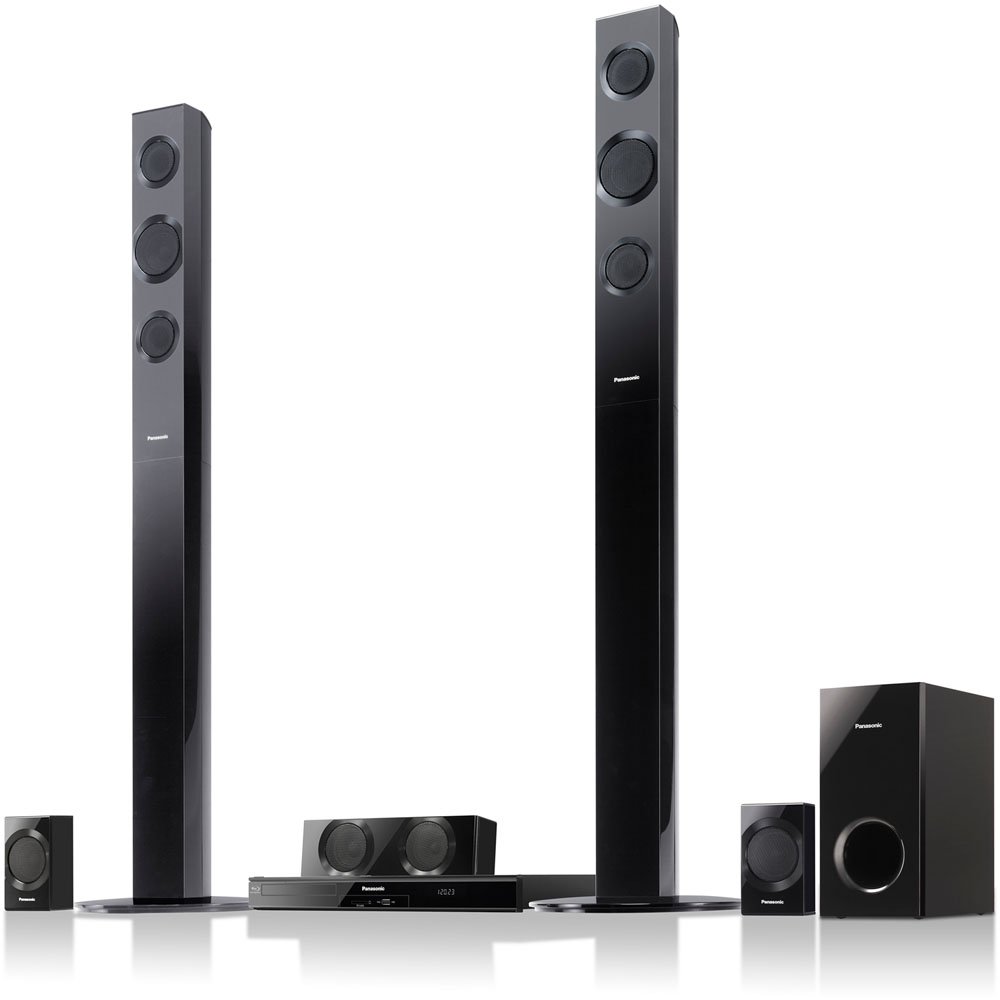
Imatge: Més deview of the Panasonic SC-BTT195 Home Theater System, showing the main unit, tallboy front speakers, surround speakers, center speaker, and subwoofer.
4. Configuració
4.1 Speaker Connection and Placement
Connect each speaker to the corresponding terminal on the main unit using the provided speaker cables. Ensure correct polarity (+ to + and - to -) for optimal sound quality.
- Altaveus frontals (E/D): Place these tallboy speakers to the left and right of your television, equidistant from the viewposició d'ingrés.
- Ponent del centre: Position this speaker directly above or below your television, centered with the screen.
- Altaveus envoltants (E/D): Place these speakers to the sides or slightly behind your main listening position, facing inwards.
- subwoofer: Position the subwoofer on the floor, preferably in a corner or near a wall for enhanced bass response.
Note: While the system is described as "Wi-Fi Ready," the rear speakers are wired. An optional accessory may be required for wireless rear speaker functionality.
4.2 Connecting to Your Television and Other Devices
- HDMI Connection (Video & Audio Out): Connect an HDMI cable from the HDMI OUT terminal on the SC-BTT195 main unit to an HDMI IN terminal on your television. This single cable transmits both video and audio signals to your TV.
- Optical Audio Input (External Devices): To receive 5.1 channel audio from external devices (e.g., game console, satellite box) that are connected directly to your TV via HDMI, you will need to use the optical audio input.
- Connect an optical cable from the optical audio output of your TV or an optical switcher to the OPTICAL IN terminal on the SC-BTT195.
- Important: Many TVs cannot pass through 5.1 surround sound from their HDMI inputs to their optical output. For true 5.1 surround sound from multiple external devices, consider using an optical audio switcher connected to the SC-BTT195's optical input, with each device connected to the switcher via its own optical cable.
- Connexió de xarxa: For internet features like Viera Connect, connect an Ethernet cable from the LAN terminal on the SC-BTT195 to your home router. This system is WIRED for network connectivity. A separate Wi-Fi adapter (not included) is required for wireless network access.
- Connexió d'alimentació: After all other connections are made, plug the AC power cord into the main unit and then into a wall outlet.
5. Instruccions de funcionament
5.1 Reproducció bàsica
- Encès: Premeu el botó PODER button on the remote control or the main unit.
- Insereix disc: Gently insert a Blu-Ray Disc or DVD into the disc slot. The system will typically begin playback automatically.
- Seleccioneu l'entrada: Utilitza el SELECCIONADOR D'ENTRADES button on the remote to switch between sources (e.g., Disc, Optical, FM, iPod).
- Control de volum: Ajusteu el volum amb el botó VOL +/- botons del comandament a distància.
- Controls de reproducció: Ús JUGAR, PAUSA, STOP, SALTAR buttons for disc playback.
The system supports Dolby TrueHD and DTS-HD Master Audio for high-quality surround sound from compatible Blu-ray discs. It can also upscale DVDs to near 1080p resolution.
5.2 Network Features (Viera Connect)
Once connected to your home network (via Ethernet or optional Wi-Fi adapter), you can access Panasonic's Viera Connect platform.
- Premeu el botó VIERA CONNECT button on the remote to access the smart TV interface.
- Navigate through available applications such as Netflix, MLB.tv, and others using the remote's directional buttons.
- Nota: The performance and interface of Viera Connect applications may vary. Ensure a stable internet connection for optimal streaming.
5.3 Smartphone Remote App
A smartphone remote app is available for enhanced control. Download the official Panasonic remote app from your device's app store and follow the in-app instructions to pair it with your SC-BTT195 system.
6. Manteniment
- Neteja de la unitat: Netegeu l'exterior de la unitat amb un drap suau i sec. Per a taques difícils, utilitzeu un drap lleugerament humit.ampened with water and a mild detergent, then wipe dry. Do not use abrasive cloths, thinners, alcohol, or other chemical cleaners.
- Cura del disc: Manipuleu els discs per les vores. Manteniu-los nets i sense ratllades. Guardeu els discs a les seves fundes quan no els feu servir.
- Ventilació: Assegureu-vos que les obertures de ventilació de la unitat no estiguin bloquejades per evitar el sobreescalfament.
- Bateries: Replace remote control batteries (2 AA) when the remote's range decreases or it becomes unresponsive.
7. Solució De Problemes
Before seeking service, please check the following points.
Sense poder
- Ensure the AC power cord is securely plugged into both the unit and a working wall outlet.
- Comproveu si la presa de corrent funciona connectant-hi un altre dispositiu.
Sense imatge al televisor
- Verify the HDMI cable is correctly connected between the SC-BTT195 and your TV.
- Assegureu-vos que el televisor estigui configurat a la font d'entrada HDMI correcta.
- Check the resolution settings on the SC-BTT195 (if accessible without picture).
No Sound or Incorrect Surround Sound
- Comproveu totes les connexions del cable de l'altaveu per assegurar-vos que la polaritat sigui correcta i que estiguin ben ajustades.
- Assegureu-vos que el volum no estigui silenciat ni massa baix.
- If using an external device (e.g., game console, cable box) connected to your TV, and audio is routed via the TV's optical output to the SC-BTT195:
- Confirm the TV's audio output settings are configured to output digital audio.
- Nota: Many TVs cannot pass 5.1 surround sound from their HDMI inputs to their optical output. If you are not getting 5.1 from an external device, connect the device's optical output directly to the SC-BTT195 (possibly via an optical switcher if multiple devices are used).
- For 5.1 surround sound, the source material (Blu-ray, game, streaming content) must be encoded with a 5.1 soundtrack. Stereo sources will only output sound from the front speakers.
- Ensure the correct audio input is selected on the SC-BTT195.
Problemes de connexió de xarxa
- Verify the Ethernet cable is securely connected to both the SC-BTT195 and your router.
- Check your router and internet connection for proper operation.
- If using an optional Wi-Fi adapter, ensure it is correctly installed and configured.
8. Especificacions
| Nom de marca | Panasonic |
| Número de model | SC-BTT195 |
| Potència de sortidatage | 1000 watts |
| Dimensions del producte | 29.7 x 16 x 19.6 polzades |
| Pes de l'article | 34.6 lliures |
| Built-In Decoders | Dolby® Digital, Dolby® Digital Plus/ Dolby® TrueHD, Dolby® Pro Logic® II, DTS™-HD Master Audio Essential/ DTS™-HD High Resolution Audio |
| Number of Component Inputs | Òptic (1) |
| Number of Component Outputs | HDMI (1) |
| Color | Negre |
| Piles necessàries | 2 piles AA (incloses per al comandament a distància) |
| Primera data disponible | 15 de març de 2012 |
9. Garantia i Suport
Per obtenir informació sobre la garantia i l'assistència al client, consulteu la targeta de garantia inclosa amb el producte o visiteu el lloc web d'assistència oficial de Panasonic. weblloc web. Conserveu el rebut de compra com a comprovant de compra per a reclamacions de garantia.
Online resources and FAQs may also be available on the Panasonic website to assist with common inquiries and technical support.