
1. Introducció
The Pentax Optio WG-2 is a rugged digital camera designed for durability and performance in challenging environments. It features a 16-megapixel CMOS sensor, 5x optical zoom, and full HD 1080p video recording. This camera is built to be waterproof down to 40 feet (12 meters), shockproof from drops up to 5 feet (1.5 meters), crushproof up to 220 pounds (100 kgf), coldproof down to 14°F (-10°C), and dustproof.
This manual provides essential information for setting up, operating, maintaining, and troubleshooting your Pentax Optio WG-2 camera.

Figura 1.1: Frontal view of the Pentax Optio WG-2 Digital Camera.
2. Configuració
2.1. Carregant la bateria
Before initial use, fully charge the camera battery using the provided external charger. Connect the charger to a power outlet and insert the battery. The charging indicator will show the charging status.
2.2. Inserció de la bateria i la targeta de memòria
- Open the battery/memory card compartment cover located on the side of the camera. Ensure the cover is dry before opening.
- Insert the charged battery with the correct orientation.
- Insert an SD, SDHC, or SDXC memory card into the card slot until it clicks into place.
- Close the compartment cover securely until it locks. Ensure the seal is free of debris to maintain waterproof integrity.
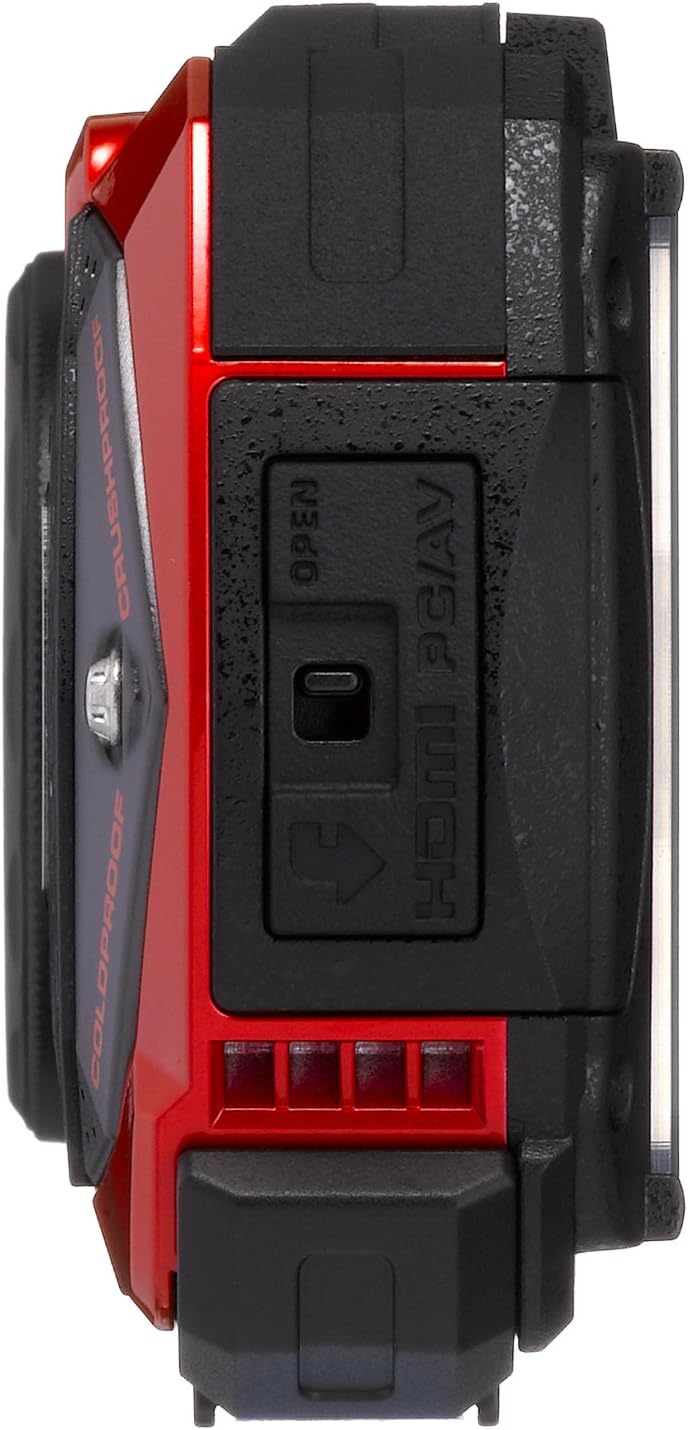
Figura 2.1: lateral view with port cover open.
2.3. Configuració inicial
Upon first power-on, the camera will prompt you to set the date, time, and language. Follow the on-screen instructions to configure these basic settings.
3. Funcionament de la càmera
3.1. Encendre/apagar
Premeu el botó ON/OFF botó situat a la part superior de la càmera per encendre-la o apagar-la.

Figura 3.1: superior view with Power and Shutter buttons.
3.2. Fer fotos
- Enceneu la càmera.
- Frame your shot using the 3.0-inch LCD display.
- Premeu el botó de l'obturador a la meitat per enfocar.
- Premeu completament el botó de l'obturador per capturar la imatge.
3.3. Funció de zoom
Use the zoom buttons (W for wide, T for telephoto) located on the back of the camera to adjust the 5x optical zoom. The camera also features a 7.2x digital zoom.

Figura 3.2: Esquena view with LCD and control buttons.
3.4. Modes de tir
Premeu el botó MODE button to select various shooting modes, including automatic, program, and specialized modes like Underwater mode. Refer to the on-screen menu for detailed options.
3.5. Gravació de vídeo
To record video, switch to video mode (if available via the MODE button or a dedicated video button). Press the shutter button to start and stop recording. The camera supports Full HD 1080p video at 30 frames per second.
3.6. Macro Photography with LED Lights
For close-up shots, the camera features a ring of six LED lights around the lens. Activate these lights in macro mode to provide even illumination for subjects as close as 1 cm.
4. Manteniment
4.1. Neteja de la càmera
- Cos de la càmera: Netegeu amb un suau, damp drap. Per a la brutícia resistent, utilitzeu una solució de sabó suau i esbandiu-la bé.
- Lent i pantalla LCD: Use a soft, lint-free cloth specifically designed for optical surfaces. Avoid harsh chemicals.
- Segells impermeables: Regularly inspect the rubber seals on the battery/card compartment and port covers for dirt, sand, or damage. Clean with a soft brush and ensure they are free of debris before closing.
4.2. After Underwater Use
After using the camera in water, especially saltwater, rinse it thoroughly with fresh water. Allow the camera to air dry completely before opening any compartments. Do not open compartments while the camera is wet to prevent water ingress.

Figure 4.1: Pentax Optio WG-2 after water exposure.
4.3. Emmagatzematge
Store the camera in a cool, dry place away from direct sunlight and extreme temperatures. Remove the battery if the camera will not be used for an extended period.
5. Solució De Problemes
- La càmera no s'encén: Assegureu-vos que la bateria estigui completament carregada i inserida correctament.
- Les imatges són borroses: Check focus settings. Ensure the lens is clean. Use image stabilization if available.
- Water inside the camera: Immediately power off the camera, remove the battery and memory card. Contact customer support. This indicates a failure of the waterproof seals.
- Poor performance in low light: The camera may struggle in very low light conditions. Use the built-in flash or adjust ISO settings if possible.
- Error de la targeta de memòria: Assegureu-vos que la targeta de memòria estigui inserida correctament i que no estigui danyada. Intenteu formatar la targeta (això esborrarà totes les dades).
- La pantalla LCD no mostra: If the screen is blank or malfunctioning, try restarting the camera. If the issue persists, contact customer support.
6. Especificacions
| Característica | Especificació |
|---|---|
| Nom del model | Pentax Optio WG-2 |
| Resolució del sensor fotogràfic | 16 MP |
| Zoom òptic | 5x |
| Zoom digital | 7.2x |
| Distància focal màxima | 140 mil·límetres |
| Distància focal mínima | 28 mil·límetres |
| Estabilització d'imatge | Òptic |
| Resolució de vídeo | FHD 1080p |
| Mida de la pantalla | 3 polzades |
| Classificació impermeable | Down to 40 feet (12 meters) |
| Classificació a prova de cops | Fins a 5 peus (1.5 metres) |
| Crushproof Rating | Up to 220 pounds (100 kgf) |
| Coldproof Rating | Down to 14°F (-10°C) |
| A prova de pols | Sí |
| Tipus de memòria flash | SD, SDHC, SDXC |
| Tecnologia de connectivitat | HDMI, USB, EyeFi |
| Interval ISO | 100-6400 |
| Pes de l'article | 0.44 lliures |
7. Garantia i Suport
For warranty information, please refer to the warranty card included with your product or visit the official Pentax website. For technical support, service, or additional inquiries, please contact Pentax customer service through their official channels.
Conserveu el vostre comprovant de compra per a reclamacions de garantia.