1. Introducció
This instruction manual provides detailed guidance for the safe and efficient operation of your Sanyo PLC-XT16 XGA Large Venue Projector. Please read this manual thoroughly before using the projector and retain it for future reference. Understanding the information contained herein will ensure optimal performance and longevity of your device.
2. Informació de seguretat
Observeu les següents precaucions de seguretat per evitar incendis, descàrregues elèctriques o lesions.
- No bloquegeu les obertures de ventilació. Assegureu-vos que hi hagi prou espai al voltant del projector per a un flux d'aire adequat.
- No exposeu el projector a la pluja o la humitat per evitar incendis o descàrregues elèctriques.
- Demaneu totes les tasques de manteniment a personal de servei qualificat. No intenteu obrir ni reparar el projector vosaltres mateixos.
- Eviteu mirar directament a la lent del projector quan lamp està activat, ja que pot causar lesions oculars.
- Use only the power cord supplied with the projector or a suitable replacement.
- Disconnect the power plug from the wall outlet if the projector is not to be used for an extended period.
3. Contingut del paquet
Verify that all items listed below are included in your package. If any items are missing or damaged, contact your dealer.
- Sanyo PLC-XT16 Projector Unit
- Cable d'alimentació
- Control remot
- Cable VGA (D-sub de 15 pins)
- Manual d'usuari (aquest document)

Figura 3.1: Accessoris inclosos. This image displays the remote control, a VGA cable, and a power cable, which are typically included with the Sanyo PLC-XT16 projector.
4. Producte acabatview
4.1 Davant View

Figura 4.1: Frontal View. This image shows the front of the Sanyo PLC-XT16 projector, highlighting the central projection lens and the front ventilation grille.
4.2 Darrera View and Connection Panel
The rear panel of the projector features various input and output ports for connecting external devices.
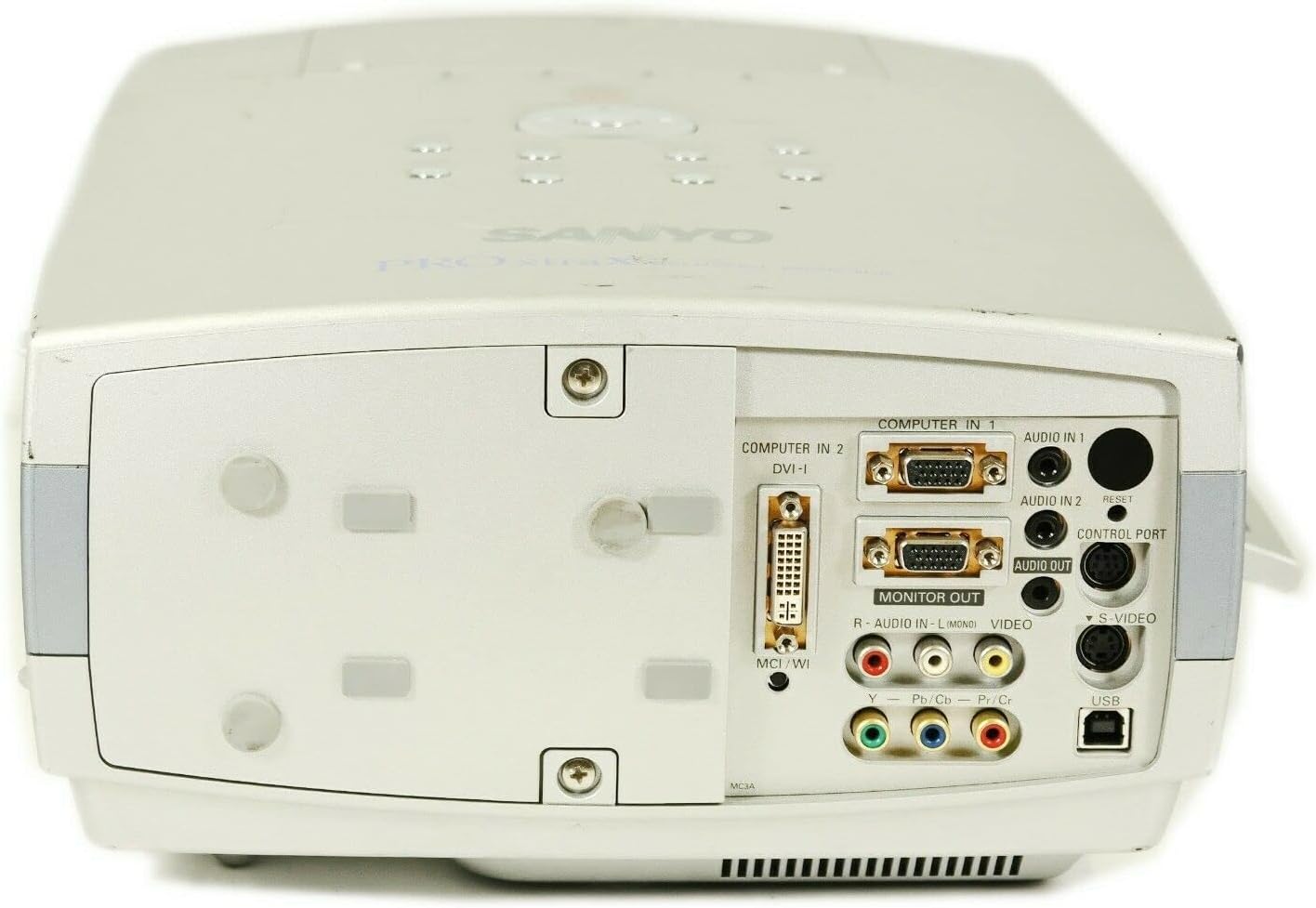
Figure 4.2: Rear Connection Panel. Aquesta imatge proporciona una clara view of the projector's rear panel, detailing the various input and output ports including Computer In (VGA), DVI-I, Audio In/Out, Monitor Out, S-Video, Video, and USB ports.
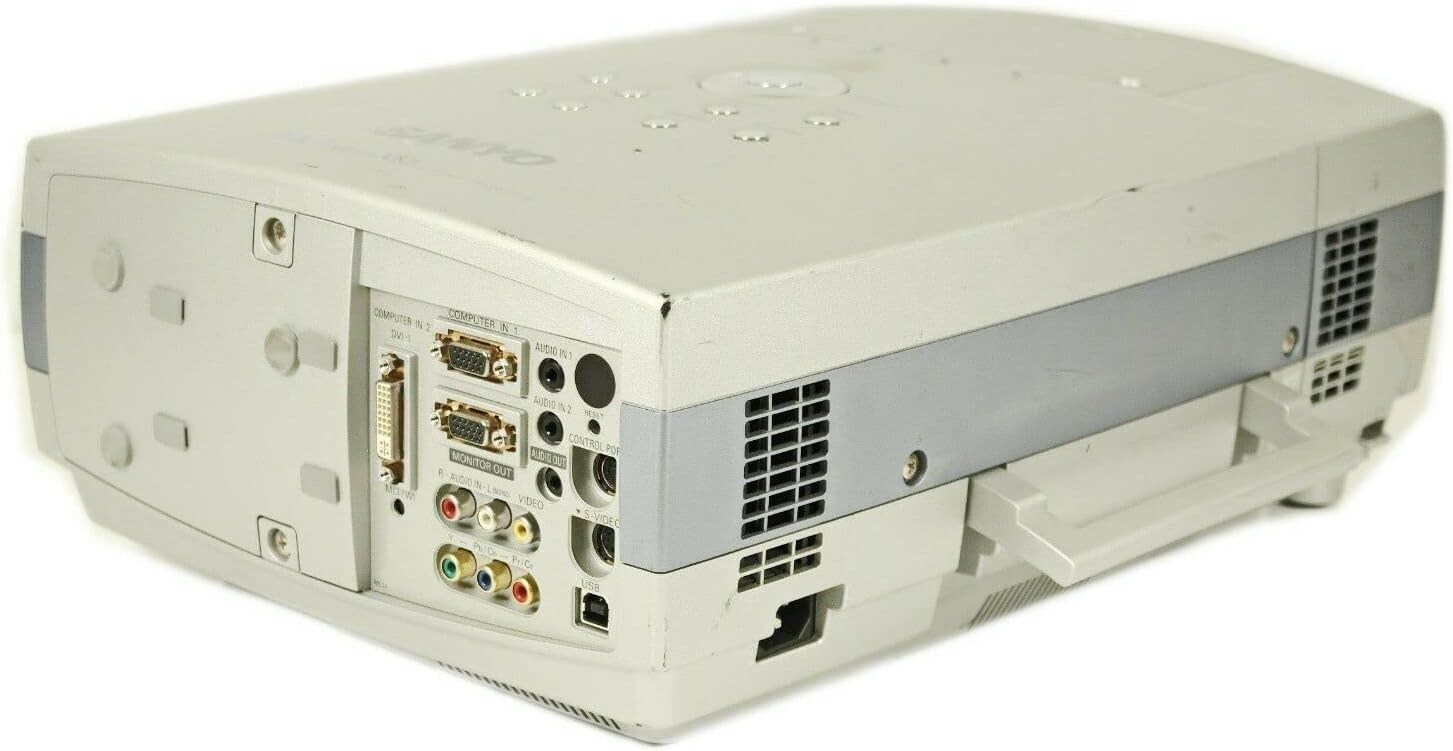
Figura 4.3: Part posterior angular View. This image offers an angled perspective of the rear panel, further illustrating the arrangement of the input and output connections on the Sanyo PLC-XT16 projector.
4.3 Amunt View i Panell de control
The top panel houses the main control buttons for operating the projector.

Figura 4.4: Panell de control superior. This image displays the top surface of the projector, featuring the integrated control panel with buttons for power, menu navigation, volume, keystone correction, lens shift, image adjustments, focus, and zoom.
4.4 A baix View
The bottom of the projector includes adjustable feet and product information labels.

Figura 4.5: A baix View. This image shows the underside of the Sanyo PLC-XT16 projector, including the adjustable feet for leveling and the product information label detailing model number and electrical ratings.
5. Configuració
5.1 Col·locació del projector
Position the projector on a stable, level surface or mount it securely. Ensure the projector is within the optimal projection distance for your screen size. Avoid placing it in direct sunlight or near heat sources.
5.2 Connexió de dispositius
Use appropriate cables to connect your video source (e.g., computer, DVD player) to the projector's input ports. The PLC-XT16 supports various connections:
- Computer In 1 (VGA): Connects to a computer's VGA output.
- Computer In 2 (DVI-I): Connects to a computer's DVI output.
- Vídeo (RCA): Connects to standard composite video sources.
- Vídeo S: Connects to S-Video sources for improved picture quality.
- Audio In 1/2 (RCA/Mini-jack): Connects audio from your source device.
- Sortida de monitor (VGA): Allows connection to an external monitor for simultaneous display.
- USB: Per a finalitats de servei o control.
After connecting, ensure all cables are securely fastened.
5.3 Engegada/apagada
- Connect the power cord to the projector and a wall outlet.
- Premeu el botó ON/OFF button on the projector's control panel or the remote control. The power indicator light will illuminate.
- Per apagar, premeu el botó ON/OFF button again. The projector will enter a cooling cycle before fully shutting down. Do not unplug the projector during the cooling cycle.
6. Funcionament del projector
6.1 Controls bàsics
Use the control panel on the projector or the remote control to navigate menus and adjust settings.
- MENÚ: Accedeix al menú de visualització en pantalla (OSD).
- SELECCIONAR: Confirma les seleccions dins del menú OSD.
- ARROW Buttons: Navegueu per les opcions del menú i ajusteu els valors.
- VOLUM +/-: Ajusta el nivell de sortida d'àudio.
- PEDRA CLAVE: Corrects trapezoidal distortion of the image.
- LENS SHIFT: Adjusts the vertical and horizontal position of the image without moving the projector.
- FOCUS: Sharpens the projected image.
- ZOOM: Ajusta la mida de la imatge.
6.2 Selecció d'entrada
Premeu el botó ENTRADA button on the remote or the projector's control panel to cycle through available input sources (Computer 1, Computer 2, Video, S-Video).
6.3 Ajust de la imatge
Access the OSD menu to fine-tune image settings such as brightness, contrast, color, tint, and sharpness. The IMATGE button on the control panel may provide quick access to common image presets.
7. Manteniment
7.1 Lamp Substitució
El projector lamp té una vida útil limitada. Quan el lamp l'indicador s'il·lumina o la imatge es torna tènue, la lamp needs replacement. Refer to the specific instructions in the full service manual for safe lamp replacement procedures. Always allow the projector to cool down completely before attempting lamp substitució.
7.2 Neteja del filtre d'aire
Regularly clean the air filter to maintain optimal cooling and prevent overheating. A clogged filter can reduce lamp life and projector performance.
- Apagueu el projector i desconnecteu el cable d'alimentació.
- Locate the air filter cover (refer to the projector diagram for exact location).
- Remove the filter and gently clean it with a soft brush or vacuum cleaner. Do not wash the filter with water.
- Torneu a inserir el filtre net i torneu a col·locar la tapa.
7.3 Neteja general
Netegeu el projector casing with a soft, dry cloth. For stubborn stains, use a slightly damp cloth with a mild, non-abrasive cleaner. Do not use harsh chemicals or solvents. Clean the lens gently with a lens cleaning cloth and solution designed for optical surfaces.
8. Solució De Problemes
Si teniu problemes amb el projector, consulteu els problemes i solucions més comuns següents:
| Problema | Causa possible | Solució |
|---|---|---|
| No es projecta cap imatge | Power cord disconnected, incorrect input source, lamp fracàs. | Check power connection, select correct input, replace lamp si cal. |
| La imatge és borrosa | Desenfocat, distància de projecció incorrecta. | Adjust the focus ring/button, reposition the projector. |
| La imatge és trapezoïdal | Projector no perpendicular a la pantalla. | Use the Keystone correction function. |
| Sense àudio | Volume too low, audio cable disconnected, incorrect audio input. | Increase volume, check audio cable connections, select correct audio input. |
| El projector s'sobreescalfa i s'apaga | Blocked ventilation, dirty air filter. | Ensure clear ventilation, clean the air filter. |
Si el problema persisteix després d'intentar aquestes solucions, poseu-vos en contacte amb personal de servei qualificat.
9. Especificacions
The following are key technical specifications for the Sanyo PLC-XT16 Projector:
- Marca: Sanyo
- Model: PLC-XT16
- Tecnologia de visualització: 3LCD
- Resolució nativa: 1024 x 768 (XGA)
- Resolució de visualització màxima: 1280 x 1024
- Brillantor: 3500 lúmens ANSI
- Tecnologia de connectivitat: USB (for control/service), VGA, DVI-I, Composite Video, S-Video
- Característiques especials: Built-In Speaker, Digital Keystone, Portable, Lens Shift
- Tipus d'altaveu: Integrat
- Primer disponible: 18 d'octubre de 2010
10. Garantia i Suport
For warranty information and technical support, please refer to the warranty card included with your product or visit the official Sanyo support weblloc web. Conserveu el rebut de compra com a comprovant de compra per a reclamacions de garantia.
For further assistance, you may contact Sanyo customer service through their official channels.