
ATI HD3450
ATI Radeon HD 3450 Video Card Instruction Manual
Model: HD3450 (ATI-102-B62902(B))
PCIe x16 Low Profile
Introducció
This manual provides comprehensive instructions for the installation, operation, maintenance, and troubleshooting of your ATI Radeon HD 3450 PCIe x16 Low Profile video card. Please read this manual carefully before installation and use to ensure optimal performance and longevity of your product.
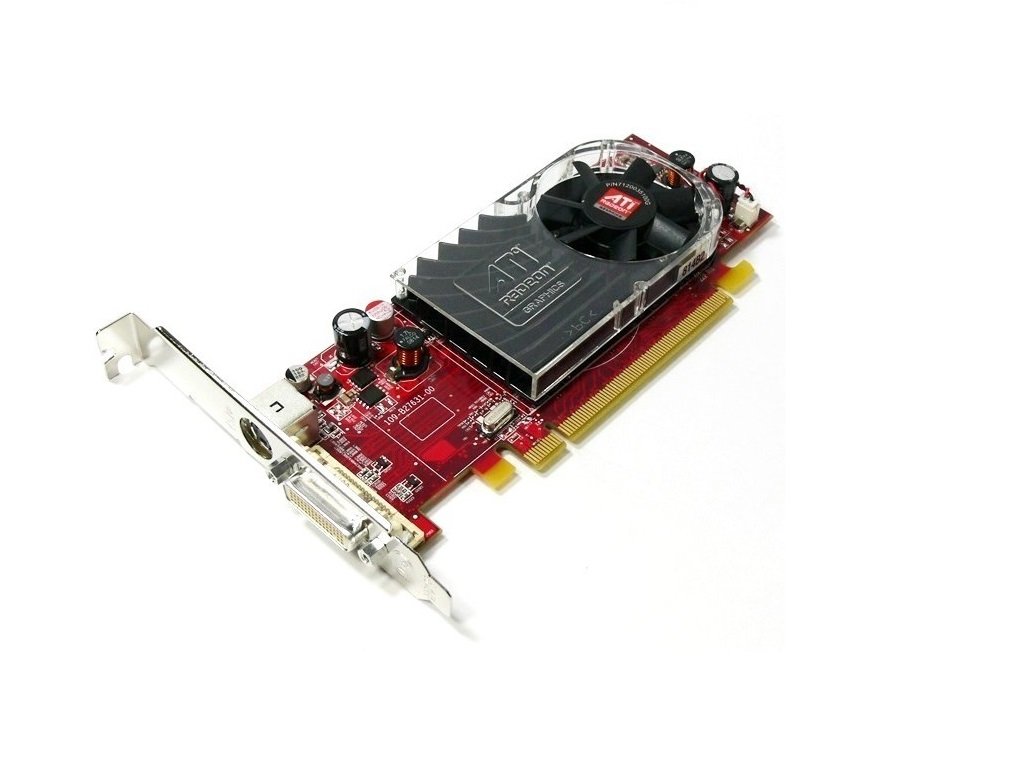
An image showing the ATI Radeon HD 3450 video card. It features a red PCB, a low-profile bracket, a cooling fan with an ATI Radeon logo, and a DVI output port. The PCIe x16 connector is visible at the bottom.
Configuració
1. Instal·lació física
- Apagar: Assegureu-vos que l'ordinador estigui completament apagat i desendollat de la presa de corrent.
- Cas obert: Obriu la carcassa de l'ordinador per accedir a la placa base.
- Locate PCIe x16 Slot: Identify an available PCI Express x16 slot on your motherboard. This is typically the longest PCIe slot.
- Treure la coberta de la ranura: Remove the metal slot cover from the back of your computer case corresponding to the chosen PCIe x16 slot.
- Insert Video Card: Carefully align the video card with the PCIe x16 slot and press down firmly until it is securely seated. You should hear a click from the retention clip.
- Targeta segura: Secure the video card to the computer case with a screw or retention clip.
- Tanca el cas: Tanqueu la carcassa de l'ordinador i torneu a connectar tots els cables.
2. Instal·lació del controlador
- Encès: Power on your computer. The operating system may install a generic display driver automatically.
- Descarrega els controladors: Visit the official AMD (formerly ATI) website or your computer manufacturer's support page to download the latest drivers for the Radeon HD 3450.
- Instal·leu els controladors: Run the downloaded driver installer and follow the on-screen prompts. You may need to restart your computer after installation.
- Verifica la instal·lació: After restarting, verify that the drivers are correctly installed by checking your operating system's Device Manager (Windows) or System Information (Linux/macOS).
En funcionament
Once installed and drivers are updated, your ATI Radeon HD 3450 video card is ready for use. It supports multiple display outputs.
- Connexió de pantalles: Connect your monitor(s) to the available ports on the video card (VGA, DisplayPort, HDMI). Use appropriate cables and adapters.
- Configuració de la pantalla: Access your operating system's display settings to configure resolution, refresh rate, and multiple monitor setups (extend, duplicate).
- AMD Catalyst Control Center (or equivalent): For advanced settings and performance tuning, use the AMD software suite installed with the drivers.
Manteniment
Regular maintenance helps ensure the longevity and stable performance of your video card.
- Eliminació de pols: Periodically open your computer case and gently clean dust from the video card's fan and heatsink using compressed air. Ensure the fan blades do not spin rapidly during cleaning.
- Actualitzacions de controladors: Check the AMD website regularly for updated drivers. Newer drivers often include performance improvements, bug fixes, and compatibility updates.
- Monitorització de la temperatura: Use system monitoring software to keep an eye on the GPU temperature, especially during heavy load. Excessive temperatures can indicate poor airflow or a failing fan.
Resolució de problemes
If you encounter issues with your video card, consider the following troubleshooting steps:
- Sense sortida de pantalla:
- Ensure the monitor is connected securely to the video card and powered on.
- Verify the video card is fully seated in the PCIe slot.
- Prova amb un altre monitor o cable si és possible.
- Driver Issues (e.g., low resolution, artifacts):
- Reinstall the latest drivers from the AMD weblloc.
- Try uninstalling existing drivers completely before installing new ones.
- Inestabilitat/Avaries del sistema:
- Ensure your power supply unit (PSU) meets the minimum requirements for your system, including the video card.
- Check for overheating (refer to Maintenance section).
For persistent issues, consult the AMD support website or your computer manufacturer's support resources.
Especificacions
| Característica | Detall |
|---|---|
| Marca | ATI |
| Número de model | Ati Radeon HD3450 (ATI-102-B62902(B)) |
| Coprocessador gràfic | AMD Radeon |
| Mida de la RAM gràfica | 256 MB |
| Interfície de sortida de vídeo | VGA, DisplayPort, HDMI |
| Interfície | PCIe x16 |
| Factor de forma | Pro baixfile |
| Pes de l'article | 0.01 unces |
| Fabricant | ATI Technologies |
Informació de la garantia
Specific warranty terms for the ATI Radeon HD 3450 video card may vary depending on the retailer and region of purchase. Please refer to your purchase documentation or contact the seller for detailed warranty information. Keep your proof of purchase for any warranty claims.
Suport
For further technical assistance, driver downloads, or product information, please visit the official AMD support website. You may also contact your computer manufacturer's support if the card was pre-installed in a system.
- Suport d'AMD: www.amd.com/support (Please note: ATI is now part of AMD)
Ask a question about this manual
Ask about setup, troubleshooting, compatibility, parts, safety, or missing instructions. Manuals+ will review the question and use this page’s manual context to help answer it.