
Introducció
The Eton American Red Cross FRX2 is a versatile, multi-powered emergency weather radio designed to keep you informed and connected during emergencies. It features AM/FM and NOAA weather band reception, multiple charging options including solar and hand turbine, an LED flashlight, and a USB port for charging small devices. This manual provides detailed instructions for the proper setup, operation, and maintenance of your FRX2 radio.

Figure 1: Eton American Red Cross FRX2 Emergency Weather Radio
Informació de seguretat
- No exposeu la unitat a temperatures extremes, a la llum solar directa durant períodes prolongats ni a una humitat elevada.
- Mantingueu la unitat allunyada de l'aigua i altres líquids.
- Do not attempt to disassemble or modify the radio. This will void the warranty and may cause damage or injury.
- Use only the specified charging methods (USB, solar, hand crank).
- Ensure the hand turbine crank is fully retracted when not in use to prevent damage.
- Eliminar les bateries segons la normativa local.
Producte acabatview
Familiarize yourself with the various components and controls of your FRX2 radio.
Panell frontal

Figura 2: Controls del panell frontal
- Dial d'ajust: Used to select AM, FM, or Weather Band frequencies.
- Control de volum: Ajusta el nivell de sortida d'àudio.
- Selector de banda: Switches between AM, FM, and Weather Band (WB) modes.
- Indicador LED: Shows charging status and alert status.
Side and Back Panels

Figure 3: Side Panel with Solar Panel
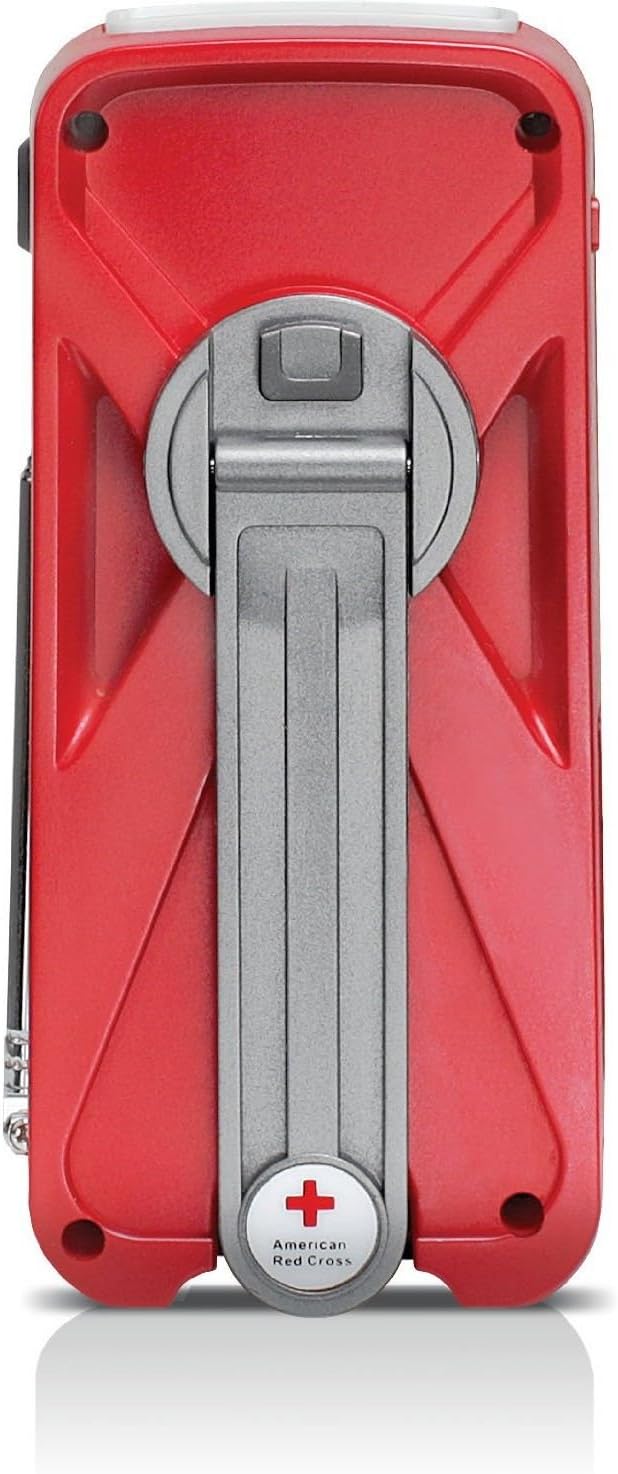
Figure 4: Back Panel with Hand Turbine Crank
- Panell solar: Located on the top/side for solar charging.
- Hand Turbine Crank: Fold-out crank on the back for manual power generation.
- Antena telescòpica: Antena extensible per a una millor recepció de ràdio.
- Llanterna: Integrated LED flashlight.
Ports i connectors
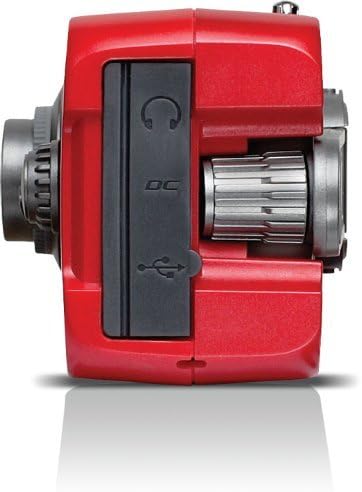
Figura 5: Ports del panell superior
- Mini-USB DC Input: For charging the internal battery via an AC adapter (not included) or computer USB port.
- Sortida USB: Per carregar dispositius externs com ara telèfons intel·ligents.
- Auriculars Jack: Per a una escolta privada.
Configuració
Càrrega inicial
Before first use, fully charge the internal battery using one of the following methods:
- Càrrega USB: Connect the supplied USB cable to the radio's Mini-USB DC input and to a powered USB port (e.g., computer, USB wall adapter). The charging indicator LED will illuminate.
- Càrrega solar: Place the radio with the solar panel facing direct sunlight. The solar panel charges the internal battery. This method is slower and best for maintaining charge or trickle charging.
- Hand Turbine Charging: Unfold the hand turbine crank and rotate it clockwise or counter-clockwise for 1-2 minutes. This provides power for immediate use or a quick boost to the internal battery.
Informació de la bateria
The FRX2 is powered by a built-in 1000mAh rechargeable internal battery. This battery is designed for long-term use and is not user-replaceable. For optimal performance, ensure the battery is regularly charged.
Instruccions de funcionament
Encès/Apagat
Gira el Control de volum knob clockwise to turn the radio on. Rotate it counter-clockwise until it clicks to turn the radio off.
Radio Tuning (AM/FM/Weather Band)
- Esteneu l'antena telescòpica per a una recepció òptima.
- Utilitza el Selector de banda switch to choose between AM, FM, or WB (Weather Band).
- Gira el Marcador de sintonització to find your desired station. The tuning indicator LED will light up when a strong signal is received.
- Ajusteu el Control de volum a un nivell d'escolta còmode.
NOAA Weather Alert Function
In WB mode, the radio can receive NOAA weather alerts. When an alert is broadcast, the radio will automatically switch from standby to the alert broadcast. Ensure the radio is in WB mode to receive these alerts.
Funcionament de la llanterna
Press the flashlight button to cycle through different modes: On, SOS (flashing), and Off. The flashlight provides illumination during power outages o en entorns foscos.
Smartphone Charging (Dump Charge)
The FRX2 can provide a 'dump charge' to small USB-powered devices like smartphones. This means it will transfer its stored battery power to the connected device. It is not designed for a full charge but can provide enough power for emergency communication.

Figure 6: Charging a Smartphone
- Ensure the FRX2's internal battery has sufficient charge.
- Connect your smartphone's USB charging cable to the FRX2's USB output port.
- The radio will begin transferring power to your device.
Manteniment
- Neteja: Netegeu la ràdio amb un suau, damp tela. No utilitzeu netejadors abrasius ni dissolvents.
- Emmagatzematge: Store the radio in a cool, dry place when not in use. For long-term storage, ensure the internal battery is charged every 3-6 months to maintain its lifespan.
- Antena: Handle the telescopic antenna with care to prevent bending or breakage. Retract it when not in use.
Resolució de problemes
| Problema | Causa possible | Solució |
|---|---|---|
| Sense alimentació/La ràdio no s'encén | La bateria interna està esgotada. | Charge the radio using USB, solar, or hand turbine. |
| Mala recepció de ràdio | Antena no estesa, senyal feble o interferències. | Esteneu completament l'antena telescòpica. Intenteu reposicionar la ràdio. |
| Smartphone not charging | Radio battery too low, incorrect cable, or device incompatibility. | Ensure radio is sufficiently charged. Use the correct USB cable. Note that the FRX2 provides a 'dump charge' and may not fully charge all devices. |
| Hand crank is stiff or not charging | Mechanism obstruction or internal issue. | Ensure the crank moves freely. If issues persist, contact customer support. |
Especificacions
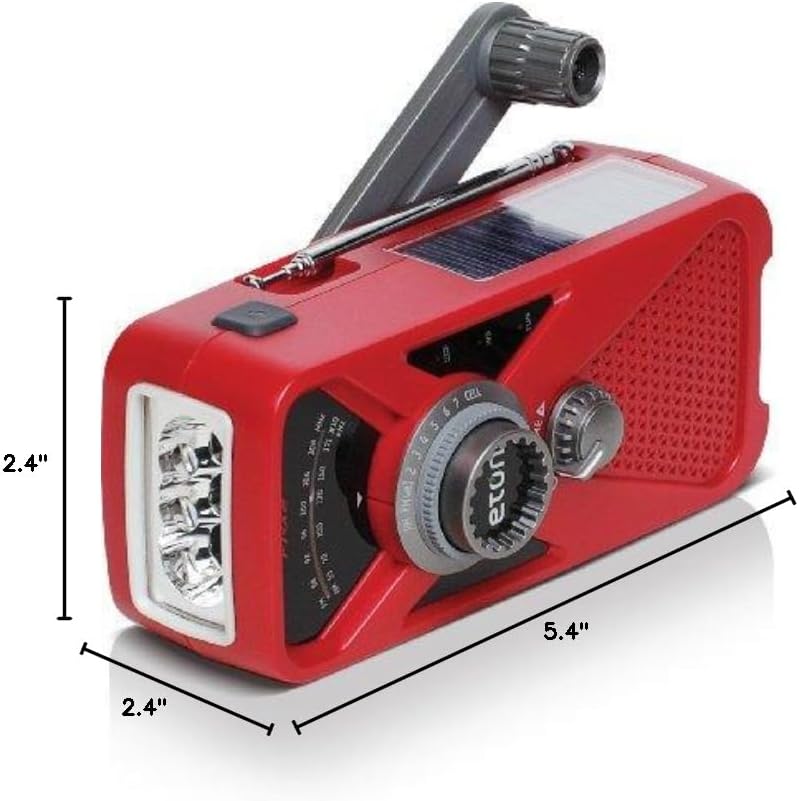
Figura 7: Dimensions del producte
- Model: ARCFRX2WXR
- Dimensions (L x A x A): 5.4" x 2.4" x 2.4"
- Pes: 0.56 lliures
- Bandes de ràdio: AM, FM, banda meteorològica de la NOAA
- Fonts d'alimentació: Internal Rechargeable Battery (1000mAh), Solar Panel, Hand Turbine, Mini-USB DC Input
- Sortida: USB (for charging external devices)
- Característiques: LED Flashlight, Headphone Jack
Informació de la garantia
Eton products are designed for reliability and performance. For specific warranty details, please refer to the warranty card included with your product or visit the official Eton weblloc web. Conserveu el comprovant de compra per a reclamacions de garantia.
Suport
If you have any questions or require assistance with your Eton American Red Cross FRX2 radio, please contact Eton Customer Support:
- Weblloc: www.etoncorp.com
- Correu electrònic: Consulteu weblloc web per a formulari de contacte o adreça de correu electrònic.
- Telèfon: Consulteu weblloc web per obtenir números de telèfon d'assistència actuals.


