
1. Introducció
Gràcies per la compraasing the Medeli M30 61-Key Professional Keyboard. This instrument is designed to provide a rich musical experience with its touch-sensitive keys, extensive voice library, and versatile accompaniment styles. This manual will guide you through the setup, operation, and maintenance of your new keyboard.
Contingut del paquet
- Medeli M30 61-Key Professional Keyboard
- Adaptador d'alimentació
- Descans musical
- Manual d'usuari (aquest document)
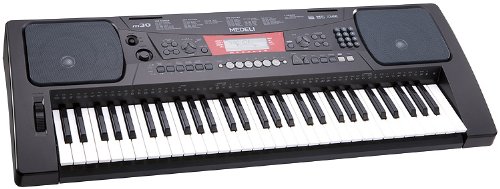
Figure 1: Medeli M30 61-Key Professional Keyboard. This image shows the keyboard from a front-angle view, highlighting its 61 keys, control panel, and display.
2. Instruccions de seguretat
- Font d'alimentació: Feu servir només l'adaptador de corrent especificat. Assegureu-vos que el volumtage coincideix amb la vostra font d'alimentació local.
- Aigua i humitat: Do not expose the keyboard to water or moisture. Avoid placing liquids near the instrument.
- Ventilació: Do not block ventilation openings. Ensure adequate airflow around the keyboard.
- Fonts de calor: Keep the keyboard away from heat sources such as radiators, heat registers, stoves, or other apparatus (including amplificadors) que produeixen calor.
- Neteja: Netegeu només amb un drap sec. No utilitzeu netejadors líquids ni aerosols.
- Manteniment: No intenteu atendre aquest producte vosaltres mateixos. Consulteu tots els serveis a personal de servei qualificat.
3. Configuració
3.1 Desembalatge
Traieu amb cura tots els components de l'embalatge. Conserveu l'embalatge per a futurs transports o emmagatzematge.
3.2 Connexió d'alimentació
- Ensure the keyboard's power switch is in the "OFF" position.
- Connect the power adapter to the DC IN jack on the rear panel of the keyboard.
- Connecteu l'adaptador de corrent a una presa de corrent CA estàndard.
- Turn the power switch to the "ON" position to power on the keyboard.
3.3 Music Rest Installation
Insert the music rest into the designated slots on the top panel of the keyboard. Ensure it is securely seated.
4. Instruccions de funcionament
4.1 Reproducció bàsica
- Encès: Press the [POWER] button to turn on the keyboard.
- Ajust de volum: Use the [MASTER VOLUME] knob to adjust the overall sound level.
- Tocant les tecles: The M30 features 61 touch-sensitive keys. The harder you press, the louder the sound.
4.2 Selecció de veus
The M30 offers 359 different voices (instrument sounds).
- Premeu el botó [VOICE].
- Use the numeric keypad or the [+] / [-] buttons to select a voice number.
- The selected voice name will appear on the display.
4.3 Selecting Styles
The keyboard includes 150 accompaniment styles.
- Premeu el botó [ESTIL].
- Use the numeric keypad or the [+] / [-] buttons to select a style number.
- Press [START/STOP] to begin the accompaniment.
- Adjust the style volume using the [ACCOMPANIMENT VOLUME] button (if available, or general volume).
4.4 Playing Songs
The M30 has 100 built-in songs and 2 demo songs.
- Premeu el botó [SONG].
- Use the numeric keypad or the [+] / [-] buttons to select a song number.
- Press [PLAY/PAUSE] to start or pause the song.
- Press [STOP] to stop the song.
5. Connectivitat
5.1 Connexió USB
The Medeli M30 features a USB port for connecting to a computer. This allows for MIDI data transfer, enabling the keyboard to be used as a MIDI controller or to connect with music software.
- Connect a standard USB cable (Type B to Type A, not included) from the keyboard's USB port to your computer's USB port.
- Your computer should automatically recognize the keyboard as a MIDI device.
- Refer to your music software's documentation for instructions on setting up MIDI input devices.
6. Manteniment
6.1 Neteja
- Wipe the keyboard's surface with a soft, dry cloth.
- Per a la brutícia persistent, lleugerament dampNetegeu el drap amb aigua i un detergent suau i, a continuació, eixugueu-lo immediatament.
- No utilitzeu netejadors abrasius, ceres ni dissolvents.
6.2 Emmagatzematge
- Quan no l'utilitzeu durant períodes prolongats, desconnecteu l'adaptador de corrent.
- Store the keyboard in a cool, dry place, away from direct sunlight and extreme temperatures.
- Consider using a dust cover to protect the keys and control panel.
7. Solució De Problemes
| Problema | Causa possible | Solució |
|---|---|---|
| Sense so | El volum és massa baix o està silenciat. | Increase the [MASTER VOLUME] knob. |
| El teclat no s'encén | L'adaptador de corrent no està connectat o està defectuós. | Ensure power adapter is securely connected and plugged into a working outlet. Check power switch position. |
| Les claus no responen | Keyboard may be in a specific mode (e.g., demo mode). | Try powering off and on again. Refer to the operating section for specific mode exits. |
8. Especificacions
| Característica | Detall |
|---|---|
| Les claus | 61, Touch-Sensitive |
| Veus | 359 |
| Estils | 150 |
| Cançons | 100 (plus 2 Demo Songs) |
| Connectivitat | USB (MIDI) |
| Dimensions (L x A x A) | 93.98 x 35.56 x 15.24 cm |
| Pes | 6.8 kg |
| Número de model | M30 |
| UPC/GTIN | 857285003529 |
9. Garantia i Suport
For warranty information and technical support, please refer to the warranty card included with your product or visit the official Medeli weblloc web. Conserveu el comprovant de compra per a qualsevol reclamació de garantia.
Fabricant: Medeli
Weblloc: www.medeli.com (Nota: Això és un marcador de posició URL, please refer to actual product documentation for correct support contact.)