
1. Introducció
This manual provides essential information for the safe and efficient operation of your Alto Professional TMX160 DFX 16-Channel Powered Mixer. The TMX160 DFX is a versatile audio mixing console featuring 16 input channels, a built-in Alesis digital effects processor, and an integrated power amplifier capable of delivering 750W stereo output at 4Ω or 1500W mono output at 8Ω. It includes 12 XLR microphone inputs with phantom power, 16 line inputs, and stereo RCA inputs, along with a 3-band equalizer on each mono and stereo channel.
Please read this manual thoroughly before using the product to ensure proper setup and operation. Keep this manual for future reference.
2. Informació de seguretat
Seguiu sempre les precaucions de seguretat bàsiques quan utilitzeu aquest producte per reduir el risc d'incendi, descàrrega elèctrica i lesions a les persones.
- Font d'alimentació: Connecteu la unitat només a una presa de corrent de CA del volum especificat.tage.
- Posada a terra: Ensure the unit is properly grounded. Do not defeat the safety purpose of the polarized or grounding-type plug.
- Aigua i humitat: Do not expose this equipment to rain or moisture. Do not use near water.
- Ventilació: Assegureu-vos que hi hagi una ventilació adequada. No bloquegeu les obertures de ventilació.
- Calor: No instal·leu a prop de cap font de calor com ara radiadors, registres de calor, estufes o altres aparells (inclosos amplificadors) que produeixen calor.
- cables: Eviteu que els cables d'alimentació siguin trepitjats o pessigats.
- Manteniment: Demaneu totes les tasques de manteniment a personal de servei qualificat. No intenteu fer el manteniment d'aquest producte vosaltres mateixos.
3. Configuració
3.1 Desembalatge i inspecció
Carefully unpack the TMX160 DFX mixer and inspect it for any signs of damage that may have occurred during transit. If any damage is found, contact your dealer immediately.
3.2 Connexió de potència
Connect the supplied AC power cord to the mixer's power input and then to a suitable grounded AC power outlet. Ensure the mixer's power switch is in the OFF position before connecting to power.
3.3 Connexió d'entrades
The TMX160 DFX offers a variety of input options:
- Entrades de micròfon (MIC 1-12): Use XLR cables to connect microphones to the 12 XLR inputs. Phantom power (+48V) can be activated for condenser microphones.
- Line Inputs (Channels 1-16): Use 1/4-inch TRS or TS cables for line-level instruments or devices. Channels 13/14 and 15/16 are stereo line inputs, also accepting RCA for 2-Track In.
- 2-Track In: Connect external audio sources like CD players or media players using RCA cables.
3.4 Connexió de sortides
Connect your speakers or monitoring system to the appropriate outputs:
- Sortides dels altaveus: Connect passive speakers to the power amplifier outputs. Ensure the impedance of your speakers matches the mixer's output capabilities (e.g., 4Ω for 750W stereo, 8Ω for 1500W mono).
- Monitor/Aux Outputs: Use these outputs to send signals to stage monitors or external effects processors.
- Stereo Out/Mono Out: These outputs provide the main mix signal for recording or connecting to additional sound systems.
3.5 Engegada inicial
After all connections are made, ensure all channel faders and the main mix fader are at their lowest settings. Turn on any connected devices (e.g., microphones, instruments) first, then power on the TMX160 DFX mixer. Finally, turn on your power ampaltaveus o altaveus actius.
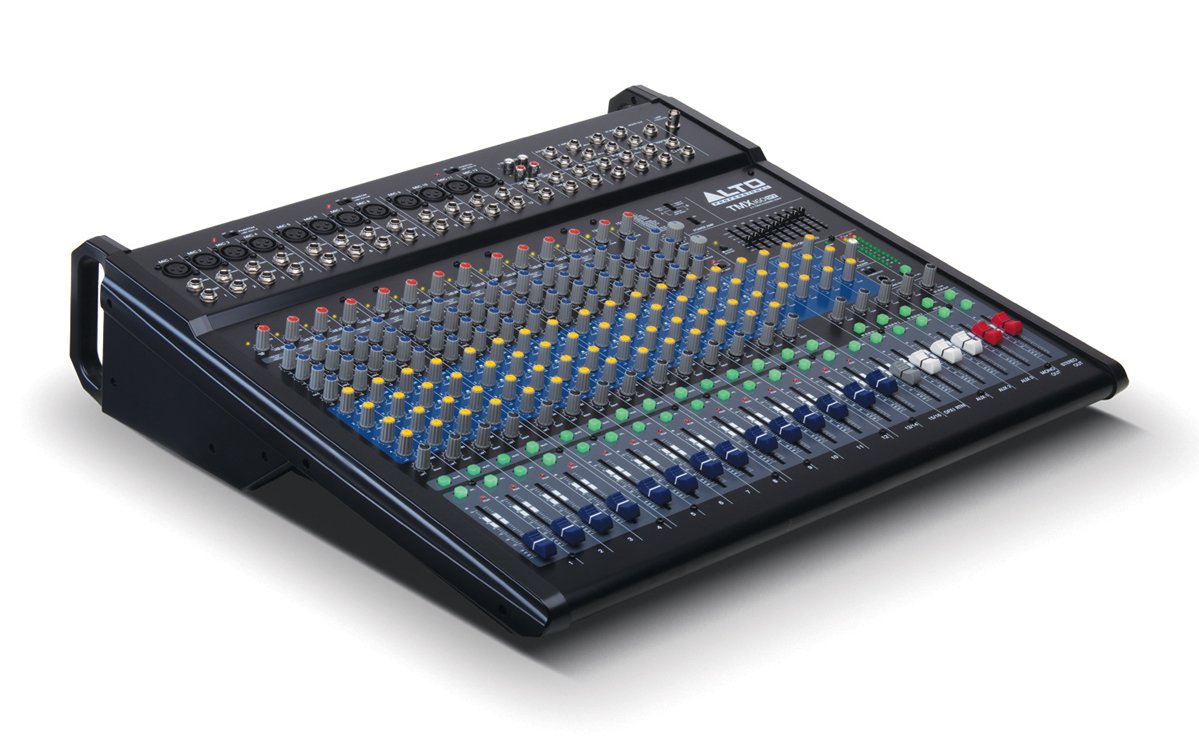
Figura 1: Panell frontal a sobreview of the Alto Professional TMX160 DFX mixer. This image shows the comprehensive layout including microphone and line inputs at the top, channel controls in the middle, and faders at the bottom.
4. Funcionament
4.1 Controls de canal
Each input channel (1-16) features a set of controls to shape its sound:
- GUANY: Adjusts the input sensitivity for the connected microphone or line-level device. Set this to achieve a strong signal without clipping (distortion).
- EQ (alt, mitjà, baix): A 3-band equalizer allows you to boost or cut frequencies (treble, midrange, bass) for each channel.
- Enviaments AUX: Controls the amount of signal sent from the channel to the auxiliary outputs (e.g., for monitors or external effects).
- PA: Positions the channel's signal within the stereo field (left to right).
- LEVEL Fader: Controla el volum general del canal a la mescla principal.
4.2 Secció mestra
The master section controls the overall output of the mixer:
- Main Mix Faders: Control the overall volume of the stereo output.
- DFX (Digital Effects) Controls: Select and adjust parameters for the built-in Alesis digital effects.
- Stereo Graphic EQ: A 7-band graphic equalizer allows for fine-tuning the overall frequency response of the main mix.
- Poder Amp Controls: Adjust the output level and mode (Stereo/Mono) for the integrated power ampmés viu.
4.3 Built-in Alesis Digital Effects
The TMX160 DFX features a high-quality Alesis digital effects processor. Use the DFX controls in the master section to browse and select from various effects such as reverb, delay, chorus, and more. Adjust the effect send levels on individual channels and the overall effect return level in the master section to blend the effects into your mix.
Figura 2: Detallada view of the input channels, showing individual GAIN, EQ, AUX, PAN, and LEVEL controls for precise audio shaping.
5. Manteniment
Proper maintenance ensures the longevity and optimal performance of your TMX160 DFX mixer.
- Neteja: Use a soft, dry cloth to clean the exterior of the mixer. Avoid using abrasive cleaners, solvents, or waxes.
- Pols: Regularly remove dust from the ventilation openings to prevent overheating.
- Emmagatzematge: Quan no l'utilitzeu durant períodes prolongats, guardeu la batedora en un lloc fresc i sec, allunyat de la llum solar directa i de temperatures extremes.
- Faders and Knobs: Avoid applying excessive force to faders and knobs. Keep them free from dust and debris.
6. Solució De Problemes
If you encounter issues with your TMX160 DFX, refer to the following common problems and solutions:
- Sense energia:
- Check if the power cord is securely connected to both the mixer and the AC outlet.
- Verify the AC outlet is functional.
- Assegureu-vos que l'interruptor d'alimentació de la batedora estigui en la posició ON.
- Sense sortida de so:
- Comproveu totes les connexions dels cables d'entrada i sortida.
- Ensure channel GAIN and LEVEL faders are appropriately set.
- Verify the Main Mix faders are raised.
- Check if connected speakers or power amplifiers are turned on and functioning.
- Assegureu-vos el poder Amp controls are set correctly for your speaker configuration.
- So distorsionat:
- Reduce the GAIN setting for the input channel.
- Lower the channel LEVEL fader or Main Mix faders.
- Comproveu si hi ha cables danyats.
- Effects Not Heard:
- Ensure the DFX send controls on the channels are turned up.
- Verify the DFX return level in the master section is raised.
- Check the selected effect program.
If the problem persists after trying these steps, contact Alto Professional customer support.
7. Especificacions
| Característica | Especificació |
|---|---|
| Marca | Alto Professional |
| Model | TMX160 DFX |
| Nombre de canals | 16 |
| Pes de l'article | 12.5 quilos |
| Tecnologia de connectivitat | Auxiliar |
| Entrada d'àudio | XLR, RCA, Line, AUX, 2-Track |
| Fabricant | enMúsica |
| ASIN | B007T1VZ52 |
| Power Output (Stereo) | 750 W @ 4 Ω |
| Power Output (Mono) | 1500 W @ 8 Ω |
| Equalitzador | 3-band EQ per channel, Stereo Graphic EQ |
| Efectes | Built-in Alesis Digital Effector (24-bit A/D and D/A converters) |
| Dimensions (L x P x A) | Aprox. 21.9 x 22.2 x 5.7 polzades (555 x 565 x 145 mm) |
8. Garantia i Suport
For warranty information and technical support, please refer to the documentation included with your product or visit the official Alto Professional weblloc web. Conserveu el rebut de compra com a comprovant de compra per a reclamacions de garantia.
For further assistance, you may contact Alto Professional customer service directly.