
1. Introducció
The IDANCE FREE30 Wired Over-Ear Headphones are designed for a clear audio experience across various devices. Featuring a comfortable over-ear design with aluminum brackets, these headphones include an integrated in-line microphone for communication and control. They are compatible with a wide range of devices including iPhone, iPad, iPod, tablets, and Android smartphones.
2. Contingut del paquet
Si us plau, comproveu que tots els elements siguin presents al paquet:
- IDANCE FREE30 Wired Over-Ear Headphones
- Integrated Audio Cable with 3.5mm Jack and In-line Microphone/Controls
3. Producte acabatview

Figura 1: Davant view of the IDANCE FREE30 Wired Over-Ear Headphones. This image displays the yellow headphones with their adjustable headband, cushioned earcups, and the integrated audio cable.
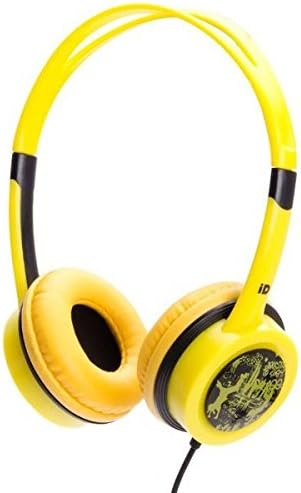
Figura 2: En angle view of the IDANCE FREE30 Wired Over-Ear Headphones. This image provides a different perspective, highlighting the design of the earcups and the aluminum brackets.
The IDANCE FREE30 headphones feature an adjustable overhead band, soft over-ear cushions, and durable aluminum brackets. The audio cable is permanently attached and includes an in-line control unit with a microphone.
4. Configuració i connexió
4.1 Connexió al dispositiu
- Locate the 3.5mm audio jack on your smartphone, tablet, laptop, MP3 player, or PC.
- Insert the 3.5mm connector from the headphone cable firmly into your device's audio jack.
- No additional drivers or software installation are required for basic audio playback and microphone functionality.
4.2 Compatibilitat de dispositius
These headphones are designed for broad compatibility with devices featuring a standard 3.5mm audio output, including:
- iPhone, iPad, iPod (models with 3.5mm jack)
- Android Smartphones and Tablets
- Laptops and PCs
- Reproductors MP3
5. Funcionament
5.1 Ajust de l'ajust
Gently extend or retract the adjustable headband to ensure the earcups sit comfortably over your ears. A proper fit enhances sound quality and comfort during extended use.
5.2 Using In-Line Controls
The integrated in-line control unit allows for convenient management of audio and calls:
- Control de volum: Use the dedicated buttons or slider (depending on model variation) to adjust the audio volume.
- Gestió de trucades: Press the multi-function button to answer or end calls.
- Reproducció de música: Press the multi-function button to play or pause music. Double-press to skip to the next track.
- Silencia l'àudio: Some models may feature a dedicated mute button for the microphone.
5.3 Ús del micròfon
The built-in microphone is designed to pick up your voice clearly during calls or online meetings. Ensure the microphone is positioned appropriately for optimal voice capture.
6. Cura i Manteniment
To ensure the longevity and optimal performance of your IDANCE FREE30 headphones, follow these care instructions:
- Neteja: Use a soft, dry cloth to wipe the earcups and headband. Do not use harsh chemicals or abrasive cleaners.
- Emmagatzematge: Store the headphones in a clean, dry place away from extreme temperatures and direct sunlight. Avoid tangling the cable.
- Durabilitat: The headphones feature durable aluminum brackets. Handle them with care to prevent damage. Avoid excessive bending or twisting of the headband and cable.
- Exposició líquida: Do not expose the headphones to water or other liquids.
7. Solució De Problemes
Si teniu problemes amb els auriculars, consulteu les solucions habituals següents:
- Sense so:
- Assegureu-vos que el connector de 3.5 mm estigui completament inserit al dispositiu.
- Comprova el nivell de volum del dispositiu i del control integrat dels auriculars.
- Test the headphones with a different device to rule out a device-specific issue.
- Ensure the audio output setting on your device is directed to the connected headphones.
- El micròfon no funciona:
- Ensure the 3.5mm jack is fully inserted, as some devices require a full connection for microphone functionality.
- Check your device's privacy settings to ensure the application has permission to access the microphone.
- Verify the microphone input selection in your device's sound settings.
- Prova el micròfon amb una altra aplicació o dispositiu.
- Distorsió del so:
- Lower the volume on your device and headphones.
- Assegureu-vos que la font d'àudio sigui de bona qualitat.
- Check for any damage to the cable or connector.
8. Especificacions
| Nom del model | GRATIS 30 |
| Marca | BALLO |
| Tecnologia de connectivitat | Amb cable |
| Conector d'auriculars | 3.5 mm Jack |
| Col·locació de l'orella | Sobre l'orella |
| Factor de forma | Sobre l'orella |
| Material | Alumini |
| Color | groc |
| Impedància | 32 ohms |
| Pes de l'article | 7 unces (aproximadament 198 grams) |
| Dimensions del producte | 2 x 6 x 6 polzades (aproximadament 5.08 x 15.24 x 15.24 cm) |
| Plataforma de maquinari | Laptop, MP3 Player, PC, Smartphone, Tablet |
9. Garantia i Suport
Per obtenir informació sobre la garantia o assistència tècnica, consulteu la documentació proporcionada en el moment de la compra o poseu-vos en contacte amb el vostre distribuïdor. Conserveu el comprovant de compra per a qualsevol reclamació de garantia.