
Introducció
The Taylor Splash 'N' Drop Digital Timer is a durable and rugged kitchen timer designed to withstand the demands of a busy kitchen environment. It features an IP65 rating for dust and water resistance, and can endure impacts from up to 4 feet. This versatile timer offers both count-up and count-down functions, four adjustable volume settings, a bright blue backlight LCD display, and memory recall for previous settings. It also conveniently switches between timer and clock functions.
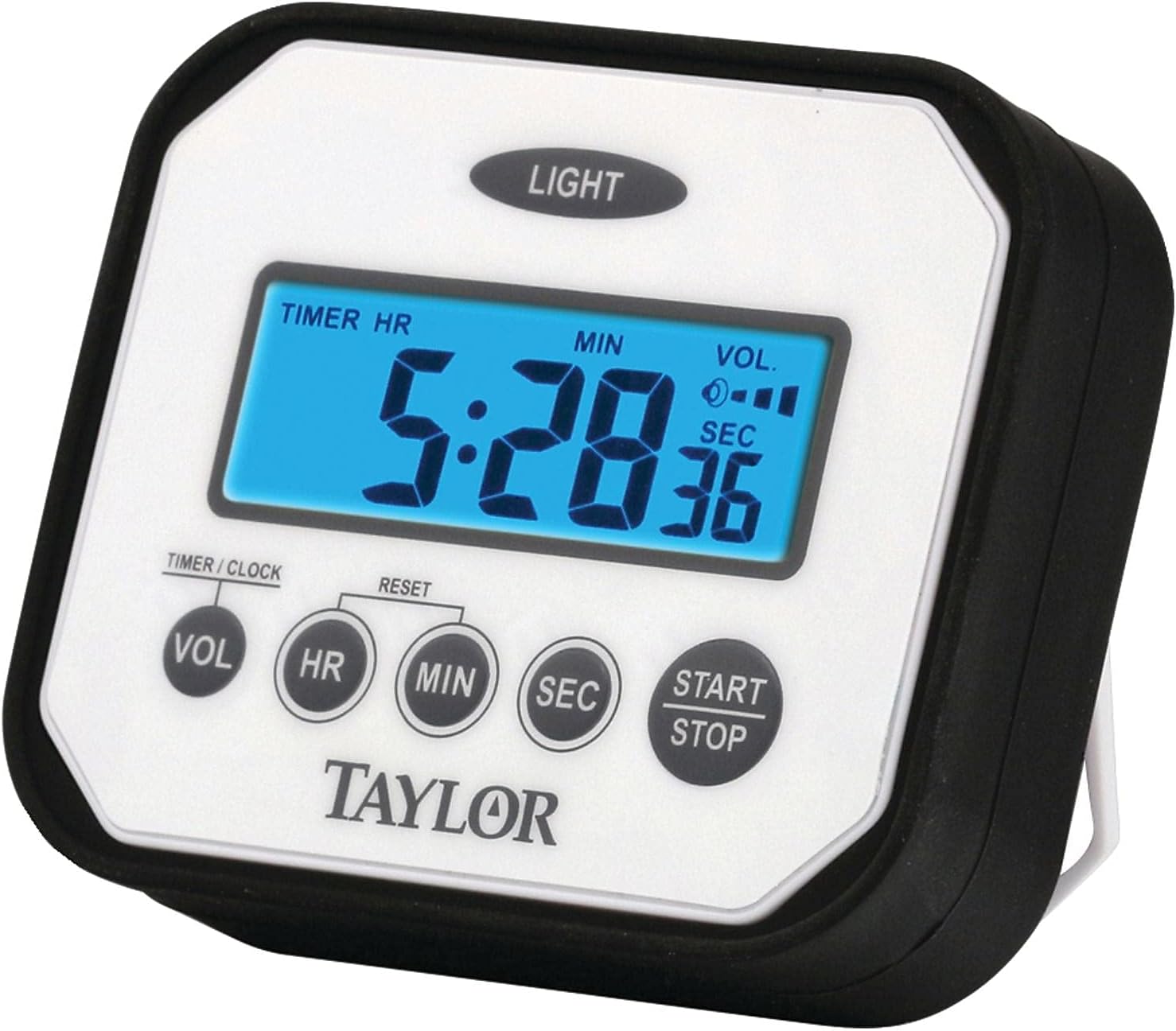
Davant view of the Taylor Splash 'N' Drop Digital Timer, showing the display and control buttons.
Configuració
Instal·lació de la bateria
Your Taylor Splash 'N' Drop Digital Timer requires 2 AAA batteries (included). To install or replace batteries:
- Localitza el compartiment de les piles a la part posterior del temporitzador.
- Obriu la tapa del compartiment de la bateria.
- Introduïu 2 piles AAA, assegurant-vos de la polaritat correcta (+/-).
- Tanqueu bé la tapa del compartiment de la bateria.
Opcions d'ubicació
The timer offers flexible placement options:
- Suport integrat: Utilize the collapsible stand on the back to position the timer upright on a counter or flat surface at a slight angle for easy viewing.
- Muntatge magnètic: The timer features two magnets on the back, allowing it to be securely attached to a stove, refrigerator, or any other metal surface.

The timer is designed to resist liquid splashes, making it suitable for kitchen environments.
Instruccions de funcionament
Configuració del temporitzador (compte enrere)
- To enter Timer Mode, press and hold the VOL button for 3 seconds. The display will show "TIMER HR".
- While in Timer Mode, repeatedly press the VOL button to cycle through the four available ringer volume settings. Select your desired volume.
- Utilitza el HR, MIN, i SEC botons per configurar el temps de compte enrere desitjat.
- Premeu el botó INICI/PARA botó per iniciar el compte enrere.
- To pause or stop the timer at any point, press the INICI/PARA button. To resume, press it again.
- To reset the timer to zero, press the RESET button (located between HR and MIN buttons) while the timer is stopped.
Using as a Stopwatch (Count-Up)
- Ensure the timer is in Timer Mode (hold VOL for 3 seconds if not).
- To reset the timer to zero, press and hold both the HR i MIN buttons simultaneously until the display shows "0:00:00".
- Premeu el botó INICI/PARA button to begin counting up.
- To pause or stop the stopwatch, press the INICI/PARA button. To resume, press it again.
Configuració del rellotge
- To enter Clock Mode, press and hold the VOL button for 3 seconds. The display will show "CLOCK".
- Utilitza el HR, MIN, i SEC buttons to adjust the current time. The display will indicate AM/PM.
- To switch back to Timer Mode, press and hold the VOL botó durant 3 segons de nou.
Ús de la llum de fons
In low light conditions, press the LLUM button (located at the top of the timer) to illuminate the display for better visibility.
Official Product Video Guide
This video provides a visual guide on how to set and operate the Taylor Splash 'N' Drop Digital Timer, including setting the volume, timer, clock, and using the stopwatch function.
Manteniment
- Neteja: Netegeu el temporitzador amb l’anunciamp cloth. Do not immerse in water or use abrasive cleaners. The timer is water-resistant, not waterproof.
- Emmagatzematge: Guardeu el temporitzador en un lloc sec quan no l'utilitzeu.
- Resistència a l'impacte: While designed to be impact resistant up to 4 feet, avoid unnecessary drops to prolong the life of the device.
Resolució de problemes
- La pantalla està en blanc o té poca llum:
- Comproveu la instal·lació de la bateria i assegureu-vos de la polaritat correcta.
- Canvieu les piles si són velles o esgotades.
- Premeu el botó LLUM button to activate the backlight in dim conditions.
- Alarm is too quiet or too loud:
- In Timer Mode, press the VOL button repeatedly to cycle through the four volume settings until the desired level is reached.
- Timer not starting/stopping:
- Assegureu-vos que esteu prement el botó INICI/PARA botó fermament.
- If setting a countdown, ensure a time has been set before pressing START.
- Timer not resetting:
- Ensure the timer is stopped before attempting to reset.
- For countdown timer, press the RESET button. For stopwatch, hold HR i MIN simultàniament.
Especificacions
| Marca | Taylor |
| Número de model | Pro Splash |
| Color | Blanc |
| Material | Plàstic |
| Dimensions del producte | 0.9 "P x 3.5" W x 3" H |
| Pes de l'article | 4 unces |
| Max Timer Duration | 24 hores, 59 minuts, 59 segons |
| Configuració de volum | 4 nivells |
| Classificació de resistència | IP65 (resistent a la pols i a l'aigua) |
| Resistència a l'impacte | Fins a 4 peus |
| Bateries | 2 piles AAA (incloses) |
Garantia i Suport
For detailed warranty information and further support, please refer to the official user manual PDF available for download or contact Taylor customer service.
Manual d'usuari oficial (PDF): Descarregar PDF