
POLY M25
Manual d'usuari dels auriculars Bluetooth Plantronics M25
Model: M25
Introducció
The Plantronics M25 Bluetooth headset is designed for convenient wireless communication and audio playback. It features an extended battery life with DeepSleep mode, ensuring readiness when needed. The headset provides whispered alerts for battery status and connection information, and allows for listening to music, internet radio, or navigation directions while managing calls.
Contingut del paquet
Verifiqueu que tots els elements siguin presents al vostre paquet:
- Auriculars Bluetooth Plantronics M25
- AC Charger (100-240v)
- Clip-on Earloop
Configuració
1. Càrrega dels auriculars
Before first use, fully charge the headset. Connect the AC charger to the headset's charging port. The indicator light will change to show charging status and turn off or change color when fully charged. A full charge can provide up to 5 months of readiness in DeepSleep mode.
2. Vinculació amb un dispositiu
To pair your Plantronics M25 headset with a Bluetooth-enabled device (e.g., smartphone, tablet):
- Assegureu-vos que els auriculars estiguin carregats i apagats.
- Press and hold the Call button on the headset until the indicator light flashes red and blue, indicating pairing mode.
- Al dispositiu, activa el Bluetooth i cerca dispositius nous.
- Select "Plantronics M25" from the list of available devices.
- Si se us demana un codi d'accés, introduïu "0000" (quatre zeros).
- Once paired, the headset's indicator light will stop flashing and a voice prompt will confirm the connection.
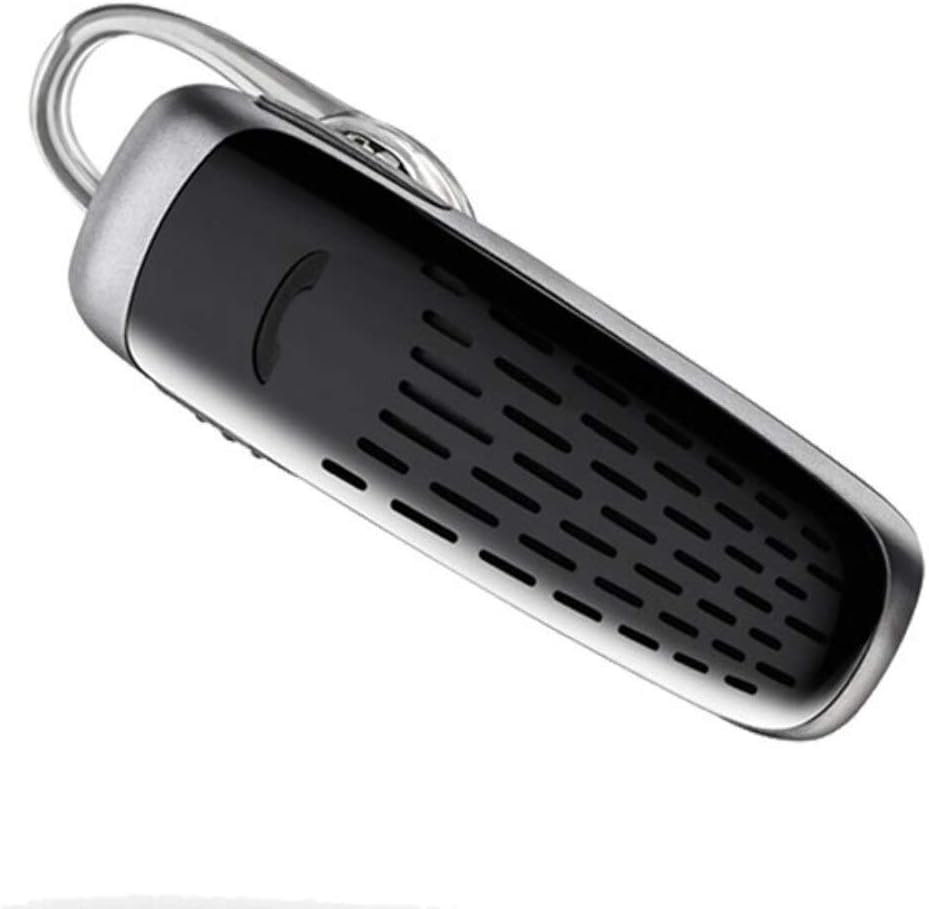
Image: The Plantronics M25 Bluetooth Headset, a compact black and silver device with an earloop, shown from an angled perspective. The call button is visible on the side.
Instruccions de funcionament
Encès/Apagat
- Encès: Press and hold the Power button until the indicator light flashes blue.
- Apagar: Press and hold the Power button until the indicator light flashes red.
Fer i rebre trucades
- Respon a la trucada: Premeu el botó de trucada.
- Finalitzar la trucada: Premeu el botó de trucada.
- Rebutja la trucada: Manteniu premut el botó de trucada durant 2 segons.
- Torna a marcar l'últim número: Premeu dues vegades el botó de trucada.
Reproducció d'àudio
The headset supports streaming audio from your device, including music, podcasts, and GPS directions.
- Reproduir/pausa: Press the Call button during audio playback.
Mode DeepSleep
The headset enters DeepSleep power-saving mode if it is disconnected from your phone for over 90 minutes. To wake it up when it's back in range (within 33 feet), simply tap the Call button.
Manteniment
- Neteja: Use a soft, dry cloth to clean the headset. Do not use liquid cleaners or aerosols.
- Emmagatzematge: Guardeu els auriculars en un lloc fresc i sec, allunyat de temperatures extremes.
- Cura de la bateria: To preserve battery life, avoid fully discharging the battery frequently. Charge the headset regularly, even if not in use.
- Resistència a l'aigua: Aquest dispositiu és No resistent a l'aiguaEviteu l'exposició a l'aigua o a una humitat excessiva.
Resolució de problemes
| Problema | Solució |
|---|---|
| Els auriculars no s'encén. | Ensure the headset is charged. Connect it to the AC charger and allow it to charge for at least 30 minutes before attempting to power on. |
| No puc emparellar els auriculars amb el meu dispositiu. |
|
| No audio or low audio volume. |
|
| Headset frequently disconnects. |
|
Especificacions
| Característica | Detall |
|---|---|
| Nom del model | Plantronics M25 |
| Tecnologia de connectivitat | Bluetooth |
| Tecnologia de comunicació sense fils | Bluetooth |
| Dispositius compatibles | Smartphones, Laptops, Desktops, Tablets, Smart Speakers, Televisions |
| Tipus de control | Control de trucades |
| Pes de l'article | 0.3 unces (aprox. 8.5 grams) |
| Nivell de resistència a l'aigua | No resistent a l'aigua |
| Interval de freqüència | 20 Hz a 20,000 Hz |
| Battery Life (DeepSleep) | Fins a 150 dies |
| Interval Bluetooth | Fins a 10 metres (33 peus) |
| Col·locació de l'orella | A l'orella |
| Factor de forma | One Ear |
| Control de soroll | Cancel·lació activa del soroll |
| Dimensions del producte | 1.85 x 0.59 x 0.35 polzades |
| Color | Negre |
| Fabricant | Plantronics |
Garantia i Suport
Informació de la garantia: Tingueu en compte que aquest producte es ven amb No Warranty or Return as per the provided information. Users are advised to verify product condition upon receipt.
For further assistance or inquiries, please refer to the official POLY support channels or visit their website. Contact information may be available on the product packaging or the manufacturer's official weblloc.
Disclaimer: Product specifications and features are subject to change without notice. Always refer to the latest information provided by the manufacturer.
Documents relacionatsM25


Ask a question about this manual
Ask about setup, troubleshooting, compatibility, parts, safety, or missing instructions. Manuals+ will review the question and use this page’s manual context to help answer it.