
Introducció
The Jabra Music Street2 Bluetooth Stereo Headset is designed to provide high-quality audio and hands-free communication. This manual provides essential information for the proper use, maintenance, and troubleshooting of your device. Please read it carefully before use.
Configuració
1. Càrrega dels auriculars
Before first use, fully charge the headset. Connect the micro-USB charging cable to the charging port on the headset and the other end to a USB power source.
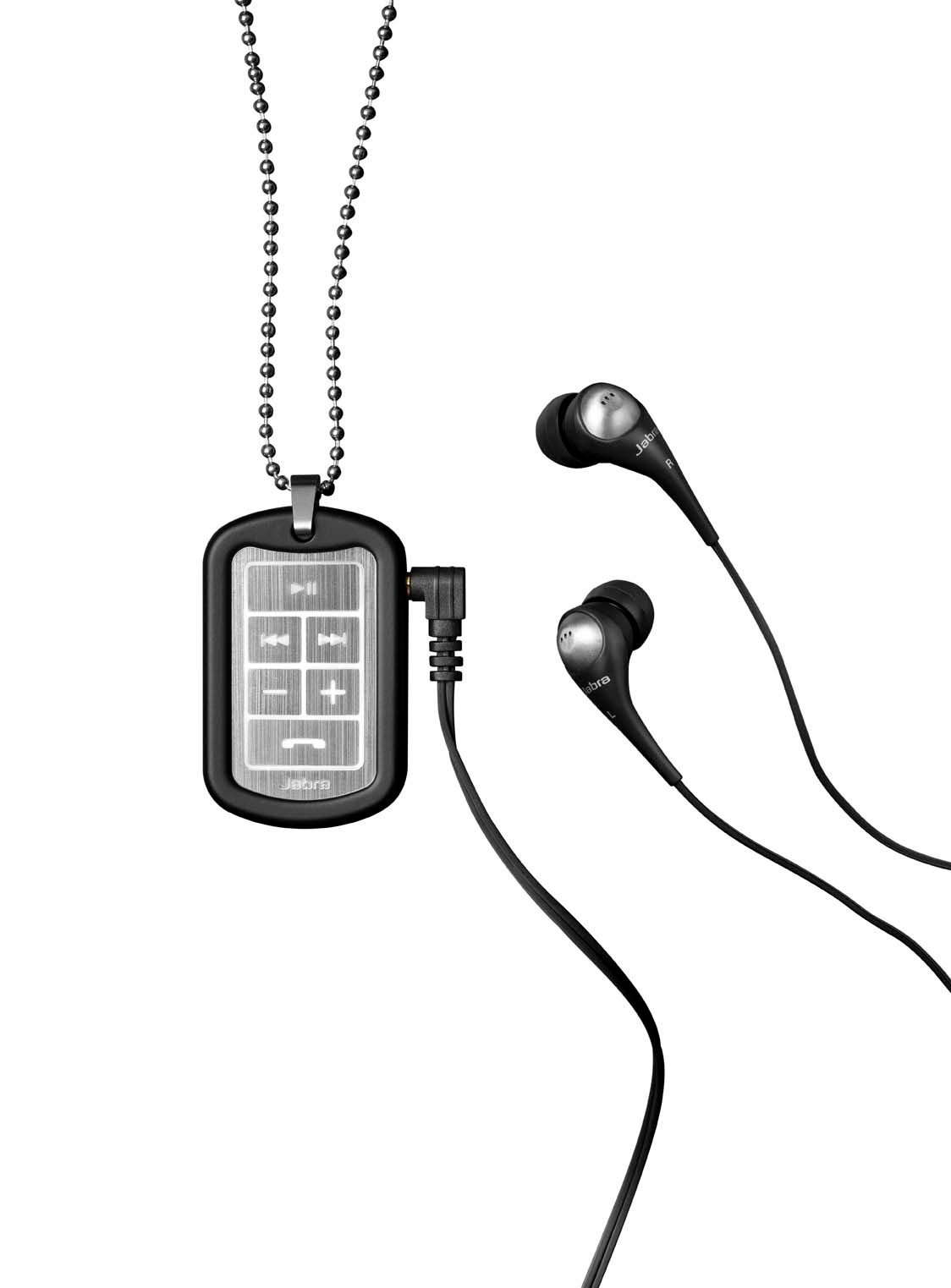
Image: The Jabra Music Street2 headset, highlighting the micro-USB charging port located on the side of the control unit.
- Una càrrega completa sol trigar aproximadament 2 hores.
- L'indicador LED mostrarà l'estat de càrrega (per exemple, vermell per a la càrrega, blau per a la càrrega completa).
2. Vinculació amb un dispositiu Bluetooth
- Assegureu-vos que els auriculars estan apagats.
- Press and hold the Multi-function button (usually the play/pause button) for approximately 5-7 seconds until the LED indicator flashes blue rapidly. This indicates pairing mode.
- Al dispositiu amb Bluetooth (telèfon intel·ligent, tauleta, etc.), aneu a la configuració de Bluetooth i activeu-lo.
- Cerca available devices. "Jabra Street2" should appear in the list.
- Select "Jabra Street2" to connect. If prompted for a passcode, enter "0000" (four zeros).
- Once successfully paired, the LED indicator will flash blue slowly.
The headset can remember multiple paired devices but can only be connected to one at a time.
Instruccions de funcionament
Encès/Apagat
- Encès: Premeu i manteniu premut el botó multifunció fins que el LED parpellegi en blau.
- Apagar: Press and hold the Multi-function button until the LED flashes red and then turns off.
Control de música
- Reproduir/pausa: Premeu el botó multifunció una vegada.
- Pista següent: Press the "Next Track" button (usually marked with a forward arrow).
- Pista anterior: Press the "Previous Track" button (usually marked with a backward arrow).
- Pujar el volum: Premeu el botó "+".
- Baixar el volum: Premeu el botó "-".
Gestió de trucades
- Respon a la trucada: Premeu el botó multifunció una vegada.
- Finalitzar la trucada: Premeu el botó multifunció una vegada durant una trucada.
- Rebutja la trucada: Manteniu premut el botó multifunció durant 2 segons.
- Torna a marcar l'últim número: Double-press the Multi-function button when not on a call.
- Marcatge per veu: Press the Multi-function button once when not on a call (if supported by your phone).
The headset automatically switches between music and calls.
Manteniment
- Keep the headset dry. Moisture can damage the electronic circuits.
- Eviteu les temperatures extremes. Les temperatures altes poden escurçar la vida útil dels dispositius electrònics, fer malbé les bateries i deformar o fondre certs plàstics.
- Do not attempt to open the headset. Unauthorized modifications can damage the unit and void your warranty.
- Clean the headset with a soft, dry cloth. Do not use harsh chemicals or detergents.
- Guardeu els auriculars en un lloc fresc i sec quan no els feu servir durant períodes prolongats.
Resolució de problemes
Sense poder
- Assegureu-vos que els auriculars estiguin completament carregats. Connecteu-los a una font d'alimentació i comproveu l'indicador de càrrega.
No es pot vincular amb el dispositiu
- Make sure the headset is in pairing mode (LED flashing blue rapidly).
- Assegureu-vos que el Bluetooth estigui activat al dispositiu i que estigui dins del seu abast (normalment 10 metres o 33 peus).
- Try turning off and on both the headset and your Bluetooth device.
- If previously paired, try deleting "Jabra Street2" from your device's Bluetooth list and re-pairing.
No hi ha so o qualitat de so deficient
- Comproveu els nivells de volum tant dels auriculars com del dispositiu connectat.
- Assegureu-vos que els auriculars estiguin connectats correctament al dispositiu.
- Apropa't més al dispositiu per evitar interferències.
- Ensure the ear buds are correctly inserted and fit snugly to block external noise.
Calls Not Switching Automatically
- Verify that the headset is the active audio device for calls on your phone's Bluetooth settings.
- Some phone models may require manual selection of the audio output during a call.
Especificacions
| Nom del model | Jabra Music Street2 |
| Versió Bluetooth | 3.0 + EDR |
| abast sense fils | Fins a 10 metres (33 peus) |
| Temps de conversa | Fins a 8 hores |
| Temps d'espera | Fins a 9.5 dies |
| Temps de càrrega | Aproximadament 2 hores |
| Connectivitat | Bluetooth, 3.5 mm Jack (for wired connection if applicable) |
| Característiques | Virtual surround sound, power bass, noise-blocking ear buds, automatic music/call switching |
Garantia i suport
Jabra products are covered by a limited warranty. For specific warranty terms and conditions, please refer to the warranty card included with your product or visit the official Jabra weblloc.
For technical support, frequently asked questions, or to download the latest software/firmware updates, please visit the official Jabra support page:
You may also contact Jabra customer service directly for assistance.