
ATI 100-505746
ATI AMD FirePro W600 Graphics Card User Manual
Model: 100-505746
1. Introducció
This user manual provides comprehensive instructions for the installation, operation, and maintenance of your ATI AMD FirePro W600 2GB GDDR5 6Mini DisplayPort PCI-Express Video Card. The FirePro W600 is designed for professional graphics applications, offering high performance and multi-display capabilities. Please read this manual thoroughly before installing and operating the graphics card to ensure proper functionality and safety.
2. Informació de seguretat
Observeu sempre les següents precaucions de seguretat per evitar danys al producte o lesions personals.
- Assegureu-vos que el sistema informàtic estigui apagat i desendollat de la presa de corrent abans de la instal·lació.
- Discharge any static electricity from your body by touching a grounded metal object (e.g., the computer chassis) before handling the graphics card.
- Handle the graphics card by its edges; avoid touching the components or gold-plated connectors.
- No exposeu la targeta gràfica a la humitat ni a temperatures extremes.
- Only use the card in a well-ventilated computer case to prevent overheating.
3. Contingut del paquet
Verifiqueu que tots els elements siguin presents al vostre paquet:
- ATI AMD FirePro W600 Graphics Card
- Guia d'inici ràpid (si s'inclou)
- Driver CD (if included, otherwise download from manufacturer's weblloc)
- Mini DisplayPort to DVI adapters (quantity may vary, often sold separately)
4. Configuració i instal·lació
4.1 Requisits del sistema
- PCI-Express x16 slot available on motherboard.
- Sufficient power supply (consult your system's power supply specifications).
- Compatible operating system (e.g., Windows 7/8/10, Linux).
- Minimum 2GB system memory.
4.2 Instal·lació de maquinari
- Prepara l'ordinador: Apagueu l'ordinador i desendolleu el cable d'alimentació. Obriu la carcassa de l'ordinador.
- Locate an available PCI-Express x16 slot: Identify an empty PCI-Express x16 slot on your motherboard. Remove the corresponding expansion slot cover from the computer case.
- Instal·leu la targeta gràfica: Carefully align the graphics card with the PCI-Express x16 slot. Press down firmly and evenly until the card is securely seated in the slot. Secure the card with the screw or latch mechanism of your computer case.
- Connect power (if applicable): The FirePro W600 typically does not require additional power connectors beyond the PCIe slot, but always verify your specific model's requirements.
- Tanqueu la carcassa de l'ordinador: Once the card is securely installed, close your computer case and reconnect all cables.
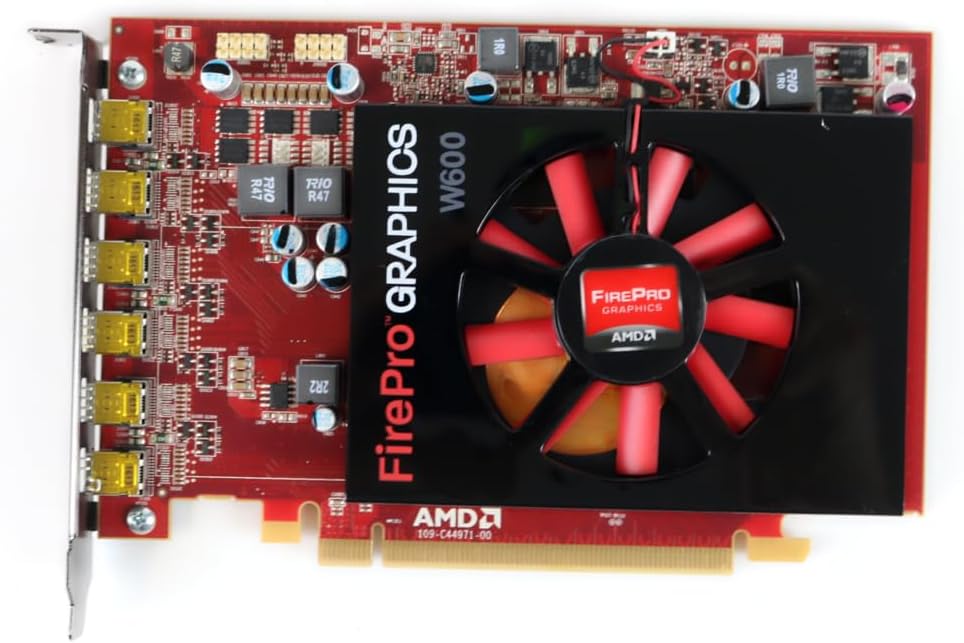
Figura 1: Frontal view of the ATI AMD FirePro W600 graphics card, showing the cooling fan and the FirePro Graphics branding.

Figura 2: posterior view of the ATI AMD FirePro W600 graphics card, displaying the intricate circuitry and components on the back of the PCB.
4.3 Instal·lació del controlador
- Power on your computer: Boot your computer. The operating system may automatically detect the new hardware and install a basic driver.
- Download the latest drivers: For optimal performance and stability, it is highly recommended to download the latest professional drivers directly from the AMD official website. Navigate to the support section and search for "FirePro W600" drivers.
- Install the drivers: Run the downloaded driver installer and follow the on-screen prompts. You may need to restart your computer after installation.
5. Funcionament de la targeta gràfica
5.1 Connexió de pantalles
The ATI AMD FirePro W600 features six Mini DisplayPort outputs. You will need Mini DisplayPort cables or Mini DisplayPort to DVI/HDMI/VGA adapters (active adapters are recommended for multi-monitor setups, especially for AMD Eyefinity features) to connect your monitors.
- Connect your Mini DisplayPort cables or adapters to the Mini DisplayPort outputs on the graphics card.
- Connect the other end of the cables to your monitors.
- Power on your monitors.

Figure 3: Detail of the six Mini DisplayPort outputs on the FirePro W600, indicating its multi-display capability.
5.2 Configuring Multi-Monitor Setups (AMD Eyefinity)
The FirePro W600 supports AMD Eyefinity technology, allowing you to combine multiple displays into a single large desktop or create independent display groups.
- After driver installation, right-click on your desktop and select "AMD Radeon Settings" or "AMD Catalyst Control Center" (depending on driver version).
- Navigate to the "Display" or "Eyefinity" section.
- Follow the on-screen instructions to detect and configure your connected displays. You can arrange displays, set resolutions, and create Eyefinity display groups for a panoramic viewexperiència.
- For optimal performance with Eyefinity, ensure you are using active Mini DisplayPort adapters for any non-DisplayPort monitors.
6. Manteniment
Un manteniment regular ajuda a garantir la longevitat i el rendiment òptim de la targeta gràfica.
- Eliminació de pols: Periodically clean dust from the graphics card's fan and heatsink using compressed air. Ensure the computer is powered off and unplugged before cleaning. Hold the fan blades gently to prevent over-spinning during cleaning.
- Actualitzacions de controladors: Keep your graphics drivers updated by regularly checking the AMD official weblloc per a les últimes versions.
- Ventilació del sistema: Ensure your computer case has adequate airflow to prevent the graphics card from overheating.
7. Solució De Problemes
Si teniu problemes amb la targeta gràfica, consulteu els següents problemes i solucions habituals:
| Problema | Possible causa/solució |
|---|---|
| No display output after installation. |
|
| Driver installation failure. |
|
| Only some monitors are detected in a multi-monitor setup. |
|
| System crashes or freezes during graphics-intensive tasks. |
|
8. Especificacions
| Característica | Detall |
|---|---|
| Chipset | AMD FirePro W600 |
| Rellotge del motor | 600 MHz |
| Memòria | 2 GB GDDR5 |
| Interfície de memòria | 128 bits |
| Màx. Resolució | 4096 x 2304 |
| Connectors | 6x Mini DisplayPorts |
| Interfície | PCI-Express x16 |
| Pes de l'article | 7 unces |
| Dimensions del producte (LxWxH) | 1.57 x 4.21 x 6.45 polzades |
9. Informació de la garantia
For detailed warranty information regarding your ATI AMD FirePro W600 graphics card, please refer to the warranty card included with your product or visit the official ATI/AMD support website. Warranty terms and conditions may vary by region and retailer. Keep your proof of purchase for warranty claims.
10. Suport
For technical support, driver downloads, and frequently asked questions, please visit the official AMD support weblloc:www.amd.com/en/support
You may also contact your retailer or point of purchase for assistance.
Ask a question about this manual
Ask about setup, troubleshooting, compatibility, parts, safety, or missing instructions. Manuals+ will review the question and use this page’s manual context to help answer it.