
beyerdynamic 721360
Beyerdynamic Stegos TB Wireless Boundary Microphone User Manual
Model: 721360
Introducció
This manual provides comprehensive instructions for the setup, operation, and maintenance of your Beyerdynamic Stegos TB Wireless Boundary Microphone. Please read this manual thoroughly before using the device to ensure optimal performance and longevity.
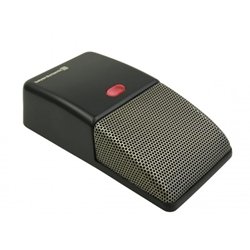
Image: Beyerdynamic Stegos TB Wireless Boundary Microphone. This image displays the compact, black wireless boundary microphone, designed for discreet placement on surfaces like conference tables.
Instruccions importants de seguretat
- No exposeu el dispositiu a l'aigua ni a una humitat excessiva.
- Eviteu temperatures extremes.
- No intenteu obrir ni modificar el dispositiu. Envieu totes les tasques de manteniment a personal qualificat.
- Feu servir només les fonts d'alimentació i els accessoris especificats.
- Mantenir fora de l'abast dels nens.
Contingut del paquet
Verifiqueu que tots els elements siguin presents al paquet:
- Beyerdynamic Stegos TB Wireless Boundary Microphone
- USB Charging Cable (Micro USB)
- Manual d'usuari (aquest document)
Configuració
1. Càrrega del micròfon
- Connect the Micro USB end of the charging cable to the microphone's charging port.
- Connect the standard USB end of the cable to a powered USB port (e.g., computer, USB wall adapter).
- The LED indicator on the microphone will show charging status.
- Un cop estigui completament carregat, desconnecteu el cable de càrrega.
2. Connexió a un dispositiu
The Stegos TB microphone connects wirelessly to compatible devices, typically personal computers, for video conferencing applications.
- Assegureu-vos que el micròfon estigui carregat i encès.
- Activate Bluetooth on your personal computer or compatible device.
- Put the microphone into pairing mode (refer to the device's specific button combination, usually holding a power/pairing button). The LED indicator will typically flash to indicate pairing mode.
- On your computer, search for available Bluetooth devices. Select "Beyerdynamic Stegos TB" from the list.
- Once paired, the LED indicator on the microphone will show a solid light, indicating a successful connection.
- In your computer's sound settings or video conferencing software, select the "Beyerdynamic Stegos TB" as the input audio device.
Instruccions de funcionament
Encès/Apagat
- To power on: Press and hold the power button for approximately 3 seconds. The LED indicator will illuminate.
- To power off: Press and hold the power button for approximately 3 seconds. The LED indicator will turn off.
Funció de silenci
The microphone features a mute function for privacy during calls.
- To mute: Press the mute button once. The LED indicator may change color or flash to indicate mute status.
- To unmute: Press the mute button again. The LED indicator will return to its normal operating state.
Placement for Optimal Performance
For best audio pickup, place the Stegos TB microphone on a flat surface in the center of the participants. Its omnidirectional polar pattern ensures 360-degree sound capture.
Manteniment
Neteja
- Wipe the microphone's exterior with a soft, dry, or slightly damp tela.
- No utilitzeu productes químics agressius, dissolvents ni netejadors abrasius.
- Ensure no liquid enters the microphone grille or ports.
Emmagatzematge
When not in use for extended periods, store the microphone in a cool, dry place, away from direct sunlight and extreme temperatures. It is recommended to fully charge the battery before long-term storage and recharge it every few months to maintain battery health.
Resolució de problemes
| Problema | Causa possible | Solució |
|---|---|---|
| El micròfon no s'encén. | Bateria baixa o esgotada. | Charge the microphone using the provided USB cable. |
| No es pot connectar sense fil. | Bluetooth is off on the device; microphone not in pairing mode; out of range. | Ensure Bluetooth is enabled. Put microphone into pairing mode. Move microphone closer to the device. |
| No hi ha entrada d'àudio del micròfon. | Microphone is muted; incorrect audio input selected on computer/software. | Unmute the microphone. Select "Beyerdynamic Stegos TB" as the input device in your system settings or application. |
| Mala qualitat d'àudio. | Microphone too far from speaker; environmental noise; interference. | Place microphone closer to speakers. Reduce background noise. Ensure no obstructions between microphone and receiving device. |
Especificacions
- Marca: Beyerdynamic
- Model: Stegos TB (721360)
- Tecnologia de connectivitat: Wireless (USB for charging)
- Tipus de connector: Micro USB (per carregar)
- Característica especial: Sense fil
- Dispositius compatibles: Ordinador personal
- Color: Negre
- Patró polar: Omnidireccional
- Font d'alimentació: Funciona amb bateria
- Usos recomanats: Videoconferència
Informació de la garantia
Beyerdynamic products are covered by a limited warranty. For specific warranty terms and conditions, please refer to the warranty card included with your product or visit the official Beyerdynamic weblloc web. Conserveu el comprovant de compra per a reclamacions de garantia.
Note: Warranty details are subject to change and may vary by region.
Suport i Contacte
For further assistance, technical support, or service inquiries, please contact Beyerdynamic customer support through their official weblloc web o la informació de contacte que es proporciona a l'embalatge del producte.
Oficial Weblloc: www.beyerdynamic.com
Please have your model number (721360) and serial number ready when contacting support.
Ask a question about this manual
Ask about setup, troubleshooting, compatibility, parts, safety, or missing instructions. Manuals+ will review the question and use this page’s manual context to help answer it.