
Introducció
This manual provides essential instructions for the safe and effective use of your Pentax K-5 II DSLR camera. Please read this manual thoroughly before using the camera and keep it for future reference. The Pentax K-5 II is a robust, weather-resistant, and cold-resistant DSLR camera featuring a 16.3 MP APS-C CMOS sensor and a highly sensitive SAFOX X AF sensor for precise autofocusing in various lighting conditions.
Precaucions de seguretat
- No exposeu la càmera a temperatures extremes, humitat ni llum solar directa durant períodes prolongats.
- Eviteu deixar caure la càmera o sotmetre-la a impactes forts.
- Mantingueu la càmera allunyada de camps magnètics forts.
- No intenteu desmuntar ni modificar la càmera. Encarregueu tot el manteniment a personal qualificat.
- Use only Pentax-approved accessories and power sources.
- Clean the camera body with a soft, dry cloth. For the lens and sensor, use specialized cleaning tools and solutions.
Configuració
Desembalatge i comprovació del contingut
Abans de continuar, assegureu-vos que tots els elements estiguin presents al paquet:
- Pentax K-5 II Camera Body
- Bateria recarregable de ions de liti
- Carregador de bateria
- Cable USB
- Corretja
- Ocular
- Body Mount Cap
- CD-ROM de programari (si s'inclou)
- Manual d'instruccions (aquest document)
Note: A tripod is typically an optional accessory and may not be included with the camera body kit.
Carregant la bateria
- Insert the provided Lithium-Ion battery into the battery charger.
- Connecteu el carregador a una presa de corrent. L'indicador lluminós de càrrega s'il·luminarà.
- Once charging is complete, the indicator light will change or turn off (refer to charger specific instructions).
- Traieu la bateria del carregador.
Inserting the Battery and SD Card
The battery compartment and SD card slot are located on the side of the camera body.

Figura 1: posterior view of the Pentax K-5 II camera with the SD card slot open. A blue 4GB SD card is partially inserted, and the battery compartment is visible below it. This illustrates the location for inserting both the battery and memory card.
- Open the battery/SD card compartment cover.
- Insert the charged battery into the battery compartment, ensuring correct orientation.
- Insert an SD card into the SD card slot with the label facing the correct direction until it clicks into place.
- Tanqueu la coberta del compartiment de manera segura.
Col·locació d'una lent
- Traieu la tapa del cos de la càmera i la tapa posterior de l'objectiu.
- Alineeu la marca d'índex vermella o blanca de l'objectiu amb la marca corresponent del cos de la càmera.
- Munteu la lent girant-la en sentit horari fins que encaixi al seu lloc.
Instruccions de funcionament
Controls de la càmeraview
Familiarize yourself with the main controls on the camera body.
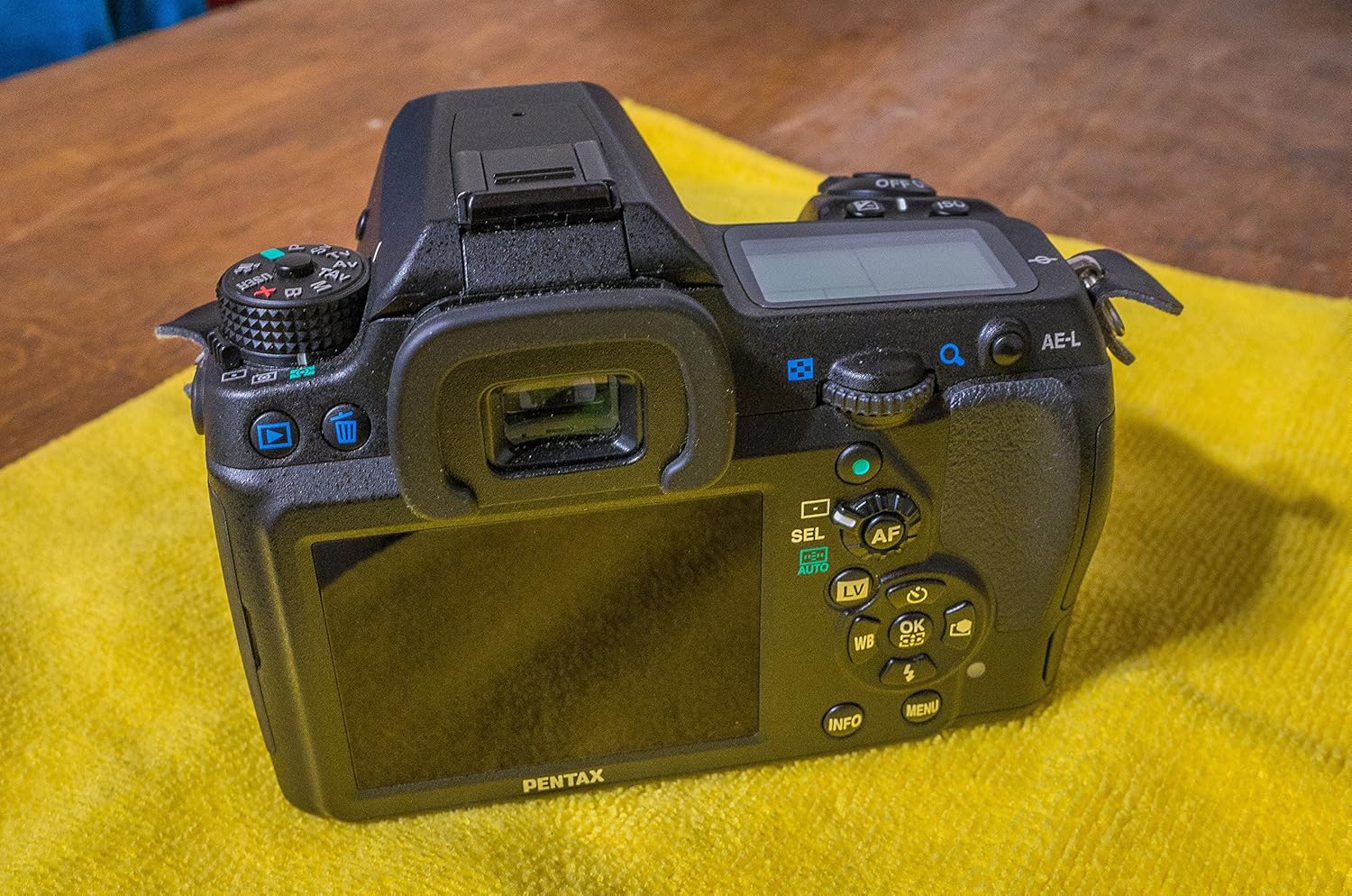
Figura 2: posterior view of the Pentax K-5 II camera, highlighting the LCD screen, viewfinder, and various control buttons. Key controls visible include the four-way controller, AF button, Live View (LV) button, INFO button, MENU button, and AE-L button.
- Interruptor d'alimentació: Located near the shutter button, turns the camera on/off.
- Botó de l'obturador: Premeu fins a la meitat per enfocar, completament per fer una foto.
- Marcador de mode: Selects shooting modes (e.g., P, Av, Tv, M, B, X, USER).
- Dials de control: Front and rear dials adjust settings like aperture and shutter speed.
- Monitor LCD: Displays menus, settings, and live view.
- Botó INFO: Displays or hides shooting information on the LCD.
- Botó MENÚ: Accesses the camera's main menu system.
- Four-Way Controller: Navega pels menús i selecciona opcions.
- AF Button: Activates autofocus.
- LV (Live View) Botó: Toggles Live View mode.
- AE-L Button: Locks exposure.
Tir bàsic
- Activar: Rotate the power switch to ON.
- Seleccioneu el mode: Rotate the mode dial to your desired shooting mode (e.g., P for Program Auto).
- Focus: Mira a través del viewcercador o utilitzar Live View. Press the shutter button halfway to focus. The camera's SAFOX X AF sensor provides broad autofocusing capabilities.
- Disparar: Premeu completament el botó de l'obturador per capturar la imatge.
Key Features for Enhanced Photography
- 16.3 MP APS-C CMOS Sensor: Ofereix imatges d'alta resolució amb un detall excel·lent.
- High Sensitivity ISO Range (80-51200): Allows for shooting in various lighting conditions with reduced noise.
- Pentax Body-Based Shake Reduction: Provides in-camera image stabilization for sharper handheld shots.
- Weather-Sealed and Cold-Proof Design: Ensures durability and reliable operation in challenging environments.
- 7 FPS Continuous Shooting: Captures fast-moving subjects with ease.
- Air Gap Free 3-Inch LCD: Ofertes clares viewing with 921,000 dots of resolution.
Manteniment
Neteja de la càmera
- Cos de la càmera: Feu servir un drap suau i sense borrissol per netejar el cos de la càmera. Per a la brutícia persistent, netegeu lleugeramentampen el drap amb aigua.
- Monitor LCD: Gently wipe with a microfiber cloth designed for optics. Avoid pressing too hard.
- Lent: Use a lens brush to remove dust, then a lens cleaning solution and a microfiber cloth.
- Sensor d'imatge: Cleaning the image sensor should be done with extreme care. If dust spots appear on your images, use the camera's built-in sensor cleaning function first. For persistent dust, consult a professional service center.
Cura de la bateria
- Guardeu les piles en un lloc fresc i sec quan no les utilitzeu.
- Eviteu descarregar completament la bateria amb freqüència per allargar-ne la vida útil.
- No exposeu les bateries a altes temperatures ni a la llum solar directa.
Emmagatzematge
- Quan guardeu la càmera durant períodes prolongats, traieu-ne la bateria.
- Store the camera in a dry, well-ventilated area, preferably with a desiccant to prevent mold and mildew.
- Col·loqueu la tapa del cos i les tapes de l'objectiu per protegir el sensor i els elements de l'objectiu.
Resolució de problemes
| Problema | Causa possible | Solució |
|---|---|---|
| La càmera no s'encén. | La bateria no està carregada o està inserida incorrectament. | Carregueu la bateria completament i torneu-la a inserir correctament. |
| Les imatges són borroses. | Enfocament incorrecte, tremolor de la càmera o lent bruta. | Ensure proper focus, use a faster shutter speed, or clean the lens. Check image stabilization settings. |
| No images are recorded. | La targeta SD està plena, no està inserida o està malmesa. | Insert a formatted SD card, delete unnecessary files, or try a different card. |
| El flaix no es dispara. | Flash mode is off, or battery is low. | Check flash settings. Ensure battery is sufficiently charged. |
| LCD screen is blank or unresponsive. | Camera may be in viewfinder-only mode, or a temporary software glitch. | Press the INFO or LV button. Remove and reinsert the battery to reset the camera. |
Especificacions
| Característica | Detall |
|---|---|
| Model | Pentax K-5 II |
| Tipus de sensor | 16.3 MP APS-C CMOS sensor |
| Interval ISO | 80-51200 (ampliat) |
| Sistema d'enfocament automàtic | SAFOX X AF sensor (-3 EV to +18 EV) |
| Estabilització d'imatge | Sensor-shift (Body-based Shake Reduction) |
| Monitor LCD | 3-inch, 921,000 dots, Air Gap Free |
| Tir continu | Up to 7 frames per second (FPS) |
| Segellat meteorològic | Dustproof, weather-resistant, cold-resistant |
| Admet File Format | RAW 14 bits (PEF, DNG), JPEG (Exif 2.3), DCF 2.0 |
| Muntatges compatibles | Pentax KAF2 |
| Dimensions del producte | 5.16 x 2.87 x 3.82 polzades |
| Pes de l'article | 1.68 lliures |
| Bateries | 1 bateria de ions de liti (inclosa) |
Garantia i suport
Informació de la garantia
This product may come with a manufacturer's warranty. Please refer to the warranty card included in your original packaging for specific terms and conditions. For products purchased from certain sellers, a limited warranty may be provided, such as a 90-day parts and labor warranty, or a 14-day satisfaction guarantee. Always retain your proof of purchase.
Note: A specific seller's legal disclaimer mentioned a "FULL 14 DAY NO HASSLE SATISFACTION GUARANTEE AND A 90 DAY PARTS AND LABOR WARRANTY." This applies to specific seller offers and may not be a general manufacturer warranty.
Atenció al client
For technical assistance, service, or inquiries regarding your Pentax K-5 II camera, please contact Pentax customer support. Visit the official Pentax weblloc web per obtenir la informació de contacte i els recursos d'assistència més actualitzats.
Pentax Official Weblloc: Ricoh Imaging (Pentax)