
Introducció
This manual provides detailed instructions for the operation and maintenance of your PENTAX Q10 digital interchangeable lens camera. The PENTAX Q10 is a super-compact and lightweight camera designed to deliver high-quality photography with a 12.4MP CMOS image sensor and improved autofocus performance.
Què hi ha a la caixa
- PENTAX Q10 Camera Body
- 02 Standard Zoom Lens (5-15mm)
- Bateria recarregable de ions de liti
- Carregador de bateria
- Cable USB
- Corretja
- Body Mount Cap
- Tapes d'objectius (davant i posterior)
- CD-ROM de programari
- Manual d'instruccions (aquest document)
Càmera acabadaview

Figura 1: Frontal View (Lens Removed) - This image displays the front of the Pentax Q10 camera body with the lens detached, revealing the image sensor and the Q-mount for interchangeable lenses. The 'PENTAX' logo is visible at the top, and 'SR' (Shake Reduction) is indicated on the grip.
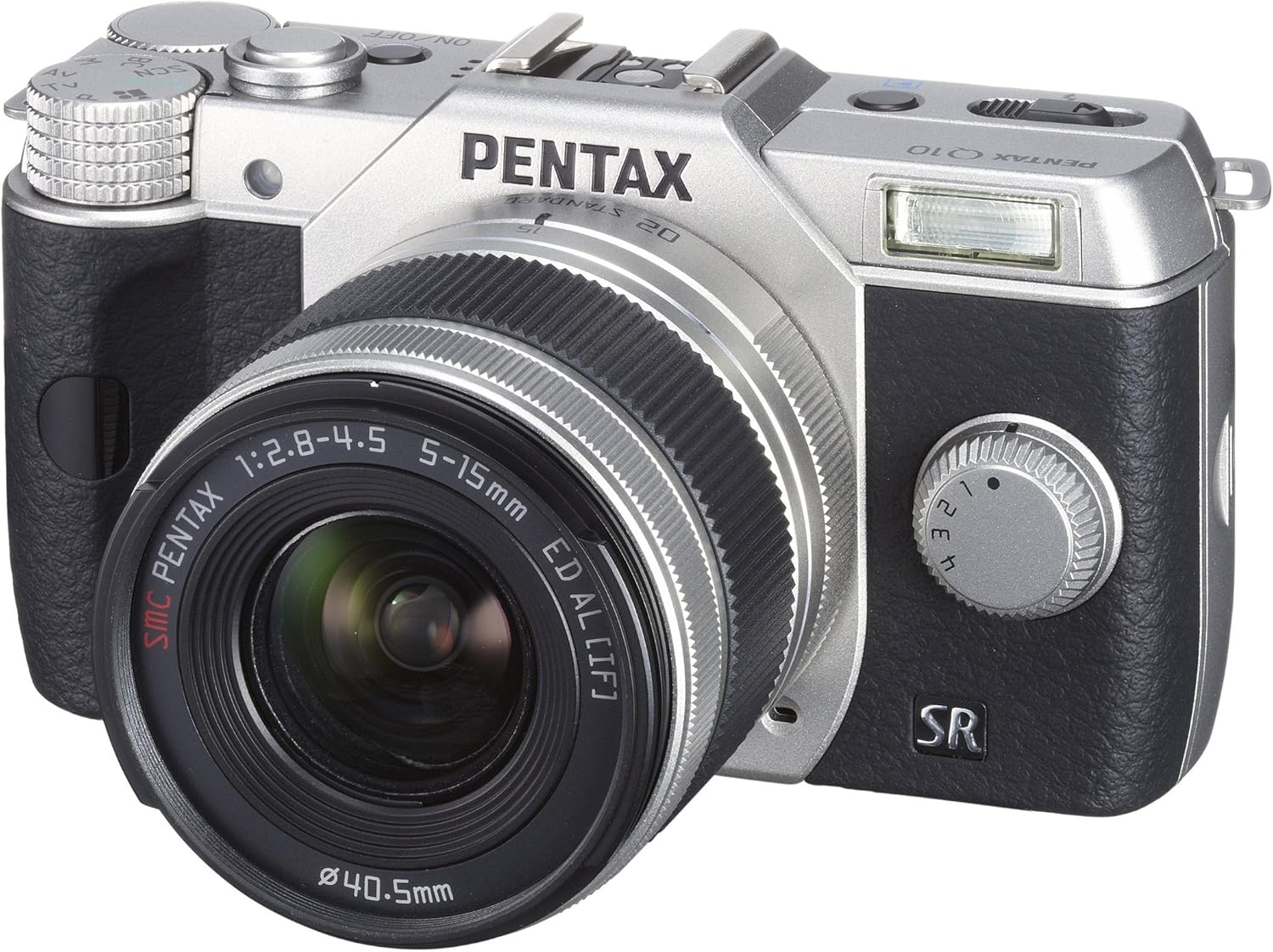
Figura 2: Frontal View with Lens Attached - The Pentax Q10 camera is shown with the 02 Standard Zoom Lens (5-15mm) mounted. This view highlights the compact size of the camera with its standard kit lens.

Figura 3: superior View - This overhead view of the Pentax Q10 shows the main controls on the top panel, including the mode dial (with Auto, P, Av, Tv, M, SCN settings), the power ON/OFF button, the shutter release button, and the hot shoe for external flash units.

Figura 4: Frontal View with Flash Activated - The Pentax Q10 is depicted with its built-in pop-up flash extended, ready for use. This view also shows the 02 Standard Zoom Lens attached.

Figura 5: posterior View - The back of the Pentax Q10 camera features the 3-inch LCD screen, along with various control buttons such as the playback button, delete button, ISO, OK, WB, and menu navigation buttons.
Configuració bàsica
1. Carregant la bateria
Insert the provided rechargeable battery into the battery charger. Connect the charger to a power outlet. The charging indicator light will show the charging status. Once fully charged, remove the battery.
2. Inserció de la bateria i la targeta de memòria
Open the battery/memory card compartment cover located at the bottom of the camera. Insert the charged battery with the correct orientation until it clicks into place. Insert an SD/SDHC/SDXC memory card into the card slot until it locks. Close the compartment cover securely.
3. Col·locació de la lent
Align the red dot on the lens with the red dot on the camera's lens mount. Rotate the lens clockwise until it clicks into place. To remove the lens, press the lens release button on the camera body and rotate the lens counter-clockwise.
4. Configuració inicial
Upon first power-on, the camera may prompt you to set the date, time, and language. Follow the on-screen instructions using the control buttons and LCD screen.
Funcionament de la càmera
Encès/Apagat
Premeu el botó ON/OFF button located on the top panel to power the camera on or off.
Modes de tir
Gireu el selector de mode a la part superior de la càmera per seleccionar el mode de fotografia desitjat:
- Automàtic: Fully automatic shooting for ease of use.
- P (Programa AE): Camera sets aperture and shutter speed, but allows for program shift.
- Av (AE amb prioritat d'obertura): Tu ajustes l'obertura del diafragma, la càmera ajusta la velocitat d'obturació.
- TV (Prioritat d'obturació AE): Tu ajustes la velocitat d'obturació, la càmera ajusta l'obertura.
- M (Manual): Ajusteu tant l'obertura com la velocitat d'obturació.
- SCN (Scene Modes): Pre-set modes for specific situations (e.g., Portrait, Landscape, Night Scene, Macro, Blue Sky, Forest, Blur control).
Fer Fotos
- Select a shooting mode using the mode dial.
- Enquadra la foto amb el monitor LCD.
- Press the shutter release button halfway down to focus. The camera will confirm focus.
- Press the shutter release button fully to take the picture.
Gravació de vídeo
The PENTAX Q10 supports Full 1080p HD video recording at 30 frames per second with H.264 compression. To record video:
- Switch the camera to movie mode (if available on the mode dial or via menu setting).
- Press the dedicated movie recording button (if present) or the shutter release button to start recording.
- Torneu a prémer el botó per aturar la gravació.
Operació Flash
The camera features a built-in pop-up flash. To activate the flash, slide the flash release lever. The flash has various modes (e.g., Auto, Flash On, Red-eye Reduction) which can be selected via the camera's menu or dedicated flash button.
Sistema d'enfocament automàtic
The PENTAX Q10 utilizes a contrast detection autofocus system with 25 autofocus points. Available AF modes include Continuous, Face Detection, Multi-area, Selective single-point, Single, and Tracking. Select the appropriate AF mode from the camera's menu to suit your shooting conditions.
Estabilització d'imatge
The camera incorporates a sensor-shift shake reduction system to minimize blur caused by camera shake, especially in low light conditions or when using longer focal lengths.
Manteniment
Cleaning the Camera Body
Netegeu el cos de la càmera amb un drap suau i sec. Per a la brutícia persistent, netegeu lleugeramentampen the cloth with water or a mild cleaning solution specifically designed for electronics. Avoid using strong solvents.
Neteja de la lent
Use a lens blower to remove dust from the lens surface. For smudges, use a specialized lens cleaning cloth and lens cleaning fluid. Never touch the lens surface with your fingers.
Neteja del sensor
The PENTAX Q10 features an integrated DRII (Dust Removal II) dust reduction system. If dust spots appear on your images, consult a professional service center for sensor cleaning. Attempting to clean the sensor yourself can cause damage.
Cura de la bateria
Store batteries in a cool, dry place. Do not expose them to extreme temperatures. If the camera will not be used for an extended period, remove the battery.
Resolució de problemes
La càmera no s'encén
- Assegureu-vos que la bateria estigui completament carregada i inserida correctament.
- Comproveu si els contactes de la bateria estan nets.
Cannot Take Pictures
- Verifiqueu que hi ha una targeta de memòria inserida i que hi ha prou espai lliure.
- Check if the lens is properly attached and unlocked.
- Ensure the camera is not in playback mode.
- If the flash is set to a slow sync mode, the shutter may not release immediately.
Les imatges són borroses
- Assegureu-vos que la lent estigui neta.
- Check if the camera is properly focused.
- Use a faster shutter speed or increase ISO in low light conditions.
- Confirm that the image stabilization (SR) is active if needed.
Error de targeta de memòria
- Torneu a inserir la targeta de memòria.
- Prova una targeta de memòria diferent i compatible.
- Formateu la targeta de memòria (nota: això esborrarà totes les dades).
Especificacions
| Nom del model | Pentax Q10 |
| Sensor d'imatge | 12.4 MP Backlit CMOS (1/2.3-inch) |
| Resolució de fixes efectius | 12.4 MP |
| Muntatge de la lent | Pentax Q-mount |
| Estabilització d'imatge | Canvi de sensor |
| Resolució de vídeo | Full HD 1080p (1920x1080) at 30fps (H.264) |
| Mostra | LCD de 3 polzades (460,000 punts) |
| Sensibilitat ISO | ISO ampliat mínim 100 |
| Velocitat d'obturació | 1/8000 a 30 segons |
| Sistema d'enfocament automàtic | Contrast Detection (25 points) |
| Tir continu | Fins a 5 fps |
| Mitjans d'emmagatzematge | Targeta de memòria SD/SDHC/SDXC |
| Connectivitat | HDMI (Type C Mini), USB |
| Pes (aprox.) | 0.44 Pounds (Body only) |
Nota: Les especificacions estan subjectes a canvis sense previ avís.
Garantia i Suport
Informació de la garantia
The PENTAX Q10 camera comes with a 1 anys de garantia de peces i mà d'obra from the date of purchase. Please retain your proof of purchase for warranty claims. This warranty covers manufacturing defects and workmanship under normal use.
Atenció al client
For technical assistance, service, or further inquiries, please visit the official Pentax support weblloc web o poseu-vos en contacte amb el seu departament d'atenció al client. Normalment, podeu trobar la informació de contacte al fabricant weblloc web o a la targeta de garantia inclosa amb el producte.