
1. Introducció
This manual provides essential information for the safe and efficient operation of your AudioCodes Mediant 1000B (M1KB-D2) VoIP router. Please read this manual thoroughly before installation and use, and retain it for future reference. The Mediant 1000B is a compact, cost-effective, and high-performance VoIP media gateway designed for small to medium-sized businesses and branch offices.
2. Informació de seguretat
Observeu les següents precaucions de seguretat per evitar danys al dispositiu i garantir la seguretat de l'usuari:
- Assegureu-vos que el dispositiu estigui connectat a una presa de corrent amb connexió a terra.
- No exposeu el dispositiu a l'aigua, la humitat ni a temperatures extremes.
- Eviteu bloquejar les obertures de ventilació per evitar el sobreescalfament.
- Utilitzeu només l'adaptador d'alimentació subministrat amb el dispositiu.
- No intenteu obrir ni reparar el dispositiu vosaltres mateixos. Encarregueu totes les tasques de manteniment a personal qualificat.
3. Contingut del paquet
Comproveu que el vostre paquet contingui els elements següents:
- AudioCodes Mediant 1000B (M1KB-D2) Unit
- Adaptador d'alimentació
- Cable Ethernet
- Guia d'inici ràpid
Si falta algun article o està malmès, contacteu immediatament amb el vostre venedor.
4. Producte acabatview
The AudioCodes Mediant 1000B (M1KB-D2) is a robust VoIP gateway. Familiarize yourself with its components:
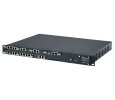
Figura 1: Frontal view of the AudioCodes Mediant 1000B (M1KB-D2) VoIP router, showing status indicators and front panel ports.
4.1 Tauler frontal
- LED d'estat: Indicators for Power, System Status, WAN, LAN, and Voice Port activity.
- Voice Ports: Connect to traditional telephony equipment (e.g., PBX, PSTN lines).
- Botó de restabliment: S'utilitza per restaurar la configuració predeterminada de fàbrica (requereix un clip o una eina similar).
4.2 Panell posterior
- Entrada d'alimentació: Es connecta a l'adaptador de corrent proporcionat.
- Ethernet Ports (WAN/LAN): Connect to your network infrastructure.
- Port de la consola: For direct serial connection for advanced configuration.
5. Configuració
Follow these steps for initial installation:
- Col·locació: Position the Mediant 1000B on a stable, flat surface, ensuring adequate ventilation. Avoid direct sunlight or heat sources.
- Connecteu els cables de xarxa:
- Connect an Ethernet cable from your internet router/modem to the WAN port on the Mediant 1000B.
- Connecteu un cable Ethernet des del LAN port on the Mediant 1000B to your local network switch or a computer for initial configuration.
- Connect Voice Lines (if applicable): Connect your telephony equipment (e.g., PBX, analog phones) to the designated voice ports.
- Connectar l'alimentació: Plug the power adapter into the device's power input, then plug the adapter into a grounded electrical outlet. The Power LED should illuminate.
- Engegada inicial: Allow several minutes for the device to boot up. Observe the status LEDs for normal operation.
- Accés Web Interfície: Obre a web browser on a computer connected to the LAN port. Enter the default IP address (refer to the Quick Start Guide or device label for the specific IP, commonly 192.168.1.1 or 10.0.0.1) to access the configuration interface.
6. Funcionament del dispositiu
Once the device is set up, you can configure and monitor its operation through the webinterfície de gestió basada en
6.1 Configuració bàsica
- Inici de sessió: Use the default username and password (typically "Admin" and "Admin" or similar, check your Quick Start Guide). Change these credentials immediately for security.
- Configuració de la xarxa: Configure WAN and LAN settings, including IP addresses, subnet masks, and DNS servers, according to your network requirements.
- VoIP Settings: Configure SIP trunks, voice codecs, and dial plans to integrate with your VoIP service provider or IP PBX.
6.2 Seguiment
El web interface provides status pages to monitor:
- System status and resource utilization.
- Network connection status.
- Voice port status and call activity.
- System logs for troubleshooting.
7. Manteniment
Regular maintenance ensures optimal performance and longevity of your Mediant 1000B.
- Actualitzacions de firmware: Periodically check the AudioCodes support website for new firmware versions. Update the firmware to benefit from new features, bug fixes, and security enhancements. Follow the instructions provided with the firmware package carefully.
- Neteja: Keep the device clean and free of dust. Use a soft, dry cloth. Do not use liquid cleaners or aerosols.
- Configuració de còpia de seguretat: Regularly back up your device configuration settings through the web interface. This allows for quick restoration in case of a factory reset or device replacement.
- Condicions ambientals: Ensure the device operates within its specified temperature and humidity ranges.
8. Solució De Problemes
Aquesta secció tracta els problemes habituals que podeu trobar:
| Problema | Causa possible | Solució |
|---|---|---|
| El dispositiu no s'encén. | Sense corrent, adaptador de corrent defectuós. | Check power cable connection. Verify power outlet. Test with another power adapter if available. |
| No es pot accedir web interfície. | Adreça IP incorrecta, problema amb el cable de xarxa, tallafocs. | Verify device IP address. Check Ethernet cable connection. Temporarily disable computer firewall. Ensure computer is on the same subnet. |
| No dial tone or calls failing. | VoIP configuration error, network connectivity, service provider issue. | Check VoIP settings (SIP registration, dial plan). Verify internet connectivity. Contact your VoIP service provider. |
| Rendiment lent de la xarxa. | Network congestion, faulty cable, device overload. | Check network cables. Monitor network traffic. Restart the device. |
If the problem persists after attempting these solutions, contact AudioCodes technical support.
9. Especificacions
Key technical specifications for the AudioCodes Mediant 1000B (M1KB-D2):
- Marca: Codis d’àudio
- Número de model: M1KB-D2
- Tecnologia de connectivitat: Bluetooth, Firewire, USB (Note: These may refer to management or auxiliary ports, primary connectivity is Ethernet for VoIP gateway function)
- Protocol de seguretat: WEP, WPA-PSK, WPS
- Suport del sistema operatiu: Linux, Mac OS X v10.4 Tiger, Windows XP Home Edition Service Pack 2 (Note: These typically refer to client OS for management tools, not the device's internal OS)
- Característica especial: WPS (Wi-Fi Protected Setup) (Note: This feature is typically for Wi-Fi devices, and its relevance to a VoIP router like M1KB-D2 might be for an optional Wi-Fi module or a miscategorization in source data.)
- Fabricant: AUDIOCODES, INC.
10. Garantia i Suport
AudioCodes products are covered by a limited warranty. For detailed warranty terms and conditions, please refer to the warranty card included with your product or visit the official AudioCodes website. For technical assistance, product documentation, and software downloads, please visit the AudioCodes support portal or contact your authorized reseller.
Assistència en línia: www.audiocodes.com/support