
Introducció
This manual provides essential instructions for the safe and efficient operation of your VisionTek Pitbull RockDoc Power Portable MP3 Speaker. Please read this manual thoroughly before using the device and retain it for future reference.
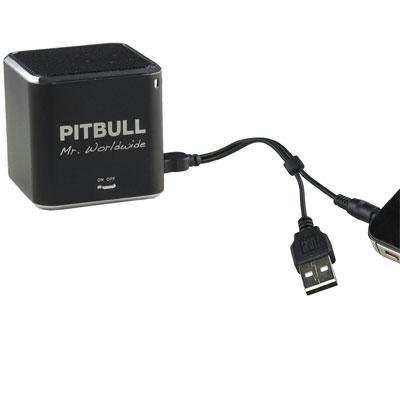
This image displays the compact, black cube-shaped Pitbull RockDoc Power Portable MP3 Speaker. The front face features the 'PITBULL Mr. Worldwide' logo and an 'ON OFF' switch. An integrated cable with a USB connector and a 3.5mm audio jack is shown connected to the speaker, ready for charging or audio input.
Característiques del producte
- Disseny portàtil: Compacte i lleuger per a un fàcil transport.
- Integrated MP3 Player: Features 4GB of internal memory for direct music playback.
- Connectivitat sense fils: Supports Bluetooth for audio streaming from compatible devices.
- Wired Audio Input: Includes a 3.5 mm audio jack for connecting non-Bluetooth devices.
- Funciona amb bateria: Operates on an internal battery for cordless use.
- Sistema d'altaveus de 1 vies: Delivers clear audio output.
Configuració
Carregant l'altaveu
- Locate the integrated USB cable attached to the speaker.
- Connect the USB-A end of the cable to a powered USB port (e.g., computer, USB wall adapter).
- The speaker's indicator light will illuminate to show charging status. Refer to the device for specific light indications.
- Un cop carregat completament, desconnecteu el cable USB.
Encès/Apagat
- To power on, slide the 'ON OFF' switch to the 'ON' position.
- To power off, slide the 'ON OFF' switch to the 'OFF' position.
Connexió de fonts d'àudio
Your speaker supports three primary methods for audio input:
1. Using Internal 4GB Memory (MP3 Playback)
- To load music onto the internal 4GB memory, connect the speaker to a computer using the USB cable. The speaker should appear as a removable storage device.
- Arrossega i deixa anar l'àudio MP3 files into the speaker's storage.
- Una vegada files are transferred, safely eject the speaker from your computer.
- The speaker will automatically play files from its internal memory when powered on and no other audio source is connected.
2. Connexió Bluetooth
- Assegureu-vos que l'altaveu estigui encès.
- Activeu el Bluetooth al vostre telèfon intel·ligent, tauleta o altre dispositiu compatible.
- Cerca available Bluetooth devices. The speaker should appear as "Pitbull RockDoc" or similar.
- Select the speaker from the list to pair. A confirmation sound or light indication may occur upon successful pairing.
3. 3.5 mm Audio Jack Connection
- Locate the integrated 3.5 mm audio jack on the speaker's cable.
- Connect this jack to the headphone output or audio-out port of your external audio device (e.g., MP3 player, phone, laptop).
- Ensure the speaker is powered on. Audio will be routed through this connection.
Instruccions de funcionament
Controls bàsics de reproducció
The speaker features basic controls for media playback. These controls typically include:
- Reproduir/pausa: Press to start or pause audio playback.
- Pista següent: Press to skip to the next audio file.
- Pista anterior: Premeu per tornar al principi de la pista actual o a la pista anterior.
- Control de volum: Adjust the volume level. (Specific button layout not provided, assume standard controls).
Note: When connected via Bluetooth or 3.5mm audio jack, playback controls on the speaker may control the connected device, or you may need to control playback directly from the source device.
Manteniment
Neteja
- Netegeu l'exterior de l'altaveu amb un drap suau, sec i sense borrissol.
- No utilitzeu netejadors abrasius, dissolvents ni productes químics forts.
- Eviteu que entri humitat a cap obertura.
Emmagatzematge
- Guardeu l'altaveu en un lloc fresc i sec, allunyat de la llum solar directa i de temperatures extremes.
- Si l'emmagatzemeu durant un període prolongat, assegureu-vos que la bateria estigui parcialment carregada (al voltant del 50%) per allargar-ne la vida útil.
Resolució de problemes
| Problema | Causa possible | Solució |
|---|---|---|
| Sense poder | La bateria s’ha esgotat | Carregueu l'altaveu amb el cable USB. |
| No hi ha so de l'altaveu | Volume too low; Incorrect input source; Device not paired (Bluetooth); Cable not connected (3.5mm) | Increase speaker volume; Ensure correct mode (internal MP3, Bluetooth, or AUX); Re-pair Bluetooth device; Check 3.5mm cable connection. |
| L'aparellament de Bluetooth falla | L'altaveu no està en mode d'emparellament; el dispositiu és massa lluny; l'interferència | Ensure speaker is discoverable; Move device closer to speaker; Turn off other Bluetooth devices. |
| No es pot transferir files to 4GB memory | Incorrect USB connection; Driver issue; Memory full | Ensure speaker is connected to computer via USB; Try a different USB port/cable; Check available memory space. |
Especificacions
| Característica | Detall |
|---|---|
| Número de model | 900584 |
| Tipus d'altaveu | 1-Way Portable Speaker |
| Memòria interna | 4 GB (per a reproducció de MP3) |
| Connectivitat | Bluetooth, 3.5 mm Audio Jack |
| Font d'alimentació | Funciona amb bateria |
| Potència de sortida màxima dels altaveus | 3 watts |
| Pes de l'article | 159 g |
| Dimensions del producte (LxWxH) | 5 x 5 x 4.9 cm |
| Fabricant | VISIONTEK MASS STORAGE |
Informació de la garantia
For detailed warranty information regarding your VisionTek Pitbull RockDoc Power Portable MP3 Speaker, please refer to the warranty card included with your purchase or contact the manufacturer directly. Amazon's buying options mention a 'Warranty Policy', indicating manufacturer coverage.
Suport
If you require technical assistance or have questions not covered in this manual, please contact VisionTek Mass Storage, the manufacturer of this product. Contact details can typically be found on their official weblloc o embalatge del producte.