
1. Introducció
Gràcies per la compraasing the KLH R5100 Surround Sound Receiver. This receiver is designed to provide high-quality audio and video performance for your home entertainment system. It features multiple audio and video inputs, surround sound processing, and a powerful amplifier to deliver an immersive listening experience. Please read this manual thoroughly before operating the unit to ensure proper setup and optimal performance.
2. Informació important de seguretat
Per reduir el risc de descàrrega elèctrica, incendi o danys a la unitat, observeu les següents precaucions de seguretat:
- Font d'alimentació: Connect the unit only to an AC 120V, 60Hz power supply.
- Ventilació: Assegureu-vos que hi hagi una ventilació adequada. No bloquegeu les obertures de ventilació. Deixeu prou espai al voltant de la unitat per a un flux d'aire adequat.
- Aigua i humitat: No exposeu la unitat a la pluja, la humitat o la humitat excessiva. No col·loqueu objectes plens de líquids, com ara gerros, a sobre de la unitat.
- Calor: Mantingueu la unitat allunyada de fonts de calor com ara radiadors, registres de calor, estufes o altres aparells (inclosos amplificadors) que produeixen calor.
- Neteja: Desendolleu la unitat de la presa de corrent abans de netejar-la. Feu servir un drap sec per netejar-la.
- Manteniment: No intenteu fer el manteniment d'aquesta unitat vosaltres mateixos. Envieu totes les tasques de manteniment a personal de servei qualificat.
- cables: Eviteu que el cable d'alimentació sigui trepitjat o pessigat, especialment als endolls, els receptacles i el punt on surten de la unitat.
3. Contingut del paquet
Si us plau, comproveu que el vostre paquet contingui els elements següents:
- KLH R5100 Surround Sound Receiver
- Unitat de control remot
- Manual d'usuari
- Cables d'àudio/vídeo (tipus RCA)
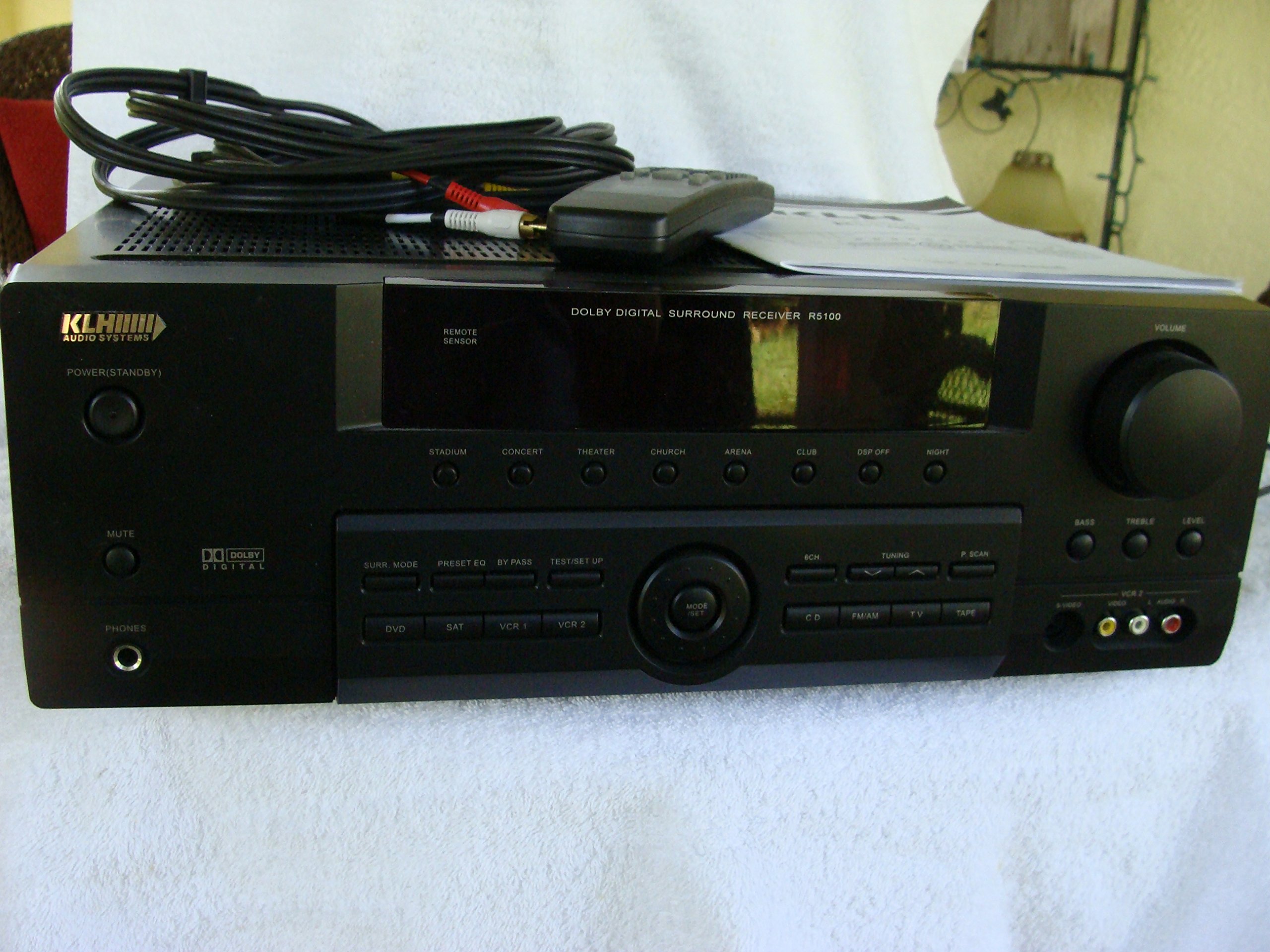
Image: The KLH R5100 receiver, its remote control, user manual, and included audio/video cables.
4. Producte acabatview
4.1 Controls del panell frontal
The front panel provides access to essential controls and indicators for daily operation.

Imatge: Una imatge detallada view of the receiver's front panel, highlighting the display, volume control, and input selection buttons.
- Botó d'encesa: Encén o apaga el receptor.
- Selectors d'entrada: Buttons for DVD, SAT, VCR 1, VCR 2, CD, FM/AM, TV, TAPE to choose your audio/video source.
- Pom de volum: Ajusta el volum de sortida general.
- Surround Mode Buttons: Select various sound fields like Stadium, Concert, Theater, Church, Arena, Club, DSP Off, Night.
- Bass/Treble/Level: Controls for adjusting audio tone and individual channel levels.
- Auriculars Jack: Per a una escolta privada.
4.2 Connexions del panell posterior
The rear panel houses all input and output terminals for connecting your audio and video components, as well as speakers.

Image: The full rear panel of the receiver, displaying all connection ports for audio, video, and speakers.
- Terminals d'altaveus: Connections for Main (Front Left/Right), Center, and Rear (Surround Left/Right) speakers.
- Audio Inputs (RCA): For connecting CD players, tape decks, VCRs, TVs, and other stereo audio sources.
- Video Inputs/Outputs (RCA/S-Video): For connecting video sources like DVD players, VCRs, and TVs.
- Digital Audio Inputs (Optical/Coaxial): For connecting digital audio sources like DVD players or set-top boxes.
- 6CH Direct Input: For connecting external multi-channel decoders or players with 5.1 analog outputs.
- Sortida del subwoofer: Sortida RCA per connectar un subwoofer actiu.
- Terminals d'antena: For FM and AM antennas.
4.3 Unitat de control remot
The remote control provides convenient access to all receiver functions from your listening position.

Imatge: Un primer pla view of the remote control unit, detailing its buttons for various functions.
- Encès/apagat: Encén o apaga el receptor.
- Selectors d'entrada: Dedicated buttons for each input source (DVD, CD, TV, etc.).
- Pujar/baixar el volum: Ajusta el volum mestre.
- Silenciar: Temporarily silences the audio output.
- Mode envoltant: Cycles through available surround sound modes.
- Level/Test: For adjusting individual speaker levels and running a test tone.
- Controls del sintonitzador: For FM/AM station tuning and memory functions.
5. Configuració
5.1 Connexió dels altaveus
Ensure the receiver is unplugged from the power outlet before making any connections.
- Altaveus frontals: Connect your main left and right speakers to the 'MAIN SPEAKERS (8Ω)' terminals. Ensure correct polarity (+ to + and - to -).
- Ponent del centre: Connect your center channel speaker to the 'CENTER SPEAKER (8Ω)' terminals.
- Altaveus posteriors: Connect your surround left and right speakers to the 'REAR SPEAKERS (8Ω)' terminals.
- subwoofer: Connect an active subwoofer to the 'SUBWOOFER OUT' RCA jack using a single RCA cable.

Imatge: Detallada view of the speaker connection terminals on the rear panel.
5.2 Connexió de fonts d'àudio/vídeo
Use appropriate cables (RCA, Optical, Coaxial) to connect your source components to the receiver.
- Reproductor de DVD: Connect the audio output of your DVD player to the 'DVD' audio input jacks (RCA) on the receiver. For digital audio, use either the 'DIGITAL IN OPTICAL' or 'DIGITAL IN COAXIAL' input. Connect the video output to the 'DVD' video input.
- Reproductor de CD: Connect the audio output of your CD player to the 'CD' audio input jacks (RCA).
- TV/Cable Box: Connect the audio output of your TV or cable box to the 'TV' audio input jacks (RCA). Connect video output to the 'TV' video input.
- Altres dispositius: Use 'SAT', 'VCR 1', 'VCR 2', or 'TAPE' inputs for other audio/video components as needed.

Image: A close-up of the digital audio inputs (Coaxial, Optical) and the 6-channel direct input section on the rear panel.
5.3 Connexió de l'antena
Connect the supplied FM and AM antennas to their respective terminals on the rear panel for radio reception.
6. Instruccions de funcionament
6.1 Funcionament bàsic
- Encès: Press the Power button on the front panel or remote control.
- Seleccioneu l'entrada: Press the desired input selector button (e.g., 'DVD', 'CD') on the front panel or remote control to choose your source.
- Ajustar el volum: Turn the Volume knob on the front panel or use the Volume Up/Down buttons on the remote control.
6.2 Surround Sound Modes
The R5100 offers various sound modes to enhance your listening experience:
- Estadi: Simulates the acoustics of a large stadium.
- Concert: Creates a concert hall ambiance.
- Teatre: Optimized for movie playback, enhancing dialogue and effects.
- Església: Replicates the spaciousness of a church.
- Arena: Provides a wide, open sound field.
- Club: Simulates a lively club environment.
- DSP Off: Disables digital sound processing for a direct stereo signal.
- Nit: Reduces dynamic range for late-night listening without disturbing others.
Press the 'SURR. MODE' button on the remote or front panel to cycle through these modes.
Control de 6.3 tons
Use the BASS and TREBLE controls on the front panel or remote to adjust the low and high frequency response. The LEVEL controls allow for fine-tuning of individual speaker output levels.
6.4 Funcionament del sintonitzador
To listen to radio:
- Press the 'FM/AM' input selector.
- Use the 'TUNING' buttons on the front panel or remote to find stations.
- Press 'MEMORY' to store favorite stations, and 'P.SCAN' to scan through presets.
7. Manteniment
To ensure the longevity and optimal performance of your KLH R5100 receiver, follow these maintenance guidelines:
- Neteja: Wipe the exterior surfaces with a soft, dry cloth. Do not use abrasive cleaners, waxes, or solvents as they may damage the finish.
- Ventilació: Regularly check that the ventilation openings are not obstructed by dust or debris. Use a soft brush or vacuum cleaner to gently remove any build-up.
- Cable d'alimentació: Inspect the power cord periodically for any signs of damage. If damaged, discontinue use and contact qualified service personnel.
- Emmagatzematge: Si guardeu la unitat durant un període prolongat, desendolleu-la de la presa de corrent i tapeu-la per protegir-la de la pols.
8. Solució De Problemes
If you encounter problems with your receiver, refer to the following common issues and solutions before seeking professional service.
| Problema | Causa possible | Solució |
|---|---|---|
| Sense poder | Cable d'alimentació desconnectat; presa de corrent no activa | Assegureu-vos que el cable d'alimentació estigui ben connectat; comproveu la presa de corrent amb un altre dispositiu |
| Sense so | Incorrect input selected; Speakers not connected properly; Volume too low; Mute function active | Select correct input source; Check speaker connections and polarity; Increase volume; Deactivate Mute |
| El comandament a distància no funciona | Batteries depleted; Obstruction between remote and receiver; Remote sensor blocked | Replace batteries; Remove any obstructions; Ensure remote sensor on receiver is clear |
| Mala recepció de ràdio | Antena no connectada o mal posicionada | Connect antennas securely; Adjust antenna position for better reception |
| So distorsionat | Input signal too high; Speaker impedance mismatch; Damaged cables | Reduce source volume; Ensure speakers match 8Ω impedance; Check and replace damaged cables |
9. Especificacions
The following are the technical specifications for the KLH R5100 Surround Sound Receiver:
- Número de model: R5100
- Dimensions del producte: 16.88 x 6.88 x 15.75 polzades
- Pes de l'article: 24.2 lliures
- Font d'alimentació: CA 120V, 60Hz
- Consum d'energia: 320W
- Mode de sortida d'àudio: Envoltant
- Configuració del canal de so envoltant: 5.1
- Tecnologia de connectivitat: RCA, 3.5mm Jack, Optical, Coaxial
- Dispositius compatibles: Altaveus
- Tipus de controlador: Remot
- Característica especial: Advanced Room Calibration (as per product listing, though specific details may vary)
- Color: Negre
10. Garantia i Suport
For warranty information and customer support, please refer to the documentation included with your purchase or contact KLH customer service directly. Keep your proof of purchase for any warranty claims.