
Ivation 0124RED
Ivation 24-Inch Oversized LED Digital Wall Clock User Manual
Model: 0124RED
1. Introducció
Gràcies per la compraasing the Ivation Oversized LED Digital Wall Clock. This manual provides essential information for the proper setup, operation, and maintenance of your new clock. Please read these instructions thoroughly before use and retain them for future reference.
2. Contingut del paquet
Verifiqueu que tots els elements que s'enumeren a continuació s'inclouen al vostre paquet:
- Ivation 24-Inch Oversized LED Digital Wall Clock
- Control remot
- AC Power Adapter (10 ft cord)
- Maquinari de muntatge (cargols i ancoratges de paret)

3. Característiques del producte
- Pantalla LED gran: Features jumbo 3.25-inch digits for enhanced visibility.
- Brillantor ajustable: 6 levels of brightness can be adjusted via remote control or back-panel buttons.
- Memòria del temps: Built-in battery retention preserves time and settings during power outages.
- Muntatge versàtil: Designed for both shelf placement and wall mounting with included hardware.
- Comandament a distància: Ajusteu convenientment la configuració des de la distància.
- Opcions de visualització: Shows hours, minutes, and seconds, with AM/PM indicator and 12/24-hour format options.


4. Configuració
4.1 Connexió d'alimentació
- Locate the AC power adapter.
- Plug the small end of the adapter into the power input port on the back of the clock.
- Plug the larger end of the adapter into a standard electrical outlet. The clock display will illuminate.
4.2 Opcions de muntatge
The clock can be placed on a shelf or mounted on a wall.
Col·locació de prestatgeries:
Simply place the clock on a flat, stable surface. Ensure it is positioned where the display is clearly visible and the power cord can reach an outlet without strain.
Muntatge a la paret:
- Identify a suitable location on the wall.
- Using the clock's mounting holes as a guide, mark the positions for drilling.
- Drill pilot holes and insert the provided wall anchors if necessary.
- Insert the screws into the anchors/wall, leaving a small portion exposed.
- Carefully align the clock's mounting holes with the screws and slide the clock down to secure it.
5. Instruccions de funcionament
The clock can be operated using the buttons on the back panel or the included remote control.
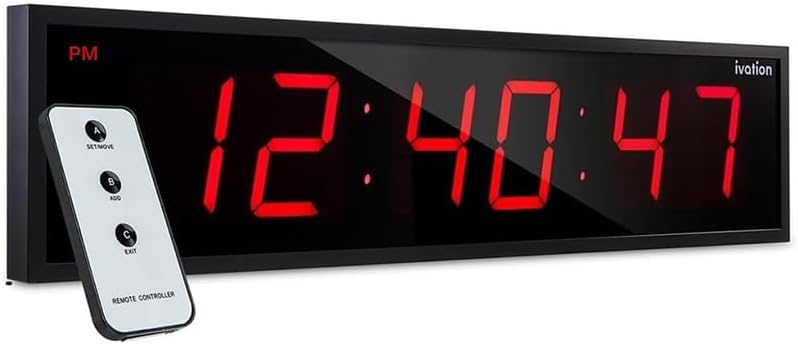

5.1 Configuració de l'hora
Use the remote control or the buttons on the back of the clock (A, B, C) to set the time.
- Premeu el botó SET/MOVE button (A on remote) to enter time setting mode. The hour digits will begin to flash.
- Premeu el botó AFEGIR button (B on remote) to adjust the hour. Continue pressing until the desired hour is displayed. Note: When setting the hours, the clock cycles through 1-12 AM, 1-12 PM, and then 1-24 in 24-hour mode. Stop pressing when your desired format and hour are shown.
- Premeu SET/MOVE again to move to the minute digits. The minute digits will flash.
- Premeu el botó AFEGIR per ajustar els minuts.
- To synchronize seconds with an external time source (e.g., internet time), set the clock approximately one minute ahead. Then, press and hold the Sortida button (C on remote) until the external time source matches the clock's display, then release. Note: Button A does not directly set seconds.
- Premeu Sortida to save the settings and exit time setting mode.
5.2 Ajust de la brillantor
The clock features 6 adjustable brightness levels.
- Use the remote control or the back-panel controls to cycle through the brightness levels. Specific buttons for brightness adjustment may vary; typically, one of the 'ADD' or 'SET/MOVE' buttons, when not in setting mode, might control brightness. Refer to the remote for specific markings if available.
Format 5.3 12/24 hores
The time format is selected during the time setting process.
- When setting the hour (as described in 5.1), repeatedly press the AFEGIR button. The display will cycle through 12-hour (with AM/PM indicator) and 24-hour formats. Stop pressing when your preferred format is shown.
5.4 Flashing Colons
The colons between the hour and minute digits can be set to flash or remain static.
- To stop the colons from flashing, press and hold button A (on the back of the clock or the 'SET/MOVE' button on the remote) until they become static.
- To resume flashing, press and hold button A again until they flash.
6. Manteniment
To ensure the longevity and optimal performance of your Ivation Digital Wall Clock, follow these simple maintenance guidelines:
- Neteja: Use a soft, dry cloth to wipe the clock's surface. Avoid abrasive cleaners, solvents, or chemical sprays, as these can damage the display or casing.
- Col·locació: Mantingueu el rellotge allunyat de la llum solar directa, de temperatures extremes i d'alta humitat.
- Potència: Always use the provided AC power adapter. Disconnect power before cleaning or if the clock will not be used for an extended period.
7. Solució De Problemes
If you encounter issues with your clock, refer to the following troubleshooting steps:
7.1 Clock Not Displaying / No Power
- Assegureu-vos que l'adaptador de corrent estigui ben connectat tant al rellotge com a una presa de corrent que funcioni.
- Test the outlet with another device to confirm it is supplying power.
- Comproveu si l'adaptador de corrent presenta algun dany visible.
7.2 Inexactitud temporal
- Reset the time following the instructions in Section 5.1.
- If the clock consistently gains or loses time significantly, contact customer support.
7.3 LED Segments Not Working
- Unplug the clock, wait 30 seconds, and plug it back in to perform a soft reset.
- If segments remain unlit or partially lit, this may indicate a hardware issue.
7.4 El comandament a distància no respon
- Ensure there are no obstructions between the remote and the clock's sensor.
- Verify the remote's battery is functional and correctly inserted.
- Be aware that other infrared remote controls (e.g., for TVs) might interfere with the clock's remote. Try operating the clock's remote away from other active devices.
8. Especificacions
| Marca | Ivació |
| Número de model | 0124RED |
| Tipus de visualització | LED digital |
| Color | Vermell |
| Dimensions del producte | 24 cm d'amplada x 6 cm d'alçada |
| Alçada dels dígits | 3.25 polzades |
| Font d'alimentació | Elèctric amb cable |
| Tipus de muntatge | Muntatge de paret, muntatge de prestatge |
| Pes de l'article | 3.76 lliures |
| Material | Plastic, Metal Frame |
9. Garantia i Suport
This Ivation Digital Wall Clock comes with a Limited Warranty. For specific details regarding warranty coverage, terms, and conditions, please refer to the warranty information provided at the time of purchase or contact Ivation customer support.
For further assistance, troubleshooting, or to inquire about replacement parts, please visit the official Ivation support weblloc o poseu-vos en contacte amb el seu departament d'atenció al client.
An official user manual in PDF format may also be available for download from the manufacturer's weblloc web o a través del següent enllaç: Ivation Digital Wall Clock User Manual (PDF)
Ask a question about this manual
Ask about setup, troubleshooting, compatibility, parts, safety, or missing instructions. Manuals+ will review the question and use this page’s manual context to help answer it.