
1. Introducció
This manual provides instructions for the OEM RMT-B119A remote control, designed as a replacement or secondary remote for various Sony Blu-ray player models. This remote offers full functionality for controlling your Blu-ray player's features.
Compatible Sony Blu-ray Player Models:
- BDP-BX59
- BDP-S390
- BDP-S590
- BDP-BX110
- BDP-S1100
- BDP-S3100
- BDP-BX310
2. Configuració
2.1 Instal·lació de la bateria
The remote control requires two (2) AAA batteries (not included). Follow these steps to install the batteries:
- Localitzeu la tapa del compartiment de la bateria a la part posterior del comandament a distància.
- Premeu la pestanya i feu lliscar la tapa cap avall per obrir el compartiment.
- Introduïu dues piles AAA, assegurant-vos que els terminals positiu (+) i negatiu (-) s'alineïn correctament amb les marques de l'interior del compartiment.
- Feu lliscar la tapa del compartiment de la bateria fins que faci clic de manera segura.
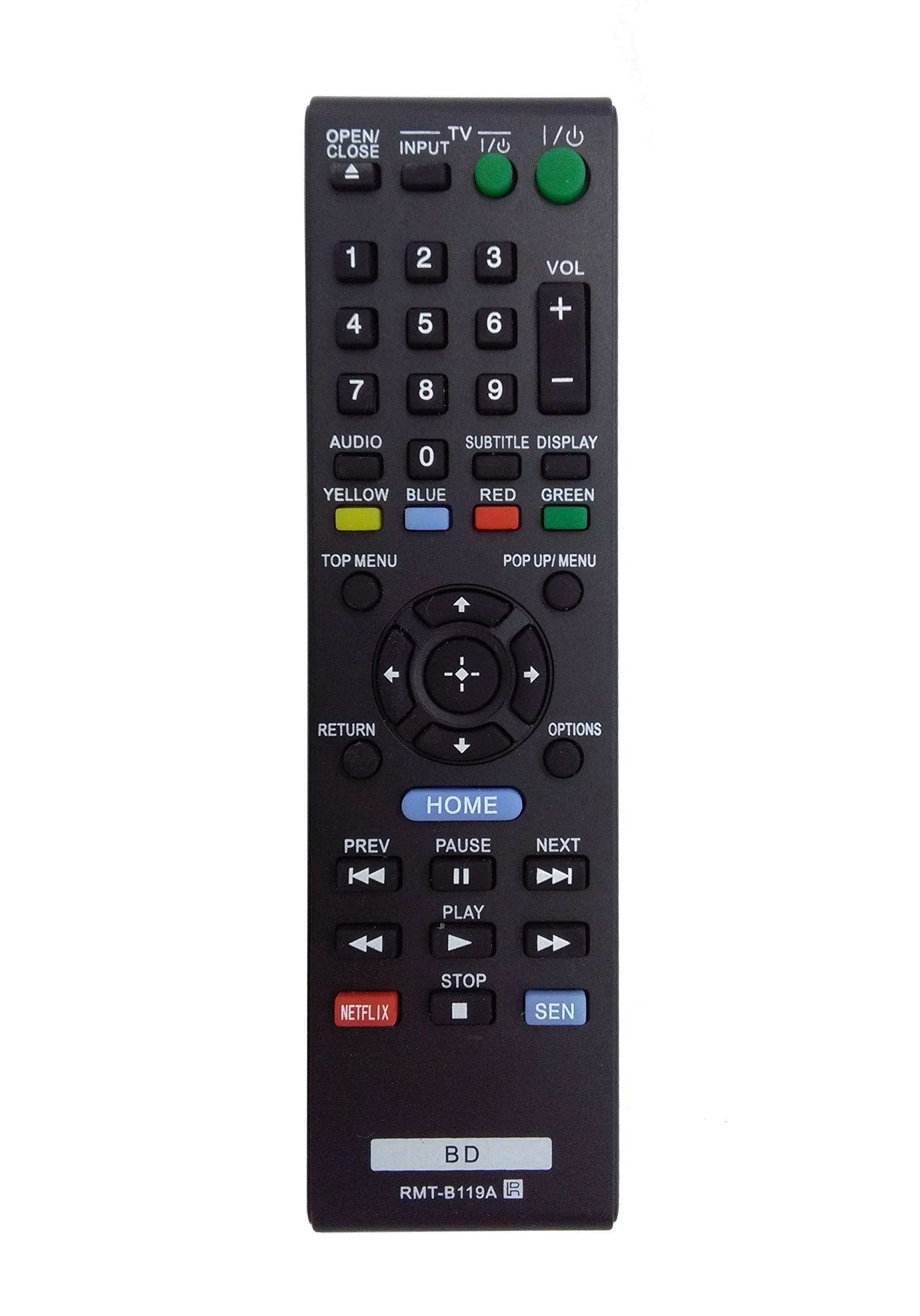
Image: The OEM RMT-B119A remote control, showing the full button layout on the front and a partial view of the open battery compartment on the back, revealing the battery terminals.
3. Instruccions de funcionament
3.1 Remote Control Layout and Button Functions
Familiarize yourself with the buttons on your RMT-B119A remote control. Below is a description of each button's primary function.
Image: The OEM RMT-B119A remote control, displaying all buttons and their labels.
- Alimentació (E/S): Turns the Blu-ray player on or off.
- OPEN/CLOSE (▲): Obre o tanca la safata del disc.
- ENTRADA: Switches the input source on the connected TV (if programmed).
- TV: Switches the remote to TV control mode (if programmed).
- Teclat numèric (0-9): Used for direct track selection, chapter selection, or entering numerical data.
- VOL (+/-): Adjusts the volume level (typically for the connected TV, if programmed).
- ÀUDIO: Changes the audio track or language during playback.
- SUBTITLE DISPLAY: Toggles subtitle display on or off, or cycles through available subtitle languages.
- YELLOW, BLUE, RED, GREEN: Color-coded function buttons, typically used for specific features within menus or interactive content. Their function varies depending on the disc or menu.
- MENÚ PRINCIPAL: Accesses the main menu of the Blu-ray disc.
- POP UP/MENU: Displays the pop-up menu during disc playback.
- Directional Pad (↑↓←→): Navega pels menús i opcions.
- Center Button (Enter/Select): Confirma una selecció o introdueix un element del menú.
- TORNADA: Torna a la pantalla o al menú anterior.
- OPCIONS: Displays context-sensitive options or settings.
- INICI: Accesses the Blu-ray player's home menu.
- PREV (◀◀): Skips to the beginning of the current track/chapter or the previous track/chapter.
- PAUSE (▌▌): Posa en pausa la reproducció.
- NEXT (▶▶): Salta a la pista o al capítol següent.
- PLAY (▶): Inicia o reprèn la reproducció.
- ATURAR (■): Atura la reproducció.
- NETFLIX: Direct access button for the Netflix streaming service.
- SEN: Direct access button for the Sony Entertainment Network (now PlayStation Video/Music).
- BD: Likely a dedicated button for Blu-ray Disc functions or to switch to Blu-ray mode.
4. Manteniment
Per garantir la longevitat i el bon funcionament del comandament a distància, seguiu aquestes pautes de manteniment:
- Neteja: Netegeu el comandament a distància amb un drap suau i sec. Per a la brutícia resistent, netegeu-lo lleugerament.ampNetegeu el drap amb aigua o un netejador suau i no abrasiu. Eviteu utilitzar productes químics o dissolvents agressius.
- Substitució de la bateria: Replace batteries when the remote's response becomes sluggish or it stops functioning. Always replace both batteries at the same time with new ones of the same type.
- Emmagatzematge: Store the remote in a cool, dry place away from direct sunlight, extreme temperatures, and high humidity. If the remote will not be used for an extended period, remove the batteries to prevent leakage.
- Eviteu les gotes: Protegiu el comandament a distància d'impactes físics, ja que les caigudes poden danyar els components interns.
5. Solució De Problemes
If you experience issues with your remote control, refer to the following table for common problems and solutions:
| Problema | Causa possible | Solució |
|---|---|---|
| El comandament a distància no funciona. | Piles gastades o incorrectament inserides. | Canvieu les piles per unes de noves, assegurant-vos de la polaritat correcta (+/-). |
| El remot funciona de manera intermitent. | Low battery power or obstruction. | Replace batteries. Ensure no objects are blocking the remote's signal path to the Blu-ray player. |
| El comandament a distància no controla el televisor. | Remote not programmed for TV or TV mode not selected. | This remote is primarily for Blu-ray players. TV control functionality may require specific programming not covered by this manual, or may not be supported by this OEM model. |
| Els botons no responen o són enganxosos. | Brutícia o restes sota els botons. | Netegeu la superfície del comandament a distància. Eviteu vessar líquids sobre el comandament a distància. |
6. Especificacions
- Marca: OEM
- Número de model: RMT-B119A
- Tecnologia de connectivitat: Infrarojos (IR)
- Dispositius compatibles: Sony Blu-ray Players (specific models listed in Introduction)
- Font d'alimentació: 2 piles AAA (no incloses)
- Interval màxim: Uns 10 metres (33 peus)
- Característica especial: Disseny ergonòmic
7. Garantia i Suport
This OEM RMT-B119A remote control comes with a 30 dies de garantia des de la data de compra, que cobreix els defectes de fabricació. Conserveu el comprovant de compra per a reclamacions de garantia.
For technical support or warranty inquiries, please contact the retailer or manufacturer directly. Refer to your purchase documentation for specific contact information.