
Introducció
This manual provides detailed instructions for the installation, operation, and maintenance of your VTech VTCS6619 DECT 6.0 Expandable Speakerphone with Caller ID. Please read this manual thoroughly before using your new telephone system to ensure proper functionality and to take full advantage de les seves característiques.
Contingut del paquet
Comproveu que el vostre paquet contingui els elements següents:
- Cordless Phone with Caller ID/Call Waiting
- Unitat base telefònica
- Adaptador de corrent alterna
- Cordó de línia telefònica
- Rechargeable Battery for Handset
- Handset Cover
Configuració
Follow these steps to set up your VTech VTCS6619 telephone system.
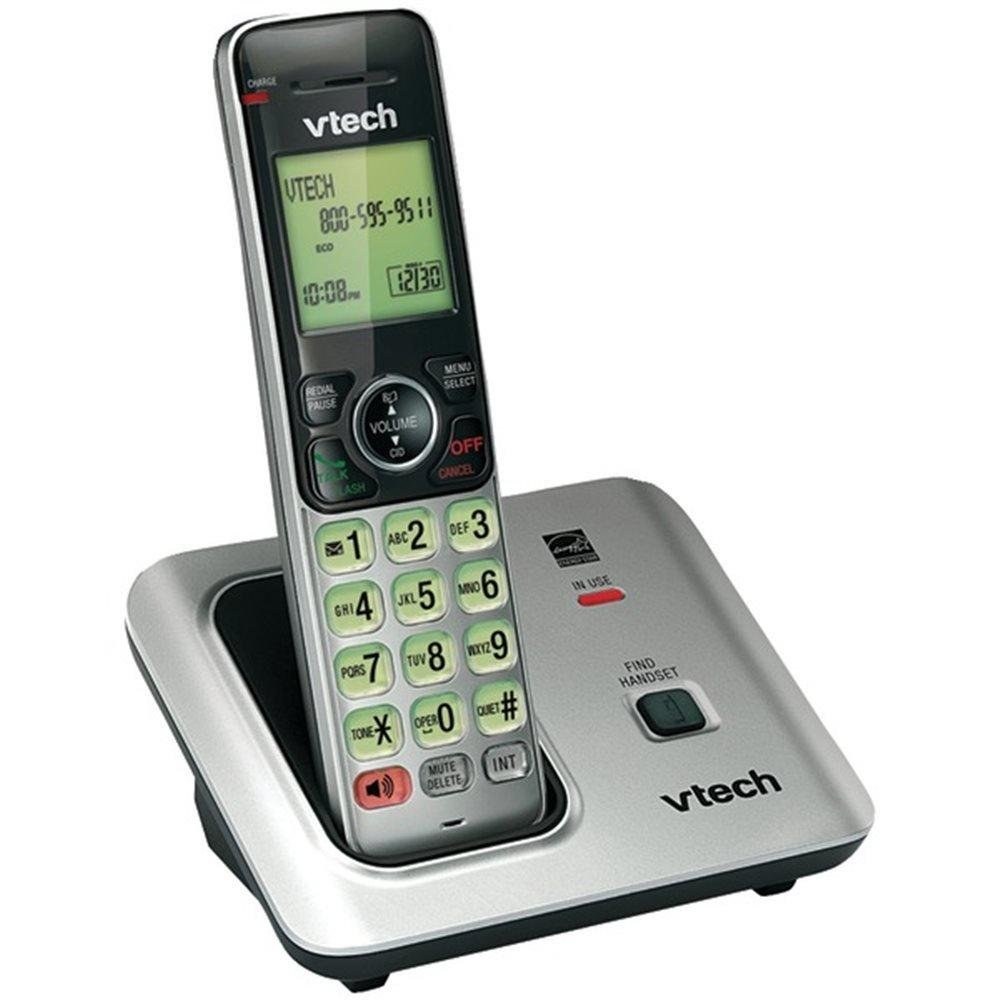
Image: The VTech VTCS6619 DECT 6.0 Cordless Speakerphone with Caller ID, showing the black handset and base unit.
1. Instal·lació de la bateria
- Obriu la tapa del compartiment de la bateria a la part posterior del telèfon.
- Connecteu el connector de la bateria de manera segura a la presa de l'interior del compartiment.
- Place the battery pack with the label UP and tuck the wires neatly inside the compartment.
- Tanqueu la tapa del compartiment de la bateria.
2. Connexió de la unitat base
- Plug the small end of the AC power adapter into the power jack on the back of the telephone base.
- Plug the large end of the AC power adapter into a wall outlet not controlled by a wall switch.
- Plug one end of the telephone line cord into the TEL LINE jack on the back of the telephone base.
- Connecteu l'altre extrem del cable de la línia telefònica a una presa de paret.
3. Handset Charging
Once the battery is installed and the base unit is connected, place the handset on the telephone base. The CHARGE light on the handset will illuminate, indicating that the battery is charging. Allow the handset to charge for at least 10 hours before initial use.
Instruccions de funcionament
This section details the basic functions and features of your VTech VTCS6619 phone.
Fer i rebre trucades
- Per fer una trucada: Premeu XERRADA / FLASH or PONENTi, a continuació, marqueu el número de telèfon.
- Per respondre una trucada: Quan soni el telèfon, premeu XERRADA / FLASH or PONENT.
- Per finalitzar una trucada: Premeu DESACTIVAT/ESBORRAT or place the handset back on the telephone base.
Funció altaveu
To activate the speakerphone during a call, press the PONENT Premeu-lo de nou per tornar a l'auricular del microtelèfon.
Identificació de trucades i trucada en espera
The phone displays the caller's name and number (if available) before you answer. If you subscribe to Call Waiting service, the phone will alert you to an incoming call while you are on another call. Press FLASH per canviar entre trucades.
Conferència trucada
The VTech VTCS6619 supports 3-way conference calls. While on a call, you can add a third party by pressing the FLASH button, dialing the new number, and then pressing FLASH again to connect all parties.
Sistema de resposta digital
The integrated digital answering system records incoming messages when you are unavailable. Access messages by pressing the PLAY/STOP button on the base or through the handset menu. Refer to the full user guide for detailed instructions on setting up your outgoing message and managing messages.
Manteniment
Proper care ensures the longevity of your telephone system.
Neteja
Clean the telephone and base unit with a soft, damp cloth. Do not use cleaning sprays or liquid cleaners, as they may damage the finish or electrical components.
Cura de la bateria
To maintain optimal battery performance, avoid exposing the handset to extreme temperatures. If the phone will not be used for an extended period, remove the battery to prevent leakage.
Resolució de problemes
If you experience any issues with your phone, refer to the following common problems and solutions:
| Problema | Solució |
|---|---|
| Sense to de marcatge | Ensure the telephone line cord is securely plugged into both the base unit and the wall jack. Check if the AC power adapter is properly connected. |
| Mala qualitat del so | Move the handset closer to the base unit. Check for interference from other electronic devices. Ensure the battery is fully charged. |
| El telèfon no es carrega | Verify the handset is correctly placed on the base unit. Clean the charging contacts on both the handset and base with a dry cloth. Check the power connection to the base unit. |
| No es mostra l'identificador de trucades | Ensure you have subscribed to Caller ID service from your telephone service provider. The feature may not work if the caller has blocked their number. |
Especificacions
- Marca: VTech
- Model: VTCS6619
- Tipus de telèfon: Sense fils
- Color: Negre
- Nombre de bateries: Necessites 1 piles AAA (incloses)
- Material: Plàstic
- Font d'alimentació: Funciona amb bateria
- Tipus de marcador: To
- Dimensions de l'article (L x A x A): 6.9 x 5.2 x 6.7 polzades
- Tipus de contestador: Digital
- Pes de l'article: 1 lliures
- Dispositius compatibles: VTech CS6619 handsets, basic answering machines
- Capacitat de trucada de conferència: 3 vies
- Operació multilínia: Operació d'una sola línia
- Temps d'espera del telèfon: 7200 minuts
- Identificador de trucada: Sí
Garantia i Suport
Your VTech VTCS6619 telephone system is covered by a Garantia limitada de 1 anys from the date of purchase. This warranty covers defects in material and workmanship under normal use. For warranty service or technical support, please refer to the contact information provided in your product packaging or visit the official VTech weblloc web per obtenir informació sobre el servei d'atenció al client.
Si us plau, conserveu el rebut de compra com a comprovant de compra per a reclamacions de garantia.