
Introducció
This manual provides instructions for the installation, operation, and maintenance of the Barkan Swivel and Tilt TV/PC Monitor Wall Mount, model BAR-E120. This mount is designed to securely hold flat and curved screens ranging from 13 to 29 inches, with a maximum weight capacity of 15 kg (33 lbs). It supports VESA mounting patterns of 75x75mm and 100x100mm. The mount offers flexible viewing angles with 160-degree swivel, 0-15 degree tilt, and a +/-3 degree post-installation leveling adjustment.
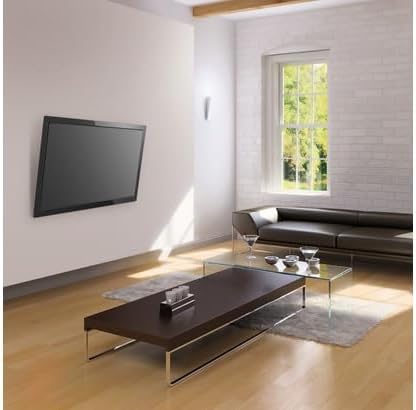
Image: The Barkan wall mount securely holding a television in a modern living room setting.
Informació de seguretat
- Capacitat de pes: Do not exceed the maximum weight capacity of 15 kg (33 lbs). Exceeding this limit can result in serious injury or equipment damage.
- Estructura de la paret: Ensure the wall structure can safely support the combined weight of the mount and the display. Consult a professional if unsure about wall integrity.
- Tipus de paret: This mount is suitable for installation on solid concrete walls, brick walls, or solid wood walls. No instal·leu on plasterboard, hollow walls, or soft walls without proper reinforcement.
- Eines: Use appropriate tools for installation and follow all instructions carefully. Wear safety glasses during drilling.
- Nens: Mantenir els nens allunyats de la zona d'instal·lació.
- Apretament: No estrenyeu massa els cargols, ja que això pot causar danys.
Contingut del paquet
Verifiqueu que tots els components siguin presents abans de començar la instal·lació.
- Suport de muntatge a la paret
- Wall Anchors for Solid Walls
- Mounting Screws (various sizes for TV connection)
- Volandes metàl·liques
- Separadors de plàstic
- Guia d'instal·lació

Imatge: Detallada view of the Barkan Hardware Kit, illustrating various screws, wall anchors, metal washers, and plastic spacers provided for installation.
Nota: If your screen requires different connection screws than those provided, please purchase them from your local hardware store or contact Barkan support.
Configuració i instal·lació
Follow these steps for a secure and proper installation of your Barkan wall mount.
Pas 1: Prepareu la paret
- Choose a suitable location on a solid concrete, brick, or solid wood wall. Avoid plasterboard or hollow walls.
- Use a stud finder to locate wall studs if installing on a wood wall.
- Mark the drilling points for the wall bracket. Ensure the marks are level.
- Perforeu forats pilot als llocs marcats amb una broca adequada per al tipus de paret.
Step 2: Install the Wall Bracket
- Insert the wall anchors (if required for your wall type) into the drilled holes.
- Position the wall bracket over the holes and secure it to the wall using the provided wall screws. Tighten firmly but do not overtighten.
Step 3: Attach Adapter to Display
- Identify the VESA mounting holes on the back of your TV or monitor. This mount supports 75x75mm and 100x100mm patterns.
- Select the correct screws, washers, and spacers from the hardware kit that fit your display's mounting holes.
- Attach the adapter plate (the part that connects to the display) to the rear of your TV/monitor. Ensure it is securely fastened.
Pas 4: Muntar la pantalla
- Carefully lift the display with the attached adapter plate.
- Align the adapter plate with the wall bracket and snap the electronic device onto the bracket. Ensure it is fully engaged and secure. The mount's inner structure is designed to prevent accidental disengagement.

Image: Product benefits diagram showing the simple 1-2-3 assembly process and features like screen leveling and tool-free tilt.
Instruccions de funcionament
The Barkan BAR-E120 mount allows for flexible positioning of your screen to achieve the optimal viewangle de ing.
- Ajust de gir: The mount allows for a 160-degree swivel movement. Gently push or pull the screen to adjust its horizontal angle.
- Ajust d'inclinació: The mount features a tool-free tilt adjustment from 0 to 15 degrees. Apply gentle pressure to the top or bottom of the screen to adjust its vertical angle. The automotive friction brake-pads ensure smooth and stable positioning.
- Anivellament de la pantalla: After installation, a built-in mechanism allows for a +/-3 degree leveling adjustment to ensure your screen is perfectly horizontal.

Image: Technical drawing detailing the dimensions, 160-degree swivel, and 0-15 degree tilt capabilities of the mount.
Manteniment
- Comprovacions periòdiques: Inspeccioneu periòdicament tots els cargols i connexions de muntatge per assegurar-vos que estiguin ben ajustats i segurs.
- Neteja: Clean the mount with a soft, dry cloth. Do not use abrasive cleaners, solvents, or chemical-based cleaning products, as these may damage the finish.
- Lubricació: No lubrication is required for the moving parts.
Resolució de problemes
| Problema | Causa possible | Solució |
|---|---|---|
| Screen is not level. | Petit desajust durant la instal·lació. | Use the built-in +/-3 degree leveling mechanism to adjust the screen's horizontal position. |
| La muntura sembla fluixa o inestable. | Screws may have loosened over time or were not tightened sufficiently during installation. | Carefully re-tighten all wall mounting screws and display attachment screws. Do not overtighten. Ensure the wall structure is sound. |
| Display does not fit the mount. | Incorrect VESA pattern or screen size/weight. | Verify your display's VESA pattern (75x75mm or 100x100mm) and ensure its size (13-29 inches) and weight (max 15kg) are within the mount's specifications. |
Especificacions
| Número de model | BAR-E120 |
| Screen Sizes Supported | 13 - 29 polzades (33 - 74 cm) |
| Pes màxim de TV | 15 kg (33 lliures) |
| Compatibilitat VESA | 75x75mm, 100x100mm |
| Distància des de la paret | 9.4 cm (3.7 polzades) |
| Gamma giratòria | 160 graus |
| Interval d'inclinació | 0 to 15 degrees (tool-free) |
| Ajust d'anivellament | +/-3 degrees (post-installation) |
| Material | Acer d'aliatge |
| Color | Negre |
| País d'origen | Països Baixos |

Image: Official specifications table for the Barkan Swivel and Tilt TV/Monitor Wall Mount.
Garantia i Suport
The Barkan Swivel and Tilt TV/PC Monitor Wall Mount (BAR-E120) comes with a Garantia limitada de per vida.
For product support, technical assistance, or warranty claims, please visit the official Barkan support weblloc: https://www.barkanmounts.com/support.


