
1. Introducció
The VOX MINI3 G2 is a highly portable and versatile modeling guitar amplifier, designed to provide guitarists with a comprehensive set of features in a compact form factor. Leveraging VOX's proprietary modeling technology, it offers a wide range of authentic amp tones and high-quality effects. Its battery-powered operation makes it ideal for use anywhere, from home practice to outdoor performances.

Figura 1: Frontal view of the VOX MINI3 G2 Modeling Guitar Ampmés viu.
2. Característiques clau
- Onze Amp Models: Offers a diverse range of tones, from high-gain distortion to pristine clean, suitable for various instruments and musical styles.
- VOX "Bassilator" Circuit: Delivers powerful, solid low frequencies and a robust bottom end, even at low volumes.
- Enhanced Quality Effects: Includes essential effects such as compressor, chorus, flanger, tremolo, delay, and reverb for sound shaping.
- Opcions d'alimentació dual: Can be powered by the included AC adapter for home use or six AA batteries for portable operation, providing up to 10 hours of enjoyment.
- Presa d'entrada AUX: Allows connection of external audio sources like MP3 players for jamming along.
- Dedicated Mic Input: Features an independent volume and reverb/delay send for vocal or acoustic instrument amplificació.
- Sortida d'auriculars: Enables silent practice.
- Sintonitzador integrat: Conveniently integrated for accurate instrument tuning.
- Disseny compacte i portàtil: Lightweight and includes a detachable shoulder strap for easy transport.
3. Configuració
3.1 Powering the Ampmés viu
The MINI3 G2 offers flexible power options:
- Alimentació CA: Connect the included AC adapter to the DC 12V input jack on the rear panel of the amplifier and plug it into a standard wall outlet.
- Potència de la bateria: For portable use, the amplifier requires six AA batteries. Open the battery compartment on the rear of the unit and insert the batteries, ensuring correct polarity. The amplifier can operate for up to 10 hours on battery power.

Figura 2: posterior view mostrant el compartiment de la bateria.
3.2 Connexions
Refer to the control panel image below for connection points:
- Jack d'ENTRADA: Connect your electric guitar or other instrument here.
- MIC IN Jack: Connect a microphone for vocal or acoustic instrument amplification. This input has its own TRIM (volume) control and DLY/REV SEND for effects.
- Jack AUX IN: Connect an external audio device (e.g., MP3 player, smartphone) using a 3.5mm stereo cable to play along with your favorite tracks.
- TELÈFONS Jack: Connect headphones for silent practice. This mutes the main speaker output.

Figure 3: Top panel controls and input/output jacks.
4. Instruccions de funcionament
4.1 Controlsview
The MINI3 G2 features intuitive controls for shaping your sound:
- AMP Perilla: Selects one of the eleven built-in ampmodels de lifier.
- Mando GAIN: Adjusts the amount of distortion or overdrive for the selected amp model.
- Mando de TONE: Controls the overall tonal character, from darker to brighter.
- Pom MÀSTER: Ajusta el volum de sortida general del ampmés viu.
- TRIM Knob (MIC IN): Adjusts the input level for the connected microphone.
- DLY/REV SEND Knob (MIC IN): Controls the amount of delay/reverb effect applied to the microphone input.
- EFFECTS Knob: Selects and adjusts the intensity of the modulation effects (Compressor, Chorus, Flanger, Tremolo).
- DELAY/REVERB Knob: Selects and adjusts the intensity of the delay and reverb effects (Tape Echo, Spring, Room, Analog). The TAP button allows for tap tempo control for delay.
- Interruptor ON/STANDBY: Powers the unit on or puts it into standby mode.
4.2 Amp Models
The MINI3 G2 offers 11 distinct amp models, ranging from classic clean tones to modern high-gain sounds. Rotate the AMP knob to select your desired model. Experiment with each setting to find the perfect tone for your playing style.
Video 1: Demonstration of various amp models and effects (relevant segments: 0:39-1:13 for amp models, 1:14-1:23 for effects, 1:41-2:02 for direct line input).
This video showcases the tonal versatility of the MINI3 G2, demonstrating different amp models and effects in action. It also highlights the direct line input capability for other instruments.
4.3 Efectes
El amplifier includes a suite of built-in effects. Use the EFECTES knob to select and adjust modulation effects like Compressor, Chorus, Flanger, and Tremolo. The DELAY/REVERB knob controls spatial effects such as Tape Echo, Spring Reverb, Room Reverb, and Analog Delay. The TOCA button allows you to set the delay time by tapping it in rhythm.
4.4 Direct Line Connection (LINE Mode)
The MINI3 G2 features a dedicated LINE mode, accessible via the AMP knob. This mode provides a clean, uncolored signal path, making it suitable for connecting instruments like keyboards, acoustic guitars with pickups, or other audio devices directly to the amplifier without unwanted coloration from the amp modeling circuitry.
4.5 Built-in Tuner
Per activar l'afinador integrat, premeu i manteniu premut el botó TOCA button. The indicator lights will guide you to tune your instrument accurately. Press the TOCA button again briefly to exit tuner mode.
5. Manteniment
- Neteja: Utilitzeu un drap suau i sec per netejar l'exterior amplifier. Avoid using abrasive cleaners or solvents, which may damage the finish.
- Substitució de la bateria: When using battery power, replace all six AA batteries simultaneously to ensure consistent performance. Do not mix old and new batteries or different types of batteries.
- Emmagatzematge: Emmagatzemar el amplifier in a cool, dry place away from direct sunlight and extreme temperatures. If storing for an extended period, remove the batteries to prevent leakage.
6. Solució De Problemes
If you encounter issues with your VOX MINI3 G2, consider the following common troubleshooting steps:
- Sense so:
- Assegureu-vos el amplifier is powered on and the ON/STANDBY switch is in the 'ON' position.
- Check all cable connections (instrument, power, headphones) are secure.
- Verifiqueu que el botó de volum MASTER estigui al màxim.
- Si feu servir piles, comproveu si estan esgotades i substituïu-les si cal.
- Ensure the instrument's volume is turned up.
- So distorsionat/no desitjat:
- Adjust the GAIN knob to reduce distortion if a clean tone is desired.
- Check if any effects are engaged that might be causing the distortion.
- Assegureu-vos el correcte amp model is selected for your desired sound.
- Efectes que no funcionen:
- Verify that the EFFECTS and DELAY/REVERB knobs are turned up and the desired effect is selected.
If problems persist after attempting these steps, please contact VOX customer support or refer to the official VOX weblloc per obtenir més ajuda.
7. Especificacions
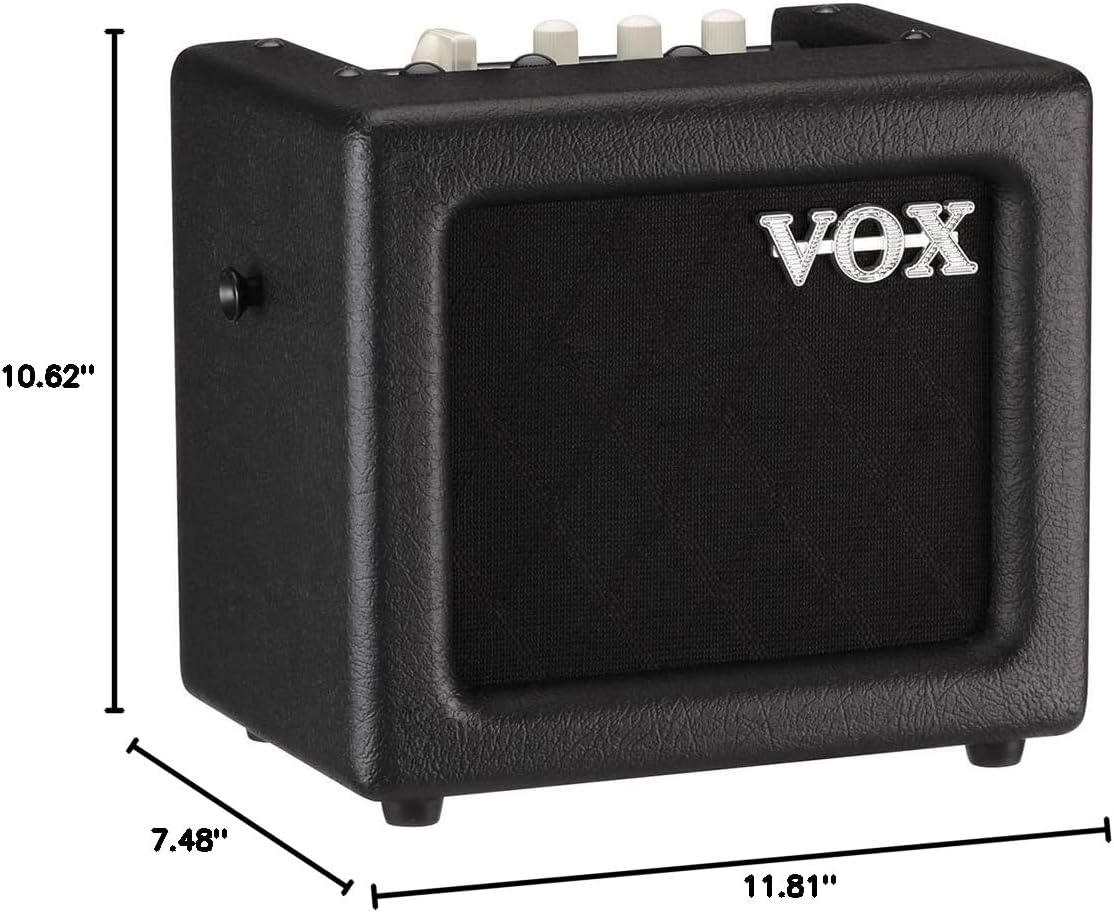
Figure 4: Dimensions of the VOX MINI3 G2.
| Especificació | Valor |
|---|---|
| Número de model | MINI3G2BK |
| Potència de sortidatage | 4 watts |
| Pes de l'article | 7.02 lliures (aprox. 3.18 kg) |
| Dimensions del producte (L x A x A) | 10.62 x 7.48 x 11.81 polzades (aprox. 27 x 19 x 30 cm) |
| Font d'alimentació | Battery Powered (6 AA batteries required) or AC Adapter |
| Color | Negre |
| Dispositius compatibles | Guitar, Microphone, MP3 Player |
| Tipus de connector | 3.5mm Jack (AUX IN, PHONES), 1/4" Jack (INPUT, MIC IN) |
| Data de primera disponibilitat | 21 de juny de 2013 |
8. Garantia i Suport
For detailed warranty information, product registration, and customer support, please refer to the documentation included with your VOX MINI3 G2 amplifier or visit the official VOX Amplificació weblloc. També podeu trobar recursos addicionals i preguntes freqüents al Botiga VOX a Amazon.