
Introducció
Gràcies per la compraasing the Lexibook Disney Planes Portable Color Game Console JL2800PL. This console offers a collection of 120 games, including 10 Disney Planes themed games and 110 classic titles, all displayed on a vibrant 2.4-inch (6.1 cm) color LCD screen. Designed for portability, it features a 16-bit processor and a rechargeable battery for extended playtime. This manual provides essential information for safe and effective use of your new device.
Informació important de seguretat
Please read all safety warnings and instructions before using this product to ensure safe operation and prevent damage. Keep this manual for future reference.
- This device is not suitable for children under 3 years due to small parts that may present a choking hazard.
- Do not expose the console to extreme temperatures, direct sunlight, or moisture.
- Avoid dropping or subjecting the console to strong impacts.
- Only use the provided charging cable or a compatible charger specified by Lexibook.
- Do not attempt to open, disassemble, or modify the console. This will void the warranty and may cause damage or injury.
- If the console becomes hot, emits smoke, or produces unusual odors, immediately discontinue use and disconnect from any power source.
- Dispose of the battery and console responsibly according to local regulations.
Contingut del paquet
Si us plau, comproveu que tots els elements siguin presents al paquet:
- Lexibook Disney Planes Portable Color Game Console JL2800PL
- Cable de càrrega USB
- Manual d'usuari (aquest document)
Configuració
1. Charging the Console
Before first use, fully charge the console's built-in Lithium-ion battery. Connect the supplied USB charging cable to the console's charging port and the other end to a USB power adapter (not included) or a computer's USB port. The charging indicator light will typically show red while charging and turn off or change color when fully charged. A full charge may take approximately 2-3 hours.
2. Encès / apagat
To power on the console, press and hold the Poder button for a few seconds until the screen illuminates. To power off, press and hold the Poder el botó de nou fins que la pantalla s'apagui.
Instruccions de funcionament
Console Layout and Controls
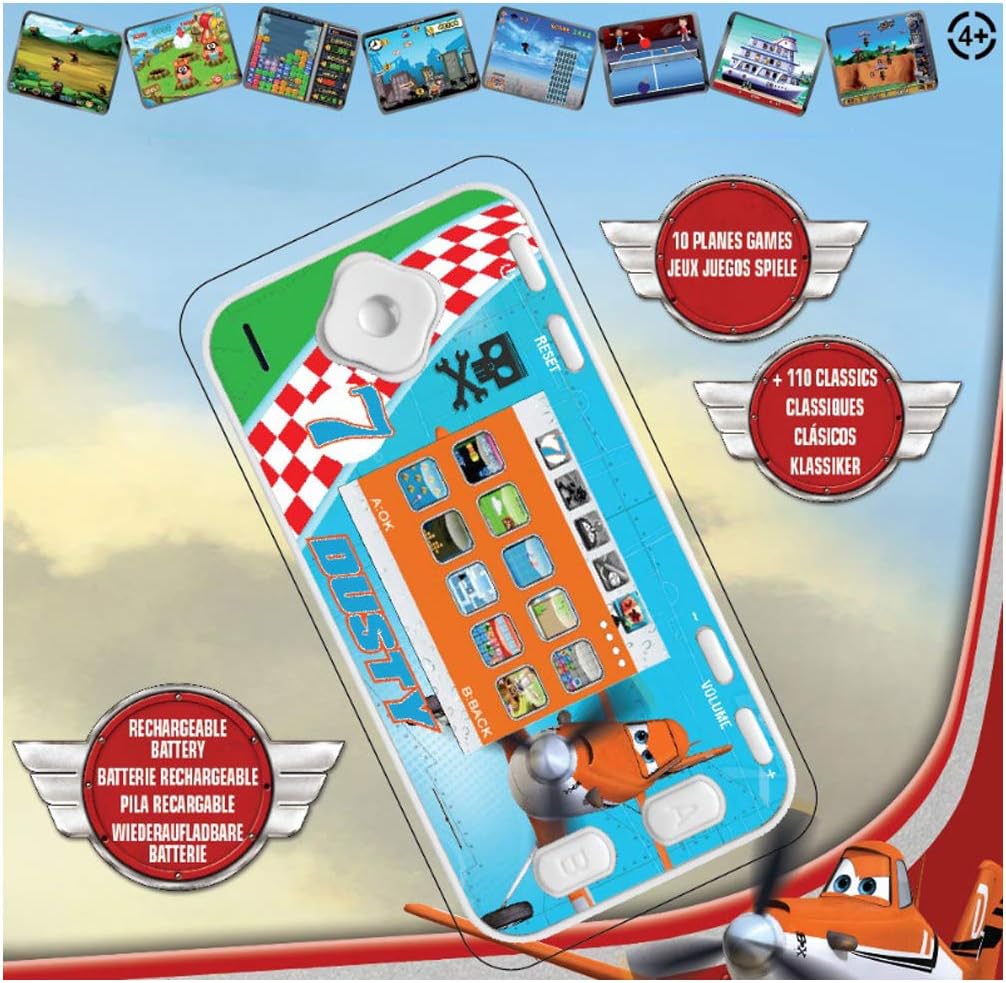
The console features a D-pad for movement, A/B/C/D action buttons, Start/Pause, Select, Reset, and Volume controls. Familiarize yourself with the button layout for optimal gameplay.
- D-Pad (coixinet direccional): Used for moving characters or navigating menus (Up, Down, Left, Right).
- Action Buttons (A, B, C, D): Perform in-game actions such as jumping, shooting, or confirming selections. Functions vary by game.
- Botó d'inici/pausa: Starts a game or pauses gameplay.
- Botó de selecció: Used for various in-game options or menu selections.
- Botó de restabliment: Resets the console to the main menu. Use a thin object like a paperclip to press the recessed reset button.
- Control de volum: Adjusts the sound level of the console.
Navigating Menus and Selecting Games
Once powered on, the console will display the main menu. Use the D-Pad to scroll through the available game categories or individual games. Press the A button (or equivalent action button) to select a game and begin playing.
Joc
Each game has its own specific controls and objectives. Refer to the on-screen instructions within each game, if available, to understand how to play. The console includes 10 Disney Planes games and 110 classic games covering action, sports, racing, and more.
Manteniment
Neteja de la consola
To clean the console, gently wipe the surface with a soft, dry cloth. Do not use liquid cleaners, solvents, or abrasive materials, as these can damage the finish or internal components. Ensure no moisture enters the console's ports or openings.
Conservació i emmagatzematge de la bateria
To prolong battery life, avoid fully discharging the console frequently. If storing the console for an extended period, charge it to approximately 50% before storage and recharge it every few months. Store the console in a cool, dry place away from direct sunlight and extreme temperatures.
Resolució de problemes
| Problema | Causa possible | Solució |
|---|---|---|
| La consola no s'encén. | La bateria està esgotada. | Charge the console using the provided USB cable. Ensure the charging indicator light is active. |
| La pantalla està en blanc o congelada. | Error de programari o fallada temporal. | Press the recessed Restableix button using a thin object (e.g., paperclip). If the issue persists, ensure the battery is charged. |
| Sense so o amb un volum baix. | Volume is turned down or muted. | Ajusteu el Volum control on the console. |
| Console not charging. | Cable, font d'alimentació o port de càrrega defectuosos. | Try a different USB cable or power adapter. Ensure the charging cable is securely connected to both the console and the power source. |
Especificacions
- Número de model: JL2800PL
- Marca: Lexibook
- Mida de la pantalla: 2.4 polzades (6.1 cm)
- Tipus de visualització: LCD color
- Processador: 16 bits
- Nombre de jocs: 120 (10 Disney Planes + 110 Classic)
- Tipus de bateria: 1 Lithium-ion (rechargeable)
- Font d'alimentació: Funciona amb bateria
- Tipus de controlador: Control de botons
- Dimensions del producte: 12.1 L x 6.1 W x 1.3 H centímetres
- Material: Plàstic
- Edat recomanada: 3+ anys

Informació de la garantia
This Lexibook product is covered by a manufacturer's warranty for a period of 2 anys des de la data de compra. Aquesta garantia cobreix els defectes de materials i fabricació en condicions d'ús normal. No cobreix els danys causats per un mal ús, accidents, modificacions no autoritzades o desgast normal. Conserveu el comprovant de compra per a reclamacions de garantia.
Atenció al client
If you encounter any issues not covered in the troubleshooting section or require further assistance, please contact Lexibook customer support. You can find contact information on the official Lexibook weblloc web o a través del vostre distribuïdor.
For more information, visit the official Lexibook weblloc: www.lexibook.com