
Introducció
Gràcies per la compraasing the Karaoke USA DV102 DVD/CDG/MP3G Karaoke Player. This manual provides essential information for setting up, operating, and maintaining your karaoke player. Please read it thoroughly before use to ensure proper function and to maximize your enjoyment of the product.
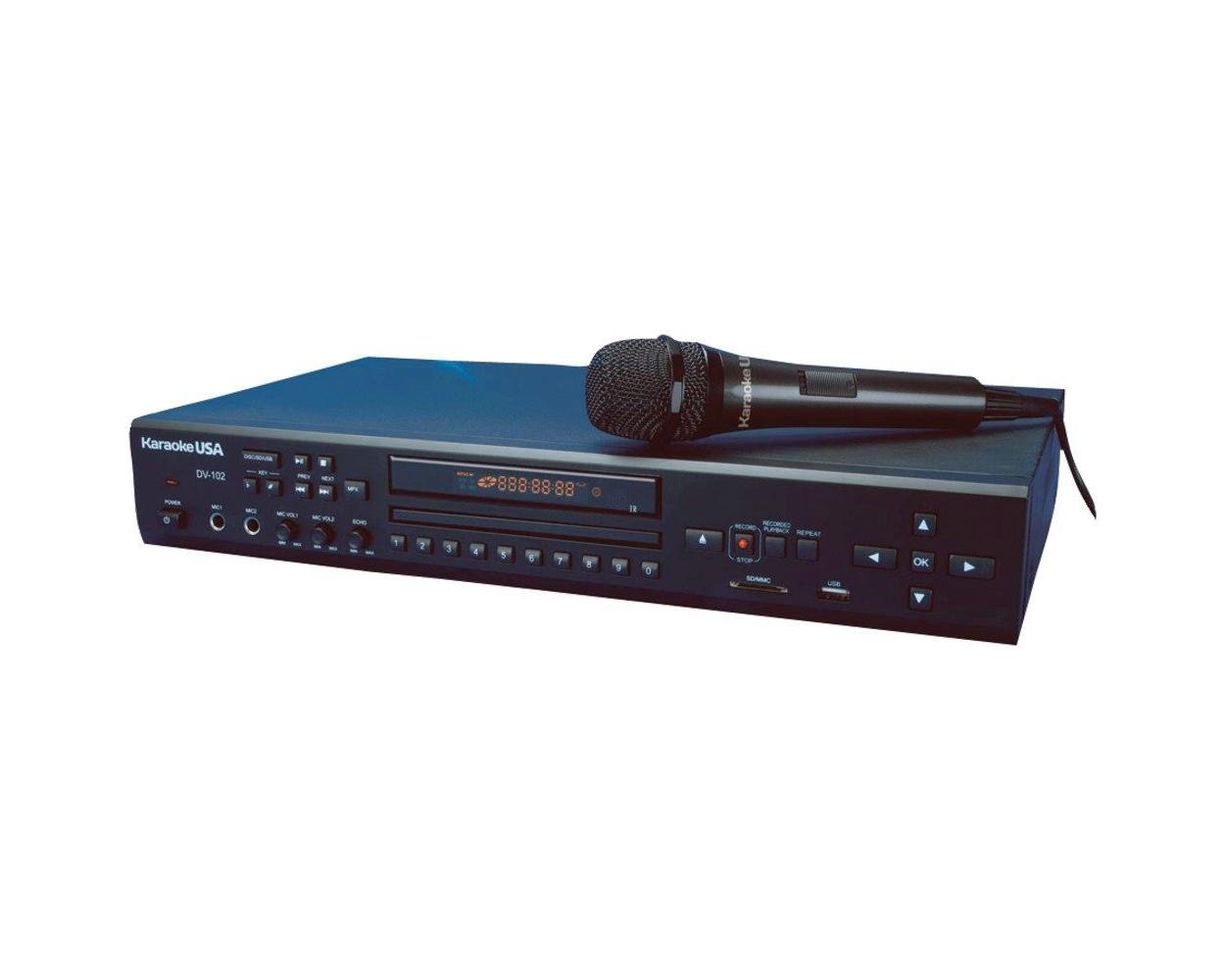
Imatge: Frontal view of the Karaoke USA DV102 player, showing disc tray, display, and control buttons.
Informació de seguretat
Per reduir el risc de descàrrega elèctrica, incendi o lesions, seguiu sempre aquestes precaucions de seguretat bàsiques:
- No exposeu aquest aparell a la pluja o la humitat.
- No traieu la coberta. Demaneu el servei tècnic només a personal qualificat.
- Assegureu-vos que el cable d'alimentació no estigui pessigat ni trepitjat.
- Desendolleu la unitat durant les tempestes llamps o quan no l'utilitzeu durant llargs períodes.
- No bloquejar les obertures de ventilació.
- Operate only from a 120VAC, 60Hz power source.
Contingut del paquet
Si us plau, comproveu que tots els elements que s'enumeren a continuació estiguin inclosos al vostre paquet:
- Karaoke USA DV102 Karaoke Player Unit
- Microphone (1x)
- Adaptador de corrent alterna
- Cable RCA d'àudio/vídeo
- Manual d'usuari
Producte acabatview
Controls del panell frontal

Imatge: Detallada view of the DV102 front panel, highlighting the disc tray, display, and control buttons such as Play, Pause, Stop, Skip, Menu, and Volume.
The front panel provides access to the disc tray, display screen, and primary control buttons for playback, navigation, and volume adjustments.
- Safata de disc: Insert DVD, CDG, or MP3G discs here.
- Pantalla de visualització: Shows track information, menu options, and lyrics (for CDG/MP3G).
- Botons de navegació: Used to browse menus and select songs.
- Reproduir/Pausa/Aturar: Controls de reproducció estàndard.
- Control de volum: Ajusta el volum de sortida principal.
- Volum del micròfon: Ajusta el volum dels micròfons connectats.
- Control d'eco: Adds an echo effect to the microphone audio.
- Control de claus: Adjusts the musical key of the song without changing tempo (13 steps).
- Ranura USB/SD: For connecting USB drives or SD cards for media playback and recording.
- Entrada auxiliar: Connect external audio devices (e.g., MP3 player).
Connexions del panell posterior

Imatge: Detallada view of the DV102 rear panel, showing audio/video output ports and power input.
The rear panel houses the necessary ports for connecting the player to your TV and audio system.
- Audio Output (RCA L/R): Connect to your audio receiver or TV for sound.
- Sortida de vídeo (RCA): Connect to your TV for video and lyrics display.
- Entrada d'alimentació de CA: Connecteu aquí l'adaptador de corrent altern proporcionat.
Configuració
1. Connecting to a TV and Audio System
- Ensure your TV and the DV102 player are turned off.
- Connect the yellow RCA video cable from the DV102's "Video Out" port to the "Video In" port on your TV.
- Connect the red and white RCA audio cables from the DV102's "Audio Out (L/R)" ports to the "Audio In (L/R)" ports on your TV or audio receiver.
- If using an external audio system (e.g., home theater receiver), connect the audio cables directly to the receiver's audio input.
2. Connexió del micròfon
- Plug the microphone cable into one of the microphone input jacks on the front panel of the DV102. The unit supports two microphones (one included).
3. Connexió d'alimentació
- Connect the AC power adapter to the "AC Power Input" on the rear panel of the DV102.
- Plug the other end of the adapter into a standard 120VAC, 60Hz wall outlet.
Instruccions de funcionament
Encès/Apagat
- Premeu el botó PODER botó del panell frontal per encendre o apagar la unitat.
Playing Discs (DVD/CDG/MP3G)
- Premeu el botó OBRIR/TANCAR botó per obrir la safata del disc.
- Place a DVD, CDG, or MP3G disc gently into the tray with the label side facing up.
- Premeu OBRIR/TANCAR again to close the tray. The player will automatically begin reading the disc.
- Utilitza el REPRODUCCIÓ/PAUSA, STOP, i SALTAR botons per al control de la reproducció.
- For CDG/MP3G discs, lyrics will display on the connected TV screen.
Reproducció de targetes USB/SD
- Insert a USB flash drive or SD card into the corresponding slot on the front panel.
- The player will detect the media and display a menu. Use the navigation buttons to select files (MP3G, MP3, etc.).
- Premeu JUGAR per iniciar la reproducció.
Recording MP3G Music and Voice
The DV102 allows you to record your karaoke performances (music and voice) to a connected USB drive or SD card.
- Assegureu-vos que hi hagi una unitat USB o una targeta SD inserida.
- Start playing an MP3G track.
- Premeu el botó REGISTRAR button (refer to front panel diagram for location).
- Sing into the microphone. Your voice will be mixed with the music and recorded.
- Premeu STOP to end the recording. The recorded file will be saved to your USB/SD media.
Digital Echo Control
- Gira el ECO knob on the front panel to add or reduce the echo effect on your microphone's sound.
13-Step Key Control
- Utilitza el CLAU+ i CLAU- buttons to adjust the musical key of the song up or down by half-steps, allowing you to match your vocal range.
On-Screen Song Search
- When a disc or USB/SD media is loaded, use the MENÚ button and navigation controls to access the on-screen song search function. Follow the prompts to find specific tracks.
Entrada auxiliar
- Connecteu un dispositiu d'àudio extern (per exemple, un telèfon intel·ligent o un reproductor MP3) al AUX IN connector mitjançant un cable d'àudio de 3.5 mm.
- Select the AUX input mode on the player (if applicable, refer to on-screen menu).
- Audio from the external device will play through the DV102's output.
Manteniment
Neteja de la unitat
- Netegeu l'exterior del reproductor amb un drap suau i sec.
- No utilitzeu netejadors líquids ni aerosols.
Manipulació del disc
- Agafeu sempre els discs per les vores.
- Keep discs clean and free from scratches. Use a soft, lint-free cloth to wipe from the center outwards if cleaning is necessary.
Resolució de problemes
| Problema | Possible causa/solució |
|---|---|
| Sense poder |
|
| Sense sortida de so |
|
| No video/lyrics on TV |
|
| El volum del micròfon és massa baix |
|
| Humming noise from speakers |
|
Especificacions
| Característica | Detall |
|---|---|
| Número de model | DV102 |
| Marca | Karaoke EUA |
| Tipus de suport | DVD, CDG, MP3G, SD Card, USB |
| Tecnologia de connectivitat | Auxiliar, USB |
| Tipus de connector | 3.5 mm Jack (Aux), RCA (Audio/Video) |
| Font d'alimentació | 120VAC, 60Hz (via AC adapter) |
| Pes de l'article | 5.3 lliures (aprox.) |
| Fabricant | Emerson Karaoke |
Garantia i Suport
This Karaoke USA DV102 player comes with a 90 dies de garantia des de la data de compra. Si us plau, conserveu el comprovant de compra per a reclamacions de garantia.
For technical support, service, or warranty inquiries, please contact Karaoke USA customer service. Contact information can typically be found on the manufacturer's weblloc o documentació inclosa.
Manufacturer: Emerson Karaoke