
Introducció
The CORSAIR Vengeance K65 is a compact mechanical gaming keyboard designed for performance and portability. It features a tenkeyless layout, Cherry MX Red mechanical key switches, and a durable aluminum chassis. This manual provides instructions for setting up, operating, maintaining, and troubleshooting your keyboard.
Les característiques clau inclouen:
- Compact 10-Keyless Design for space-saving and portability.
- Cherry MX Red Mechanical Switches for a smooth, linear key response.
- Full-Size Key Spacing for comfortable typing and gaming.
- Brushed Gunmetal Anodized Aluminum Chassis for durability.
- 100% Anti-Ghosting with Full Key Rollover via USB for accurate input.
- Detachable, Braided Cloth USB Cable with cable management.
Configuració
To set up your CORSAIR Vengeance K65 keyboard, follow these steps:
- Descomprimir el teclat: Traieu amb cura el teclat i els seus accessoris de l'embalatge.
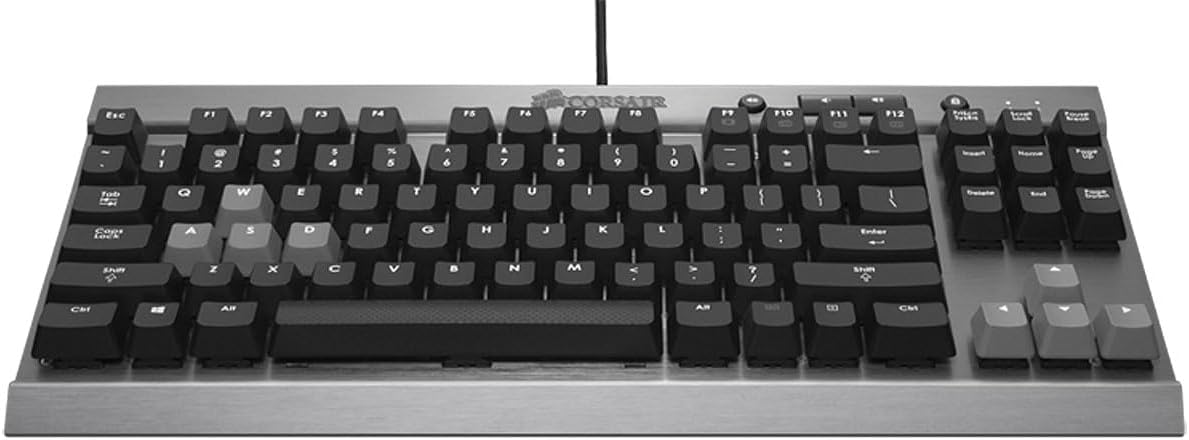
Imatge: De dalt a baix view of the Corsair Vengeance K65 keyboard, highlighting its compact layout and brushed aluminum finish.
- Connecteu el cable USB: Locate the detachable braided USB cable. Connect one end to the micro USB port on the back of the keyboard and the other end to an available USB port on your computer. The keyboard features a channel beneath it for cable routing.

Image: Close-up of the back of the Corsair K65 keyboard, illustrating the detachable USB cable connection and the polling rate switch.
- Adjust Polling Rate (Optional): On the underside of the keyboard, there is a switch to adjust the polling rate. The settings are typically 1, 2, 4, and 8, corresponding to 1000Hz, 500Hz, 250Hz, and 125Hz respectively. For most gaming scenarios, 1000Hz (setting '1') is recommended. If you experience issues booting into BIOS, you may need to adjust this setting.
- Instal·lació del controlador: Your operating system should automatically detect and install the necessary drivers. No additional software installation is typically required for basic functionality.
Funcionament del teclat
The CORSAIR Vengeance K65 is designed for responsive and accurate input. Here's an overview of its operational features:
Interruptors mecànics Cherry MX Red
The keyboard is equipped with Cherry MX Red mechanical switches. These switches are characterized by a smooth, linear key response, requiring 45g of actuation force. They actuate at 2mm and bottom out at 4mm, making them ideal for rapid key presses without an audible click. Each switch is rated for up to 50 million operations and features gold contacts for reliability.
Vídeo: Un overview of the Corsair Vengeance K65 keyboard, demonstrating its compact design, Cherry MX Red switches, anti-ghosting, and dedicated media controls.
Anti-fantasma i N-Key Rollover
The K65 features 100% anti-ghosting with full key rollover (NKRO) via USB. This ensures that every keystroke is registered accurately, even when multiple keys are pressed simultaneously, which is crucial for fast-paced gaming.
Controls de mitjans dedicats
The keyboard includes dedicated buttons for volume control (up, down, mute) and a Windows key lockout function. These controls are conveniently located above the function keys for easy access during use.

Imatge: De dalt a baix view of the Corsair K65 keyboard, showing the dedicated media control buttons and Windows key lock button.
Bloqueig de tecles de Windows
To prevent accidental interruptions during gaming, you can disable the Windows key using the dedicated lock button located near the media controls.
Manteniment
Un manteniment adequat garanteix la longevitat i el rendiment del teclat:
- Neteja: Use a can of compressed air to remove dust and debris from between the keycaps. For surface cleaning, gently wipe the keyboard with a soft, damp tela. Eviteu utilitzar productes químics o materials abrasius.
- Cura del cable: Handle the detachable USB cable with care. Avoid sharp bends or excessive pulling to prevent damage. Utilize the integrated cable management channel to secure the cable.
- Emmagatzematge: When not in use, especially during travel, disconnect the USB cable and store the keyboard in a protective case to prevent damage to the keys or chassis.
Resolució de problemes
If you encounter issues with your CORSAIR Vengeance K65, try the following solutions:
- El teclat no respon:
- Assegureu-vos que el cable USB estigui connectat correctament tant al teclat com a l'ordinador.
- Prova de connectar el teclat a un port USB diferent de l'ordinador.
- Prova el teclat en un altre ordinador per determinar si el problema és amb el teclat o amb la configuració de l'ordinador.
- Tecles específiques que no funcionen:
- Check for any physical obstructions or debris under the affected keycap.
- If the Windows key is not working, ensure the Windows key lockout function is not active.
- Intermittent Input or Lag:
- Verify the polling rate switch is set to the desired rate (e.g., '1' for 1000Hz).
- Ensure no other software or background processes are interfering with keyboard input.
- Computer Fails to Boot with Keyboard Connected:
- Adjust the polling rate switch on the underside of the keyboard to a lower setting (e.g., '8' for 125Hz) before booting. You can change it back after the system has fully loaded.
Especificacions
| Característica | Detall |
|---|---|
| Marca | Corsari |
| Número de model | CH-9000040-NA |
| Tecnologia de connectivitat | Amb cable |
| Descripció del teclat | Gaming, Compact 10-Keyless |
| Tipus de canvi | Cherry MX Red (Linear) |
| Força d'accionament | 45 g |
| Rollover de claus | Full Key Rollover (NKRO) |
| Anti-fantasma | 100% |
| Material del xassís | Brushed Gunmetal Anodized Aluminum |
| Tipus de cable | Detachable, Braided Cloth USB |
| Nombre de claus | 87 |
| Pes de l'article | 1.9 lliures |
| Sistemes operatius compatibles | Mac OS 10.15 Catalina, Windows 10 (and newer) |
Garantia i Suport
For warranty information, technical support, and additional resources, please visit the official Corsair website or refer to the documentation included with your product. You can also find the User Manual (PDF) at the following link: Corsair K65 User Manual (PDF).