
1. Introducció
This manual provides instructions for the Philips Voice Tracer DVT2000 digital voice recorder. The DVT2000 is designed for capturing conversations and audio with MP3 stereo recording for clear sound quality. It features a large backlit graphical display for easy navigation and extended battery life for long recording sessions.
Les característiques clau inclouen:
- Stereo MP3 recording for clear audio.
- Micro SD memory card slot for expandable storage up to 32GB.
- Extended battery runtime for prolonged use.
- FM radio recording capability.
- PC connection for plug-and-play file transferència.
2. Què hi ha a la caixa
Verifiqueu que tots els elements que s'enumeren a continuació s'inclouen al vostre paquet:
- Philips Voice Tracer DVT2000 Digital Recorder
- 2 x piles AAA
- Cable USB
- Guia d'inici ràpid
- Auriculars

Figura 1: Package Contents. This image illustrates the Philips Voice Tracer DVT2000 device, two AAA batteries, a USB cable, a quick start guide, and headphones.
3. Producte acabatview
Familiarize yourself with the components and controls of your DVT2000 recorder.
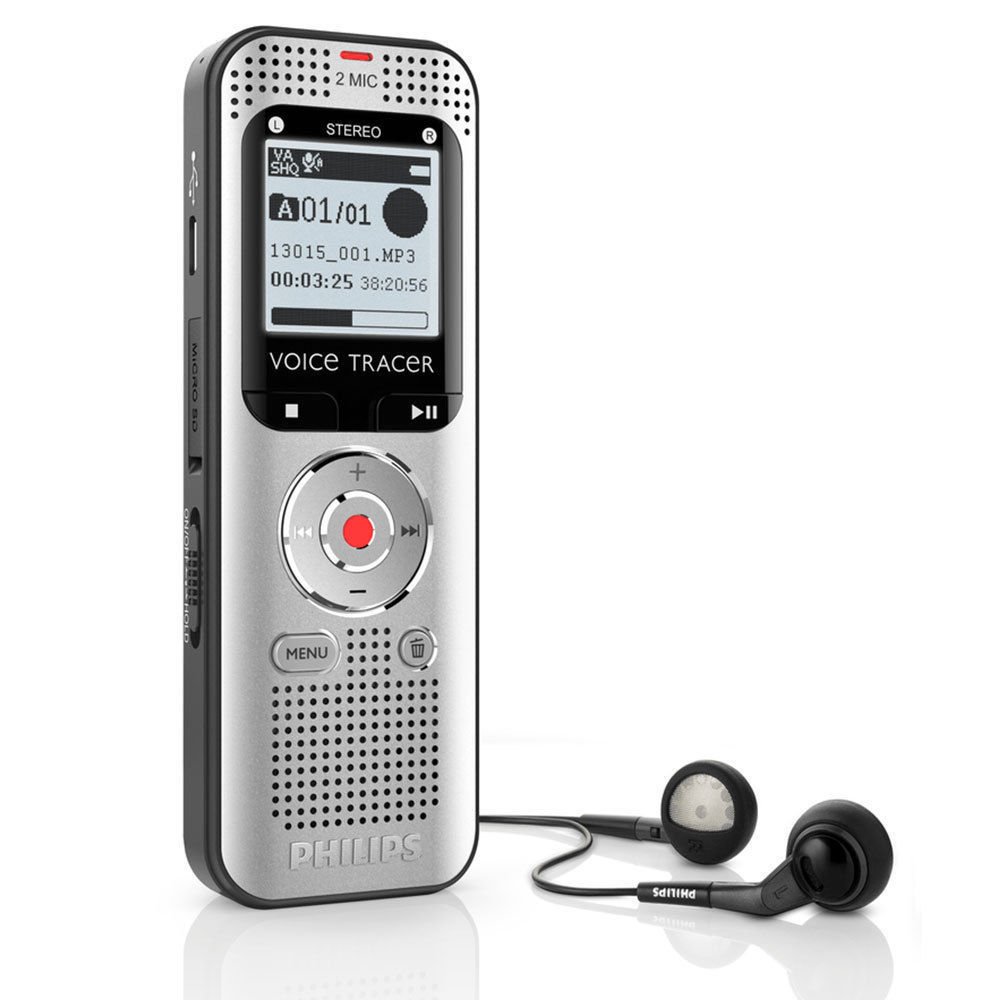
Figura 2: Davant View of the DVT2000. This image displays the front of the recorder, showing the display screen, control buttons, and built-in speaker.
3.1. Controls i ports

Figura 3: Front and Rear Sides (DVT2000) with Labels. This diagram identifies various parts of the device.
- Power on/off key, keypad lock: Slide switch to power on/off or lock the keypad.
- Slot for memory card (microSD card): Insert a microSD card for expanded storage.
- Micro USB port for computer connection: Connect to a computer using the supplied USB cable.
- Micròfon: Built-in stereo microphones for recording.
- LED d'estat: Indicates device status (Red: recording, Green: playing back, Yellow: data transfer).
- Visualització: Backlit graphical display for information.
- Operating panel with keys: Includes Play/Stop, Fast Forward, Rewind, and Record buttons.
- Ponent: Built-in speaker for audio playback.
- Operating panel with keys: Includes Menu and Delete buttons.
- Noise reduction (N.R.): Switch to activate/deactivate noise reduction.
- External microphone socket, line-in socket (stereo jack, 3.5 mm): Connect an external microphone or line-in audio source.
- Headphone socket (stereo jack, 3.5 mm): Connecteu els auriculars per a una escolta privada.
- Compartiment de la bateria: Conté les piles AAA.

Figura 4: A dalt View of the DVT2000. This image highlights the EAR (headphone) and MIC (external microphone) ports at the top of the device.
4. Configuració
4.1. Instal·lació de la bateria
- Locate the battery compartment on the rear of the device (refer to Figure 3, item 13).
- Obriu la tapa del compartiment de la bateria.
- Introduïu dues piles AAA, assegurant-vos de la polaritat correcta (+ i -) tal com s'indica a l'interior del compartiment.
- Tanqueu bé la tapa del compartiment de la bateria.
4.2. Encès / apagat
- To power on the device, slide the Power on/off key (Figure 3, item 1) to the 'On' position.
- To power off the device, slide the Power on/off key to the 'Off' position.
4.3. Inserció d'una targeta MicroSD (opcional)
- Locate the microSD card slot on the side of the device (Figure 3, item 2).
- Insert a microSD card (up to 32GB) into the slot until it clicks into place.
- Per treure-la, premeu suaument la targeta fins que surti.
5. Instruccions de funcionament
5.1. Gravació d'àudio
- Assegureu-vos que el dispositiu estigui encès.
- Premeu el botó Registre button (red button on the operating panel, Figure 3, item 7) to start recording. The status LED (Figure 3, item 5) will turn red.
- Speak clearly into the built-in microphones (Figure 3, item 4).
- Per aturar la gravació, premeu Registre botó de nou. Premeu-lo una vegada més per reprendre.
- Per aturar la gravació, premeu el botó Atureu-vos button (part of the operating panel, Figure 3, item 7). The recording will be saved automatically.
Gravació activada per veu (VOR)
The DVT2000 supports voice-activated recording. To enable this feature, navigate through the device's menu options. When VOR is active, recording will automatically start when sound is detected and pause when silence occurs, conserving memory and battery life.
5.2. Reproducció de gravacions
- Premeu el botó Jugar/Aturar button (Figure 3, item 7) to access the file llista.
- Utilitza el Avança ràpida or Rebobinar buttons (part of the operating panel, Figure 3, item 7) to select the desired recording.
- Premeu el botó Jugar/Aturar button to start playback. The status LED will turn green.
- Adjust the volume using the volume controls (usually integrated with the navigation buttons).
- Per aturar la reproducció, premeu el botó Jugar/Aturar botó de nou.
5.3. FM Radio Recording
The DVT2000 allows you to record FM radio programs.
- Access the FM radio function through the device's menu.
- Tune to your desired FM radio station.
- Premeu el botó Registre button to begin recording the broadcast.
- Premeu el botó Atureu-vos botó per finalitzar l'enregistrament. L'enregistrat file es desarà en format MP3.
5.4. Connexió a un ordinador
To transfer recordings to your computer:
- Connect the DVT2000 to your computer using the supplied USB cable. Plug one end into the Micro USB port on the device (Figure 3, item 3) and the other into a USB port on your computer.
- The device will be recognized as a removable storage device (plug & play). The status LED will turn yellow during data transfer.
- You can then drag and drop files entre la gravadora i l'ordinador.
- Expulseu el dispositiu de l'ordinador de manera segura abans de desconnectar el cable USB.
6. Manteniment
- Neteja: Feu servir un drap suau i sec per netejar el dispositiu. No utilitzeu netejadors líquids ni en aerosol.
- Emmagatzematge: Guardeu el dispositiu en un lloc fresc i sec, allunyat de la llum solar directa i de temperatures extremes.
- Cura de la bateria: Traieu les piles si no heu d'utilitzar el dispositiu durant un període prolongat per evitar fuites.
- Evitar l'impacte: No deixeu caure ni sotmeti el dispositiu a impactes forts.
7. Solució De Problemes
| Problema | Causa possible | Solució |
|---|---|---|
| El dispositiu no s'encén. | Les piles estan esgotades o inserides incorrectament. | Canvieu les piles per piles AAA noves, assegurant-vos de la polaritat correcta. |
| Poor recording quality or distortion. | Microphone sensitivity setting is too high for the environment; recording too close to the sound source; high background noise. | Adjust microphone sensitivity in the menu. Maintain an appropriate distance from the sound source. Activate noise reduction (N.R. switch, Figure 3, item 10) if available. Record in quieter environments. |
| No es pot transferir files a l'ordinador. | USB cable is faulty or not properly connected; device not recognized by computer. | Ensure USB cable is securely connected to both the device and computer. Try a different USB port or cable. Restart both the device and computer. |
| El dispositiu es bloqueja o deixa de respondre. | Error temporal de programari. | Remove and reinsert the batteries to perform a hard reset. |
| MicroSD card not detected. | Card incorrectly inserted or incompatible. | Ensure the microSD card is inserted correctly and fully. Try a different, compatible microSD card (up to 32GB). |
8. Especificacions
- Número de model: DVT2000
- Marca: Philips
- Format d'enregistrament: Àudio MP3
- Capacitat d'emmagatzematge de memòria: 4 GB (internal), expandable via MicroSD (up to 32 GB)
- Factor de forma del micròfon: Built-In Stereo
- Interfície de maquinari: MicroSD, USB
- Presa per a auriculars: 3.5 mm
- Dispositius compatibles: Ordinador personal
- Bateries: 2 piles AAA (incloses)
- Mida de la pantalla: 1.5 polzades
- Dimensions del producte: 0.75 x 1.5 x 4.37 polzades
- Pes de l'article: 1.73 unces (49 grams)
- Fabricant: Philips Peripherals and Accessories
- Data de primera disponibilitat: 11 de setembre de 2013
9. Garantia i Suport
For warranty information and technical support, please refer to the Quick Start Guide included in your package or visit the official Philips support weblloc web per a la teva regió. Conserva el comprovant de compra per a reclamacions de garantia.