
Introducció
This manual provides detailed instructions for the setup, operation, and maintenance of your Seiko QHR024S Digital Alarm Clock. Please read this manual thoroughly before using your clock to ensure proper function and longevity. Keep this manual for future reference.
Producte acabatview
The Seiko QHR024S is a modern digital alarm clock featuring a clear LCD display, radio wave control for accurate timekeeping, and essential functions like alarm, snooze, and temperature display.
Característiques principals:
- Pantalla digital
- Visualització del calendari
- Funció de posposar
- Visualització de la temperatura
- Funció d'alarma
- Quartz, Atomic Movement
- Illumination (Backlight)
- Global Radio Wave Control
Identificació de components:
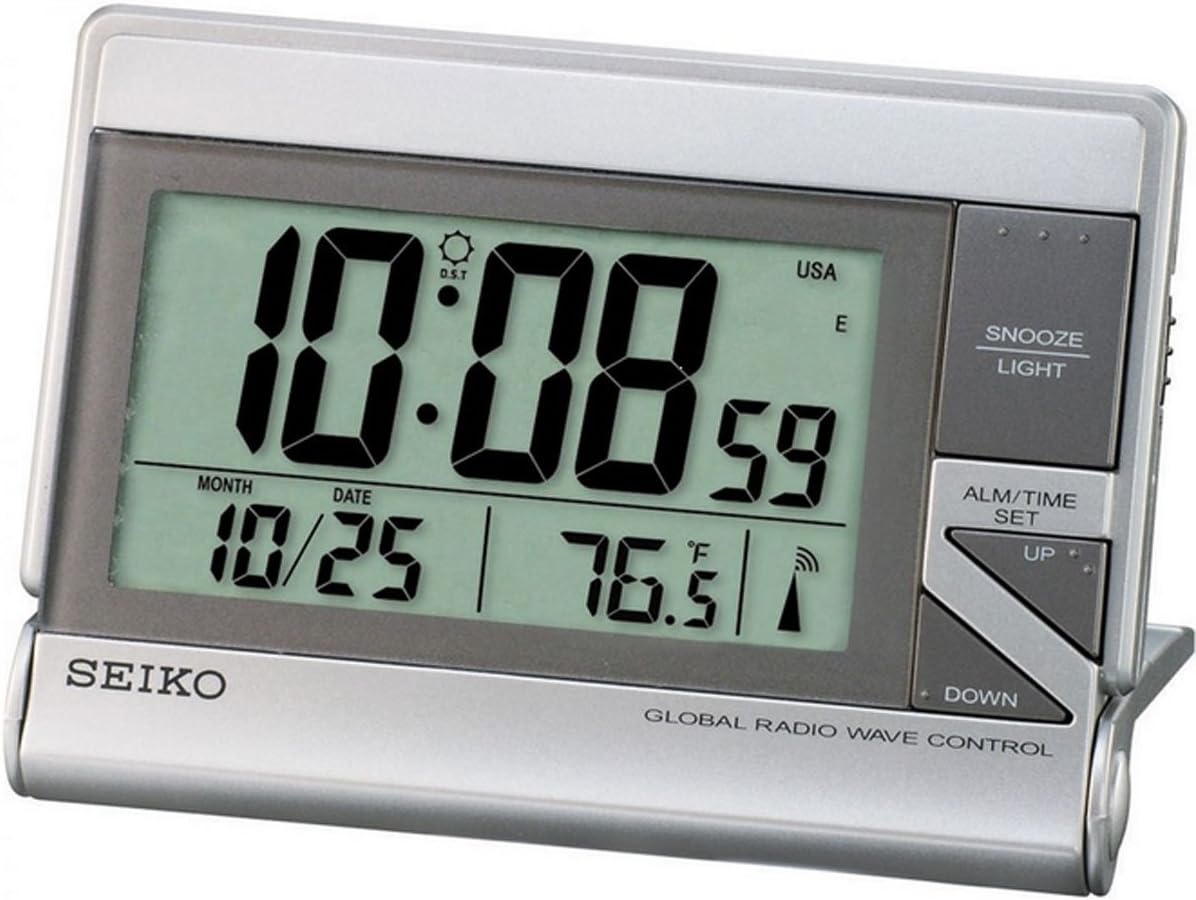
La imatge mostra la part frontal view of the Seiko QHR024S Digital Alarm Clock. The large LCD screen shows the time (e.g., 10:08:59), date (e.g., 10/25), and temperature (e.g., 76.5°F). Indicators for Daylight Saving Time (DST), USA time zone, and radio wave reception are also visible. To the right of the display are the control buttons: 'SNOOZE LIGHT' at the top, 'ALM/TIME SET' in the middle, and 'UP' and 'DOWN' arrow buttons below it. The 'SEIKO' logo is printed on the bottom left, and 'GLOBAL RADIO WAVE CONTROL' is printed on the bottom right.
Consulteu la imatge superior per veure la ubicació dels components següents:
- Pantalla LCD: Shows time, date, temperature, and various indicators.
- SNOOZE LIGHT Button: Activates snooze function and backlight.
- ALM/TIME SET Button: Used to enter time and alarm setting modes.
- Botó amunt: Adjusts values upwards during setting.
- Botó ABAIX: Adjusts values downwards during setting.
Configuració
1. Instal·lació de la bateria
- Localitza la tapa del compartiment de les piles a la part posterior del rellotge.
- Remove the cover by sliding or unlatching it.
- Insert one (1) LR44 battery, ensuring the polarity (+/-) matches the diagram inside the compartment.
- Col·loqueu la coberta del compartiment de la bateria amb seguretat.
Note: An LR44 battery is typically included with your purchase.
2. Initial Power On and Radio Wave Reception
Upon battery installation, the clock will power on and automatically attempt to receive the time signal from the nearest atomic clock transmitter. This process may take several minutes to several hours depending on your location and environmental conditions.
- Place the clock near a window, away from electronic devices that may cause interference.
- The radio wave indicator on the display will flash during reception and become solid once synchronized.
- If reception is poor, try repositioning the clock. Manual time setting is available if automatic synchronization is not successful.
Instruccions de funcionament
1. Setting Time and Date Manually
- Manteniu premut el botó ALM/TIME SET botó fins que la pantalla de temps comenci a parpellejar.
- Utilitza el UP or ABAIX botons per ajustar l'hora. Premeu ALM/TIME SET to confirm and move to minutes.
- Repeat this process for minutes, year, month, and date.
- After setting the date, press ALM/TIME SET per sortir del mode de configuració.
2. Configuració de l'alarma
- Premeu el botó ALM/TIME SET button once briefly to display the current alarm time.
- While the alarm time is displayed, press and hold ALM/TIME SET fins que l'hora de l'alarma parpellegi.
- Utilitza el UP or ABAIX botons per ajustar l'hora de l'alarma. Premeu ALM/TIME SET to confirm and move to alarm minutes.
- Adjust alarm minutes using UP or ABAIX. Premeu ALM/TIME SET per confirmar i sortir de la configuració de l'alarma.
- Per activar o desactivar l'alarma, premeu la tecla ALM/TIME SET button briefly to show the alarm time, then press UP or ABAIX to toggle the alarm ON/OFF indicator.
3. Snooze and Backlight Function
Quan soni l'alarma, premeu el botó SNOOZE LLUM button to temporarily stop the alarm. The alarm will sound again after a few minutes (typical snooze duration is 5-10 minutes). Pressing any other button will turn off the alarm until the next set time.
Premeu el botó SNOOZE LLUM button at any time to activate the backlight for a few seconds, illuminating the display for easy viewen condicions de poca llum.
4. Visualització de la temperatura
The clock displays the ambient temperature. The unit of temperature (Celsius or Fahrenheit) can typically be switched via a small button or switch located on the back or side of the clock. Refer to the physical unit for the exact location of this control.
5. Horari d'estiu (DST)
The Seiko QHR024S, with its Global Radio Wave Control feature, is designed to automatically adjust for Daylight Saving Time. Ensure the DST indicator is correctly set (usually automatic) or manually adjust if necessary during time setting.
Manteniment
1. Neteja
To clean the clock, use a soft, dry cloth. Do not use abrasive cleaners, solvents, or chemical sprays, as these can damage the casing o pantalla.
2. Substitució de la bateria
When the display becomes dim or the clock functions erratically, it is time to replace the battery. Follow the battery installation steps outlined in the
Ask a question about this manual
Ask about setup, troubleshooting, compatibility, parts, safety, or missing instructions. Manuals+ will review the question and use this page’s manual context to help answer it.