
Introducció
This manual provides essential information for the proper setup, operation, maintenance, and troubleshooting of your Medion LIFE P72066 Portable DVD Player with DVB-T Tuner. Please read these instructions carefully before using the device to ensure optimal performance and safety.
Contingut del paquet
Verifiqueu que tots els elements que s'enumeren a continuació siguin presents al vostre paquet:
- Medion LIFE P72066 Portable DVD Player
- Auriculars estèreo
- Comandament a distància (inclosa la bateria)
- Antena DVB-T
- Adaptador d'alimentació
- Adaptador de cotxe
- Li-polymer Battery (7.4V/1800 mAh)
- Cable AV
- Headrest Mounting Kit
- Bossa de transport
- Manual d'instruccions

Figura 1: Acabatview of all included accessories, including the portable DVD player, remote control, cables, and mounting kit.
Característiques del producte
- Integrated DVB-T Tuner for digital television reception.
- Xvid and MPEG4 compatibility for versatile media playback.
- User-friendly, multi-language On-Screen Display (OSD).
- Integrated stereo speakers with 2 x 1 watt RMS output.
- 4-in-1 card reader supporting SD/SDHC/MMC/MS memory cards.
- Powerful Li-polymer battery providing up to 3 hours of continuous operation.
Configuració
1. Carregant la bateria
Before first use, fully charge the integrated Li-polymer battery. Connect the power adapter to the DC IN port on the device and plug it into a wall outlet. The charging indicator will illuminate. Charging typically takes several hours.
2. Connecting the DVB-T Antenna
For digital TV reception, connect the supplied DVB-T antenna to the antenna input port on the side of the player. Extend the antenna fully for best reception.
3. Car Headrest Mounting
Use the provided headrest mounting kit to secure the DVD player in a vehicle. Attach the mounting bracket to the headrest posts and then slide the player into the bracket. Ensure it is securely fastened before driving.

Figura 2: The portable DVD player securely mounted on a car headrest, ideal for in-car entertainment.
Instruccions de funcionament
1. Encès / apagat
Manteniu premut el botó PODER button on the device or the remote control to turn the player on or off.
2. Playing DVDs
- Open the disc compartment by pressing the OBERT botó.
- Carefully place a DVD disc onto the spindle with the label side facing up.
- Close the disc compartment. The player will automatically begin reading the disc.
- Feu servir els botons de navegació i ENTRAR on the remote control to select menu options.
3. Using the DVB-T Tuner
- Ensure the DVB-T antenna is connected and extended.
- Premeu el botó DVD/DVB button on the remote control to switch to DVB-T mode.
- Navegueu fins a CONFIGURACIÓ menu and select 'Channel Search' or 'Auto Scan' to find available digital TV channels.
- Use the channel up/down buttons to browse channels once scanning is complete.
4. USB and Card Reader Playback
Insert a USB flash drive into the USB 2.0 port or an SD/SDHC/MMC/MS card into the card reader slot. The player will detect the media. Use the FONT button to select USB or Card mode. Navigate through files and select Xvid or MPEG4 videos for playback.
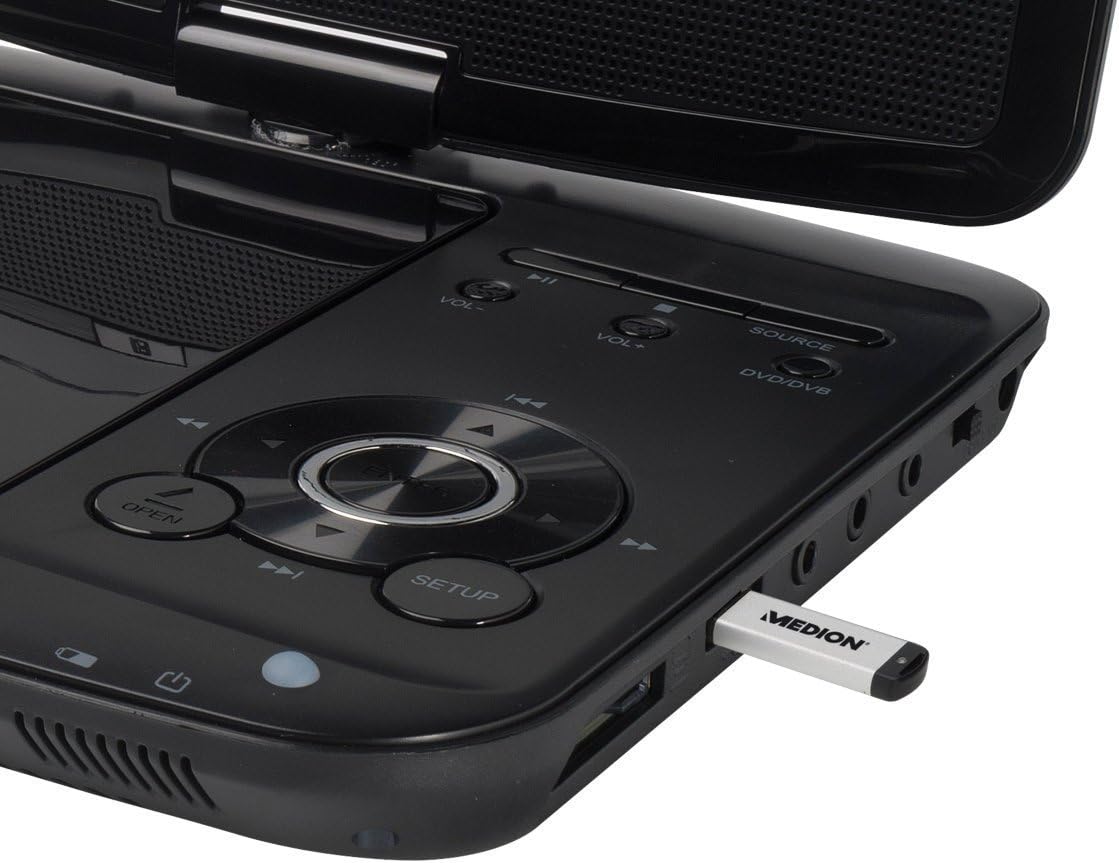
Figura 3: The control panel and side ports of the player, showing a USB stick inserted for media playback.
5. Ús del comandament a distància
The remote control provides full functionality for operating the DVD player and DVB-T tuner. Ensure the battery is correctly inserted. Point the remote control towards the infrared sensor on the player.

Figura 4: The remote control for the Medion LIFE P72066, showing all function buttons.
Manteniment
1. Neteja del dispositiu
Wipe the exterior of the player with a soft, dry cloth. For stubborn dirt, use a slightly damp cloth and then dry thoroughly. Do not use abrasive cleaners or solvents. Keep the disc compartment free of dust and debris.
2. Cura de la bateria
To prolong battery life, avoid fully discharging the battery frequently. Recharge the battery regularly, even if the device is not in use for extended periods. Store the device in a cool, dry place.
3. Emmagatzematge
When storing the player for a long time, ensure it is turned off and disconnected from power. Store it in the provided carrying bag to protect it from dust and scratches.
Resolució de problemes
| Problema | Causa possible | Solució |
|---|---|---|
| Sense poder | Battery discharged; Power adapter not connected; Device not switched on. | Charge the battery; Connect power adapter; Press the POWER button. |
| No hi ha imatge/so del DVD | Disc dirty or scratched; Disc inserted incorrectly; Incorrect source selected. | Clean or replace disc; Insert disc correctly (label up); Press SOURCE to select DVD. |
| Poor DVB-T reception | Antenna not extended; Weak signal area; Channel scan not performed. | Extend antenna fully; Reposition antenna; Perform a channel scan in the SETUP menu. |
| USB/Card not recognized | Incompatible format; Media not inserted correctly; Corrupted files. | Assegureu-vos files are Xvid/MPEG4; Reinsert media; Try different media. |
Especificacions
- Marca: Medion
- Nom del model: LIFE P72066 (MD84209)
- Número de model: 50044666
- Mida de la pantalla: 7 polzades
- Tipus de bateria: Lithium-polymer (7.4V/1800 mAh)
- Durada de la bateria: Fins a 3 hores
- Tipus de suport: DVD-Player
- Connectivitat: USB 2.0, 4-in-1 card reader (SD/SDHC/MMC/MS)
- Ponents: Integrated stereo speakers (2 x 1 watt RMS)
- Dimensions (L x A x P): 21 x 11 x 4 cm
- Pes: 1.5 kg
Garantia i Suport
For warranty information, please refer to the warranty card included with your product or visit the official Medion website. If you encounter issues that cannot be resolved using the troubleshooting guide, please contact Medion customer support for assistance. Keep your purchase receipt as proof of purchase for warranty claims.