
Introducció
The JJC GC-3 3-in-1 Digital Grey Card set is a versatile tool designed to assist photographers in achieving accurate color balance and exposure in various lighting conditions. While most digital cameras feature an automatic white balance (AWB) system, its effectiveness can be limited in scenes lacking bright areas or under strong color casts. This set provides a reliable method to establish a true white balance and proper exposure, ensuring more accurate color reproduction in your photographs.
Contingut del paquet
The JJC GC-3 set includes the following items:
- One (1) White Balance Card
- One (1) 18% Neutral Grey Card
- One (1) Black Card
- One (1) Detachable Lanyard
- One (1) Strap

Image: The three JJC GC-3 cards (white, grey, black) with the included strap and lanyard.
Configuració
The JJC GC-3 cards are designed for portability and ease of use. You can attach the included strap or detachable lanyard to the cards for convenient carrying and quick access during shoots.
- Locate the small hole on one corner of each card.
- Thread the thin loop of the strap or lanyard through this hole.
- Pass the larger end of the strap/lanyard through the loop you just created and pull gently to secure it.
- The detachable lanyard features a quick-release buckle for easy removal of the cards when needed.
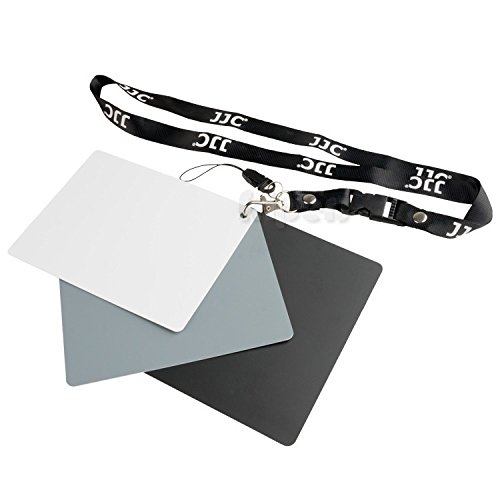
Image: A grey card from the JJC GC-3 set connected to the detachable lanyard.
Instruccions de funcionament
Utilize the three cards to achieve accurate white balance and exposure settings for your digital camera.
Using the White Card for White Balance
The white card provides a pure white reference point for your camera's custom white balance setting, ensuring accurate color temperature under specific lighting conditions.
- Place the white card in the same lighting conditions as your subject. Ensure it fills a significant portion of your camera's frame.
- Refer to your camera's manual for instructions on setting a custom white balance. Typically, this involves taking a picture of the white card and then selecting that image as the white balance reference.
- Once set, all subsequent photos taken under the same lighting will have accurate color rendition.
Using the Grey Card for Exposure and White Balance
The 18% neutral grey card is essential for setting both accurate exposure and white balance, as it reflects light uniformly across the visible spectrum.
- For Exposure: Place the grey card in the same lighting as your subject, angled towards the main light source. Take a meter reading from the grey card to determine the correct exposure settings (aperture, shutter speed, ISO). Adjust your camera settings accordingly.
- For White Balance: Similar to the white card, you can use the grey card to set a custom white balance. This is often preferred by professionals as it provides a more neutral reference point. Follow your camera's custom white balance procedure using the grey card.
Using the Black Card
The black card is primarily used to block stray light or to create specific lighting effects, particularly in studio photography or when dealing with complex lighting setups. It can help in achieving a normal exposure by preventing unwanted light from reaching the sensor or influencing the meter reading.
Manteniment
The JJC GC-3 cards are designed to be durable and waterproof, ensuring longevity and consistent performance.
- Neteja: If the cards become dirty, gently wipe them with a soft, damp cloth. Avoid abrasive cleaners or materials that could scratch the surface.
- Emmagatzematge: Store the cards in a clean, dry place away from direct sunlight when not in use to prevent any potential discoloration over extended periods.
- Manipulació: While waterproof, avoid prolonged submersion or exposure to harsh chemicals to maintain their integrity.
Resolució de problemes
If you encounter issues with color accuracy or exposure, consider the following:
- Inaccurate White Balance: Ensure the card is placed in the exact same lighting as your subject and that no shadows are falling on the card when setting custom white balance. Re-calibrate if lighting conditions change significantly.
- Exposició incorrecta: When metering off the grey card, ensure it is angled correctly towards the main light source and that your camera's spot meter (if used) is precisely on the card.
- Estat de la targeta: Verify that the cards are clean and free from smudges or damage that could affect their reflective properties.
Especificacions
| Característica | Detall |
|---|---|
| Número de model | GC-3 |
| Dimensions del producte | Aproximadament 13 x 10 x 2.4 cm (llargada x amplada x alçada) |
| Pes de l'article | 80 g |
| Material | Material impermeable |
| Inclou | White Card, Grey Card, Black Card, Strap, Detachable Lanyard |
| Fabricant | JJC |
| País d'origen | Xina |
Garantia i Suport
For warranty information or technical support regarding your JJC GC-3 Digital Grey White Balance Card Set, please refer to the documentation provided at the time of purchase or contact JJC customer service directly through their official weblloc web. Conserveu el rebut de compra com a comprovant de compra per a qualsevol reclamació de garantia.